TV HDMI Audio not detected in Settings or pwvocontrol
So .. i have recently made the switch from windows to bazzite but my experience has been pretty frustraring honestly. From little annoying weird things to outright bugs and crashes i seemed to have everything, all of which i was able to ultimately fix except for this one issue and it drives me crazy. I have never used any linux before outside of WSL so keep that in mind please.
Following scenario: I have one Monitor (Display-Port) and one TV (HDMI) connected to my nvidea graphics card, both of which are getting normal video output.
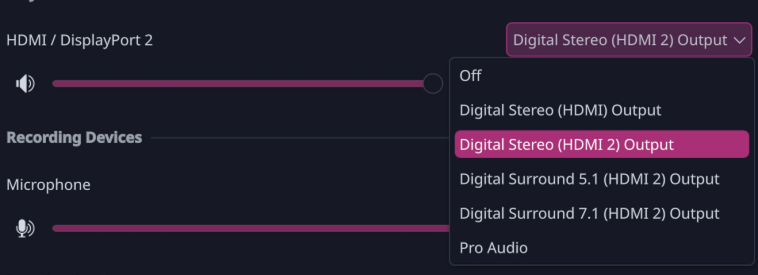
However in the Sound Settings i only have one HDMI / DisplayPort Entry (picture 1). No matter what i select, i only get sound from my monitor, not my TV.
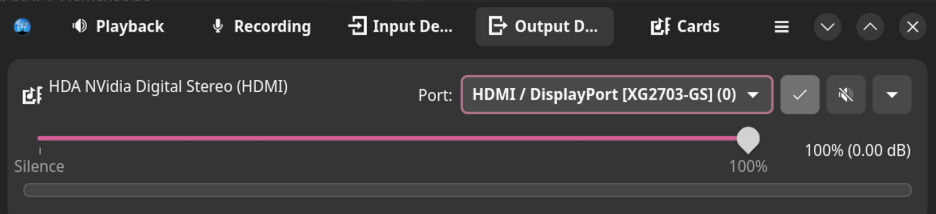
pwucontrol list two ports one for my Monitor (XG2703-GS) and indeed one for my TV (QBQ90S). (picture 2)
However no matter which one i select the audio always comes out of the monitor.
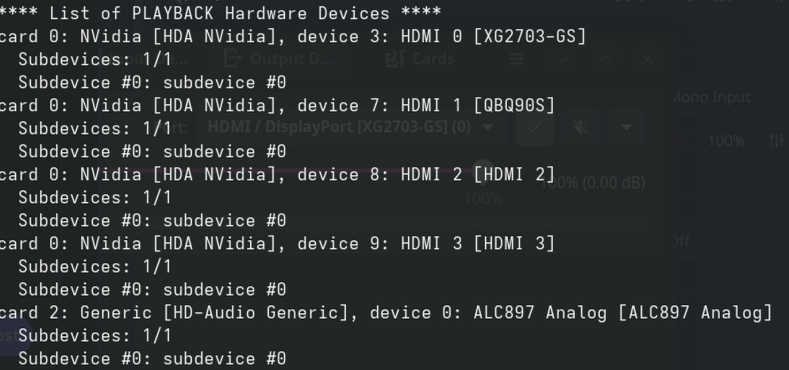
You can see my aplay -l output in picture 3 - the tv audio device clearly got detected and if i use the soundtest command for 0,7 i do indeed get an output from my tv.
So i really don´t understand what is wrong here, and why i am not able to just select that device as an output whenever its available, just like in windows.
I tried to mess with some pipewire configs and commands however that did now help and also doesn´t seem to be a valid permanent solution even if i get it to work. I really just need my tv audio to be detected whenever it is turned on.
Maybe someone here can help me, i would really appreciate any help, otherwise i will probably just go back to windows, since i just don't have the energy to deal with stuff like that in my free time.
Following scenario: I have one Monitor (Display-Port) and one TV (HDMI) connected to my nvidea graphics card, both of which are getting normal video output.
However in the Sound Settings i only have one HDMI / DisplayPort Entry (picture 1). No matter what i select, i only get sound from my monitor, not my TV.
pwucontrol list two ports one for my Monitor (XG2703-GS) and indeed one for my TV (QBQ90S). (picture 2)
However no matter which one i select the audio always comes out of the monitor.
You can see my aplay -l output in picture 3 - the tv audio device clearly got detected and if i use the soundtest command for 0,7 i do indeed get an output from my tv.
So i really don´t understand what is wrong here, and why i am not able to just select that device as an output whenever its available, just like in windows.
I tried to mess with some pipewire configs and commands however that did now help and also doesn´t seem to be a valid permanent solution even if i get it to work. I really just need my tv audio to be detected whenever it is turned on.
Maybe someone here can help me, i would really appreciate any help, otherwise i will probably just go back to windows, since i just don't have the energy to deal with stuff like that in my free time.