
If you have a DRAWING TABLET read this
Your drivers might not work properly, since BAZZITE is an immutable distro, your settings for those drivers will get reset every time you start the computer.
You can fix it, but we are getting into big linux tryhard territory, and we just want things to work™. Drivers try to install things in /etc/ by default or inside folders that get wiped every restart. I learned this the hard way with XPPEN drivers. I had to manually configure the buttons for two days straight because the driver app doesn't allow you to change where it saves the config, because, even though it should be compatible with linux, it doesn't offer the same degree of nerd-magic because its designed for windows-users(spyware enthusiasts).
You must install the Open Tablet Drivers,from the bazaar store, using -> Then, then the most common mistake is trying to set one of the pen's buttons to right click, something that is not planned to be added to this program because it would be too hard to implement. Instead you need to set up the "linux artist mode: Button 2" in that pen button to make it work with the right click, make sure you're in artist mode too.
If you have other problems with DRIVER CONFIG, and you can't figure out why, it's probably because bazzite is immutable. You might think that this is a hassle, and you're not wrong, but it's a core feature because it keeps you from fucking up your system by installing contaminated pirated games (not pointing fingers here btw), and it also prevents you from irreparably fucking up your system by being a recent windows graduate and typing sudo -rm ./ or something like that.
PD: There are obviously ways to set up containers for those drivers and some might work, but after spending hours trying to set up one for the XPPEN drivers and failing misserably, I think it's better if you choose an open source alternative to what you might be trying to install!
You can fix it, but we are getting into big linux tryhard territory, and we just want things to work™. Drivers try to install things in /etc/ by default or inside folders that get wiped every restart. I learned this the hard way with XPPEN drivers. I had to manually configure the buttons for two days straight because the driver app doesn't allow you to change where it saves the config, because, even though it should be compatible with linux, it doesn't offer the same degree of nerd-magic because its designed for windows-users(spyware enthusiasts).
You must install the Open Tablet Drivers,
If you have other problems with DRIVER CONFIG, and you can't figure out why, it's probably because bazzite is immutable. You might think that this is a hassle, and you're not wrong, but it's a core feature because it keeps you from fucking up your system by installing contaminated pirated games (not pointing fingers here btw), and it also prevents you from irreparably fucking up your system by being a recent windows graduate and typing sudo -rm ./ or something like that.
PD: There are obviously ways to set up containers for those drivers and some might work, but after spending hours trying to set up one for the XPPEN drivers and failing misserably, I think it's better if you choose an open source alternative to what you might be trying to install!
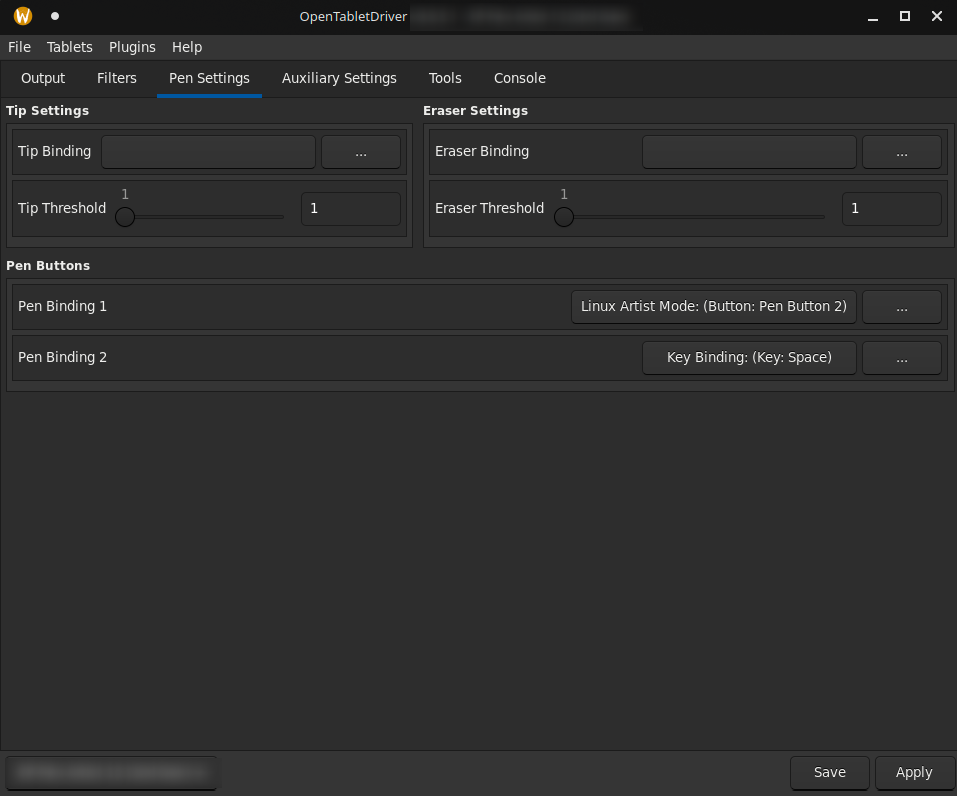
Solution
Install Open Tablet Drivers from the Flatpack store With and if you have problems with the binds (left/right click won't work), make sure you're in artist mode and you've set the right click with artist mode
