
Dropbox refuses to launch with unsupported filesytem message
Trying to launch the flatpak version of Dropbox gives a message:
"Your dropbox folder is on a filesystem that is no longer supported"
There are numerous threads about this, but none of them have completely working solutions.
* https://www.reddit.com/r/Bazzite/comments/1luapvu/any_way_to_use_dropbox_in_bazzite/
* https://universal-blue.discourse.group/t/your-dropbox-folder-is-on-a-file-system-that-is-no-longer-supported-solved/1112/3
* https://universal-blue.discourse.group/t/why-dropbox-flatpak-cannot-see-the-user-or-system-folders-in-bluefin/904/2
* https://universal-blue.discourse.group/t/apps-that-will-not-start/4245/3
* https://universal-blue.discourse.group/t/dropbox-support/10297/5
I'd like to get to the bottom of this, so that these threads have a definitive answer.
Things I've tried:
* adding permission in flatseal for app to access everything
* adding folder to
* created a 100gb partition
* reinstalling
* running Dropbox with
* running Dropbox with
the one thing that is always recommended is moving the dropbox folder from
"Your dropbox folder is on a filesystem that is no longer supported"
There are numerous threads about this, but none of them have completely working solutions.
* https://www.reddit.com/r/Bazzite/comments/1luapvu/any_way_to_use_dropbox_in_bazzite/
* https://universal-blue.discourse.group/t/your-dropbox-folder-is-on-a-file-system-that-is-no-longer-supported-solved/1112/3
* https://universal-blue.discourse.group/t/why-dropbox-flatpak-cannot-see-the-user-or-system-folders-in-bluefin/904/2
* https://universal-blue.discourse.group/t/apps-that-will-not-start/4245/3
* https://universal-blue.discourse.group/t/dropbox-support/10297/5
I'd like to get to the bottom of this, so that these threads have a definitive answer.
Things I've tried:
* adding permission in flatseal for app to access everything
* adding folder to
/var/mnt/synco/lnsync/account* created a 100gb partition
/run/media/sabrina/DropboxOther FilesMove* reinstalling
* running Dropbox with
GSK_RENDERER=ngl flatpak run com.dropbox.ClientMove* running Dropbox with
GSK_RENDERER=gl flatpak run com.dropbox.Clientthe one thing that is always recommended is moving the dropbox folder from
/home/user/Dropbox/var/homeMove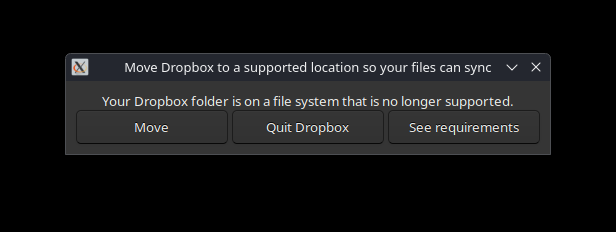

Universal Blue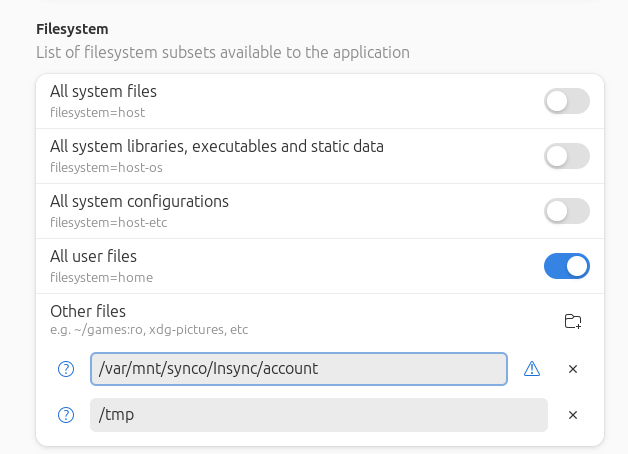
The fix is: opening Flatseal, select the Dropbox app, and change the file sharing settings under the Filesytem section. See screenshot. The partition or folder for synchronization has to be explicitly made available to Dropbox, so it can gain permissions to read or write.
Universal Blue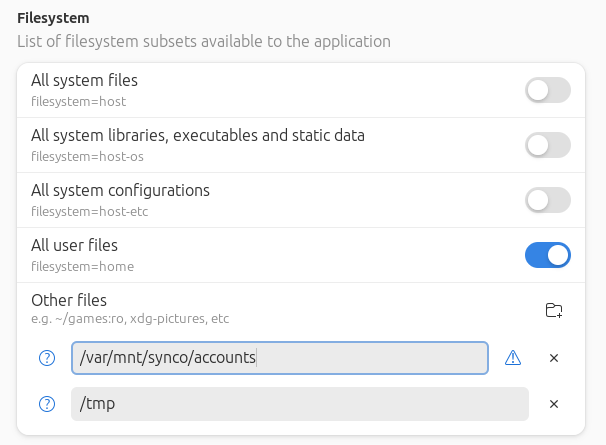
After a tour-de-force through Bottles and Wine, learned more about flatpak permissions. Coming from the world of Ubuntu 22.04, I was totally unaware of installing stuff via flatpak. At the most, I had two or three flatpaks in Ubuntu, and never had to deal with permissions. In Bluefin - or Silverblue - is drastically different. It is a new way -...
Universal Blue
try this: Open a terminal f flatpak list find your application that you want to start) in my case I was having issues with. For example I couldn’t open “Disk Usage Analyzer”! The list shows it as: Disk Usage Analyzer org.gnome.baobab 47.0 stable system Then run the app manually using: ` GSK_REN...
Universal Blue
I just installed it with flatpak, launched it and logged. Nothing more.

