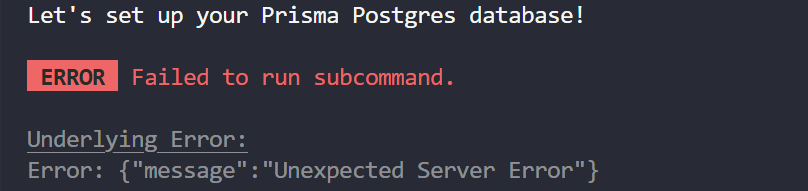
NextJS PrismaPostgress Underlying Error:Error: {"message":"Unexpected Server Error"}
hey everyone, i am setting up a nextjs project with prisma postgress but when i type this command
npx prisma init --db --output ../app/generated/prisma
i get this error
4 Replies
Skipping coffee for instant knowledge! Let's brew that AI answer now.
The error you're seeing when running:
is a known issue affecting recent Prisma versions (6.8.x and 6.9.x), especially with package managers like npm and pnpm. The error often looks like:
or a generic "Unexpected Server Error" during the init process.
Workarounds and Solutions:
1. Downgrade Prisma:
Many users have resolved this by downgrading Prisma to version 6.7.0, which does not have this bug. Run: Then try your
See related issues, another report, user confirmations. 2. Clear Cache:
If you previously tried with a broken version, clear your npm/pnpm cache and delete any temporary Prisma folders. For example, on Mac: On Linux, clear
Cache clearing advice. 3. Use Latest CLI Explicitly:
If the
See troubleshooting guide. Summary:
This is a regression in recent Prisma versions. Downgrading to 6.7.0 and clearing caches is the most reliable fix right now. Prisma maintainers are aware and working on a permanent solution. If you continue to have issues, please provide your OS, Node, npm/pnpm, and Prisma versions for more targeted help. 🤔 Alright, thanks for letting us know that there's still some help needed. A team member will reply to you shortly. In the meantime, please let us know any additional info, questions, or which parts of the answer may need clarification.
Many users have resolved this by downgrading Prisma to version 6.7.0, which does not have this bug. Run: Then try your
npx prisma init ... command again.See related issues, another report, user confirmations. 2. Clear Cache:
If you previously tried with a broken version, clear your npm/pnpm cache and delete any temporary Prisma folders. For example, on Mac: On Linux, clear
/tmp/@prisma.Cache clearing advice. 3. Use Latest CLI Explicitly:
If the
--db flag is not recognized or you get unexpected errors, try:
This ensures you're using the latest CLI, not a cached or broken one.See troubleshooting guide. Summary:
This is a regression in recent Prisma versions. Downgrading to 6.7.0 and clearing caches is the most reliable fix right now. Prisma maintainers are aware and working on a permanent solution. If you continue to have issues, please provide your OS, Node, npm/pnpm, and Prisma versions for more targeted help. 🤔 Alright, thanks for letting us know that there's still some help needed. A team member will reply to you shortly. In the meantime, please let us know any additional info, questions, or which parts of the answer may need clarification.
now i am getting this error
ERROR Failed to run subcommand.
Underlying Error:
FetchError: request to https://console.prisma.io/api failed, reason: read ECONNRESET
What happens if you run the command:
npx prisma@latest init --db --output ../app/generated/prismai tried it and still, i get the same error @Nurul (Prisma)