Prisma not working on Vercel. Missing engine error
Hi, I am trying to deploy my web app on vercel but I am currently getting
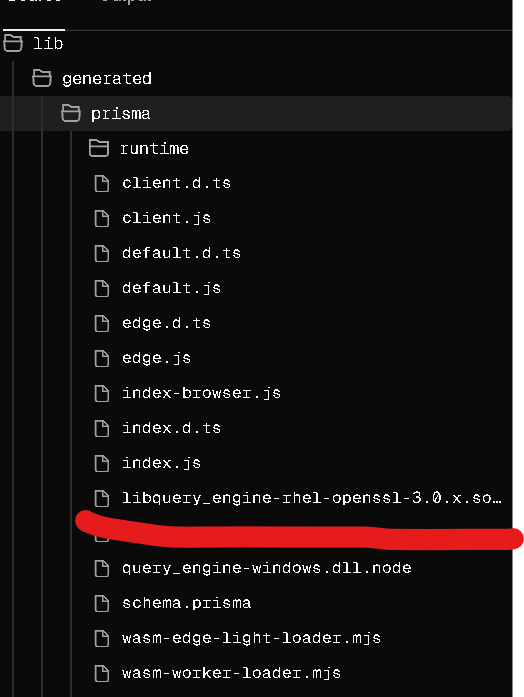
I check the vercel sources and
Error [PrismaClientInitializationError]:
Invalid `prisma.loans.findMany()` invocation:


Prisma Client could not locate the Query Engine for runtime "rhel-openssl-3.0.x".

We detected that you are using Next.js, learn how to fix this: https://pris.ly/d/engine-not-found-nextjs.

This is likely caused by a bundler that has not copied "libquery_engine-rhel-openssl-3.0.x.so.node" next to the resulting bundle.
Ensure that "libquery_engine-rhel-openssl-3.0.x.so.node" has been copied next to the bundle or in "lib/generated/prisma".

We would appreciate if you could take the time to share some information with us.
Please help us by answering a few questions: https://pris.ly/engine-not-found-bundler-investigation

The following locations have been searched:
  /var/task/lib/generated/prisma
  /var/task/.next/server
  /vercel/path0/lib/generated/prisma
  /var/task/.prisma/client
  /tmp/prisma-engines
    at hE.handleRequestError (.next/server/app/page.js:115:8125)
    at hE.handleAndLogRequestError (.next/server/app/page.js:115:6886)
    at hE.request (.next/server/app/page.js:115:6593)
    at async e (.next/server/app/page.js:127:7467)
    at async j (.next/server/app/page.js:136:3442)
    at async m (.next/server/app/page.js:1:6567) {
  clientVersion: '6.16.0',
  errorCode: undefined,
  digest: '2479025471'
}
Error [PrismaClientInitializationError]:
Invalid `prisma.loans.findMany()` invocation:
Prisma Client could not locate the Query Engine for runtime "rhel-openssl-3.0.x".
We detected that you are using Next.js, learn how to fix this: https://pris.ly/d/engine-not-found-nextjs.
This is likely caused by a bundler that has not copied "libquery_engine-rhel-openssl-3.0.x.so.node" next to the resulting bundle.
Ensure that "libquery_engine-rhel-openssl-3.0.x.so.node" has been copied next to the bundle or in "lib/generated/prisma".
We would appreciate if you could take the time to share some information with us.
Please help us by answering a few questions: https://pris.ly/engine-not-found-bundler-investigation
The following locations have been searched:
/var/task/lib/generated/prisma
/var/task/.next/server
/vercel/path0/lib/generated/prisma
/var/task/.prisma/client
/tmp/prisma-engines
at hE.handleRequestError (.next/server/app/page.js:115:8125)
at hE.handleAndLogRequestError (.next/server/app/page.js:115:6886)
at hE.request (.next/server/app/page.js:115:6593)
at async e (.next/server/app/page.js:127:7467)
at async j (.next/server/app/page.js:136:3442)
at async m (.next/server/app/page.js:1:6567) {
clientVersion: '6.16.0',
errorCode: undefined,
digest: '2479025471'
}I check the vercel sources and
libquery_engine-rhel-openssl-3.0.x.so.nodelibquery_engine-rhel-openssl-3.0.x.so.node