Ray Kholodovsky - silkscreenrect (and future fa...
silkscreenrect (and future fabricationrect?) vs silkscreenpath
I need a way to render not-filled rectangle for my margin boxes. rect seemed like the easier syntax.
my
my
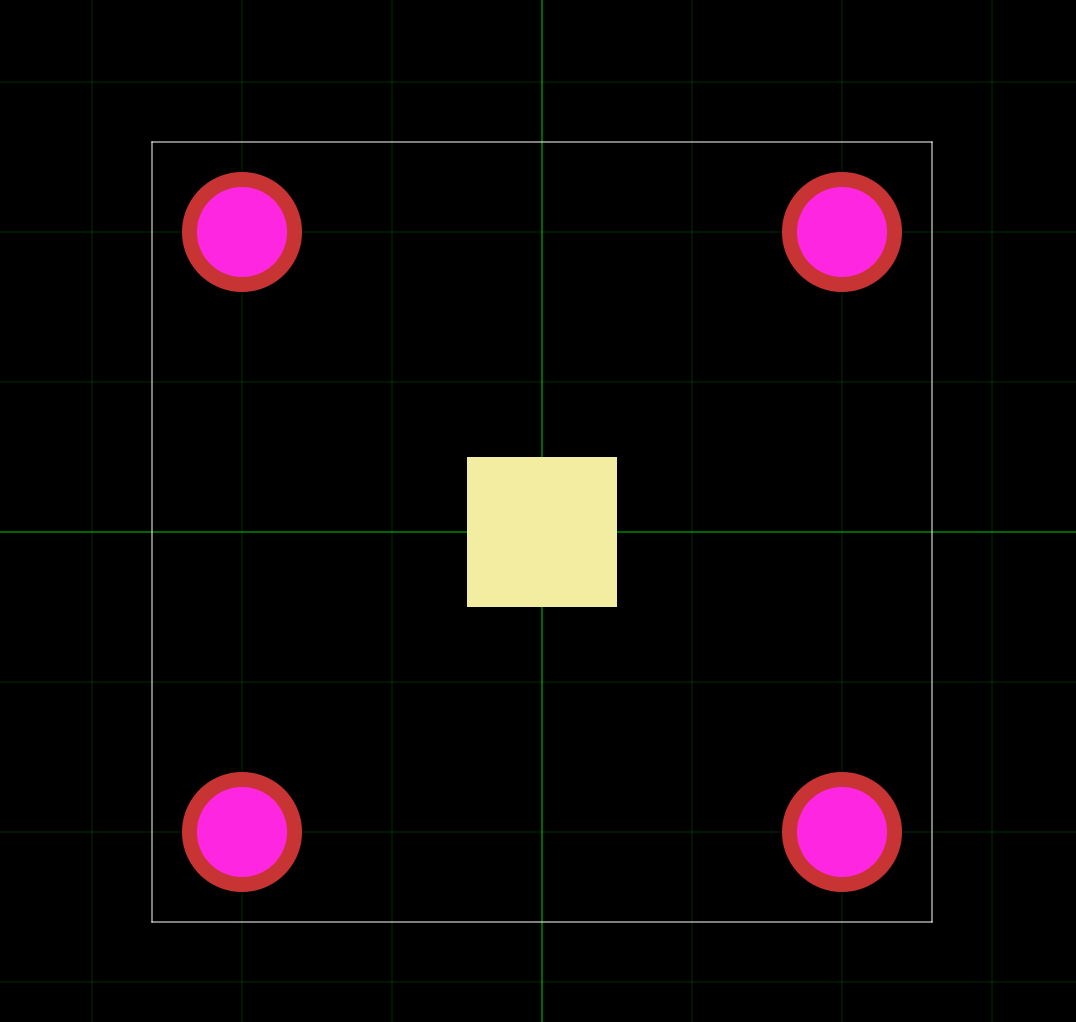
<silkscreenrect pcbX={0} pcbY={0} width={2} height={2} />
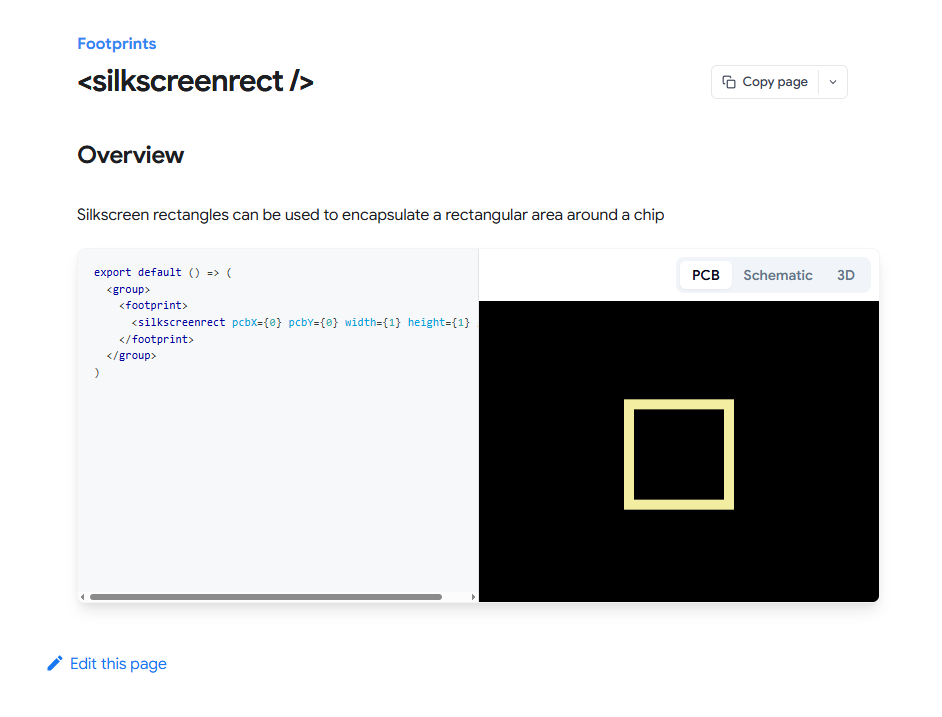
shows as filled while the doc shows unfilled. so need unfilled, also looking to be able to define strokeWidth="0.5mm" like in the silkscreenpath docs.
and ideally I can do all this as fabrication objects not silkscreen like we've discussed before.
36 Replies
fabricationrect should exist! let me see
https://docs.tscircuit.com/elements/pcbnoterect
ah, was looking in the wrong section of the docs
<pcbnoterect /> | tscircuit docs
Draw rectangles on your PCB to highlight areas, create visual boundaries, and organize board sections.
yes so
<fabricationnoterect /> does exist but doesn't have a doc (so no proof of working)
There is an isFilled prop for all of these (at least their should be) that we should add to the docs
<pcbnoterect /> is similar but won't go to the final gerbers as a layer
at least not by defaultI don't need it to be on gerbers, I actually just need "documentation" for users in the PCB and 3D view of tsci.
so these pcbnote props are the thing?
yep pcbnote is great for that
pcbnote is basically our user layers
also this is very beta but you might be interested in our
<pcbnotedimension /> https://docs.tscircuit.com/elements/pcbnotedimension<pcbnotedimension /> | tscircuit docs
The
<pcbnotedimension /> element adds dimension annotations to PCBs showing measurements between two points.sweet, now that I can visualize it, time to fix the margin logic

ahh yea very cool i like that
yea there is so much stuff the pcb viewer needs for debugging coordinate issues, glad you have a hack 😁
on hover of any pcbnoterect I get this
- symbol
I don't see any sort of "name" or "text" prop in the docs, so any idea where this comes from?i'm not sure it's supposed to have any hover behavior
i mean we could show like a name or something
what do you think, is there metadata you'd want to put on that rect right now to display to people?
i'm trying to determine if we disable hovering for the notes or if we display e.g. their name
it seems like the best behavior would be to show
text="...." if it's defined, otherwise disableyes, on hover, I want to give it a name or text to show context to people,
leftMargin rightMargin topMargin bottomMargin centerMargin
are all names I have ready to feed into it (for my use case)
gotcha ok will queue this
and I like how on hover I get the red rect showing which thing I'm hovering over and you're telling be about

so plz keep that
kk yea so 1) need to add name/text to the pcbnote* spec and 2) alter the hover text for pcb-viewer 3) make sure core is passing along props 👍
and plz 4: also display the pcbnoterect / other pcbnote stuff in the 3D viewer
oh interesting, so you want to be able to hover over the notes in the 3d viewer
we don't support hovering over footprints/notes in the 3d viewer rn but makes sense to add it
less so that, I'd settle for seeing the white rects on the 3D view, probably by option, but it's needed

no objection to this later, rn req is "this is a layer in the PCB Viewer, it needs to be viewable and toggle-able in the 3D Viewer cuz kicad does that"

CC @shibo @Abse yea so the reason the notes aren't showing is because we currently don't apply a texture to the board like we do with circuit-json-to-gltf- all the 3d geometry is created. I think we should apply a texture though
also CC @Mustafa7 😁 there's probably like 5 issues listed above haha
have at it folks
I will start working on them tomorrow god willing
btw, on
<pcbnoterect color="blue"
docs say
Rectangle color as hex string (e.g., "#ff0000")so I don't get a type error, the shape renders as white, but when I hover over, it changes to blue (or yellow/ whatever other color name I wrote) I'd prefer if you can write colors by name, seems like you're already halfway there 🙂


here is yellow behaving as above

but green is "working correctly" without any hover. strange.

yea something weird is going on, but yea writing "blue" is definitely supposed to work
you're like the first man on the moon here because i don't think anyone has used this in a project yet haha
Yeah I got that impression already.
Write more tests 🙂
I’m an expensive QA engineer in other circumstances 🙂
yea the pcb-viewer doesn't have automated tests
Oh
the SVG views do, but not the pcb-viewer. It has a massive test suite, but everything has to be manually inspected in a browser
browser automation often doesn't catch what's important...
anyway we'll get on it
Got it
more stuff on pcbnotedimension
https://docs.tscircuit.com/elements/pcbnotedimension
looks like offset doesn't work when using selectors:
<pcbnotedimension from="MP1" to="MP2" text="hello" fontSize={1} offset="8mm"/>
why is my lowercase text showing as all caps?
and what's the point of a dimension if all you can do is enter text into it manually? Isn't the whole point to be able to say "show me the distance of the from and to points I just gave you"? (ideally as variable so that it can be inserted into a larger string in the text input)<pcbnotedimension /> | tscircuit docs
The
<pcbnotedimension /> element adds dimension annotations to PCBs showing measurements between two points.
yea that is a massive oversight, text should default to the dimension 🤦♂️
RE: lowercase. Looking into it, we should support this
ok there is now no behaviour on hover over pcbnoterect
so no more arbitrary - symbol shows up
doesn't look like name/ text have been implemented yet
I try to wrap a group around pcbnoterect and I don't think the group registers it. I don't get the nice red bounding rect when I hover over the pcbnoterect
maybe that's the behaviour you want, cuz a pcbnoterect isn't a component like a footprint or chip is... so I'll just wait for pcbnoterect to get its own hover over name/text field 🙂
yes so multiple changes are rolling out, the first change makes sure that empty tooltips don't show up, the second change will add the text!!!!
color issue filed: https://github.com/tscircuit/tscircuit/issues/1151
GitHub
color="blue" or color name word does not work consistently · Issue...
Discord: https://discord.com/channels/1233487248129921135/1430269395120291932/1430281304796303521 I should be able to write color name, not just hex value. One test: <pcbnoterect color="blu...