Recently after the latest update i have started getting the TRPCClient errors on the dashboard

the logs are attached in the message and this is just for a single integration. I think this is a dns issue and the machine i run homarr on is actually my local dns server idk what exactly is wrong with dns all of a sudden but i need some help
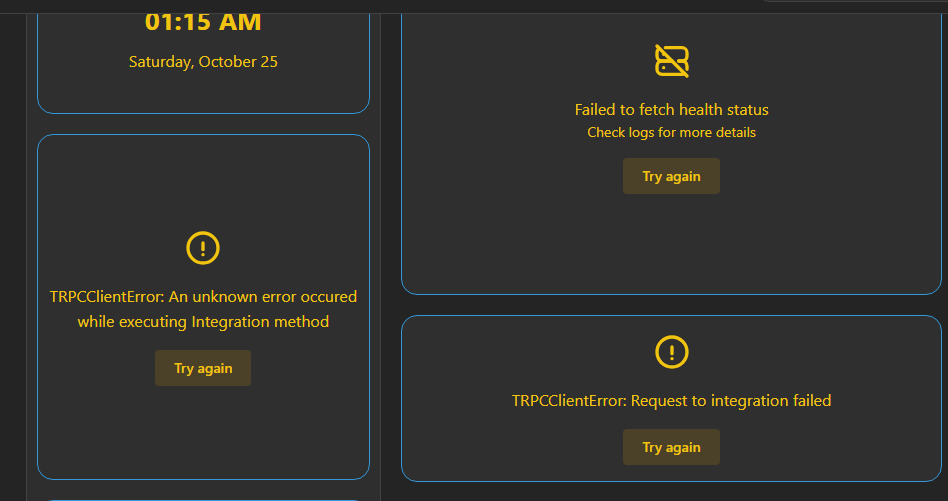
No description
40 Replies
Cakey Bot
Cakey Bot2mo ago
Thank you for submitting a support request. Depending on the volume of requests, our team should get in contact with you shortly.
⚠️ Please include the following details in your post or we may reject your request without further comment: - Log (See https://homarr.dev/docs/community/faq#how-do-i-open-the-console--log) - Operating system (Unraid, TrueNAS, Ubuntu, ...) - Exact Homarr version (eg. 0.15.0, not latest) - Configuration (eg. docker-compose, screenshot or similar. Use ``your-text`` to format) - Other relevant information (eg. your devices, your browser, ...)
Frequently Asked Questions | Homarr documentation
Can I install Homarr on a Raspberry Pi?
Yellow Haired Asia Requiem
Running Ubuntu Homarr version: 1.42.0 Config : docker compose
Meierschlumpf
Meierschlumpf2mo ago
To me this looks more like a network problem than a problem with Homarr, so your dns or something is not reachable in 10 seconds
Yellow Haired Asia Requiem
yeahh i think that is true as well should i just change the dns server for docker to something like 8.8.8.8?
Meierschlumpf
Meierschlumpf2mo ago
Yeah you can try 👍🏽
Yellow Haired Asia Requiem
is it recommended to have the local dns server the same server running other services? additionally my nginx reverse proxy also gives me dns probe possible errors
Meierschlumpf
Meierschlumpf2mo ago
Not sure, I have no experience myself and we also did not have any similar reports yet
Vasco
Vasco2mo ago
Were you able to fix @Yellow Haired Asia Requiem ?
Yellow Haired Asia Requiem
actually no since the dns issue comes from using cloudflare or google behind my adguard
Vasco
Vasco2mo ago
I think i might have the same issue but with pihole
Yellow Haired Asia Requiem
it was fine when i used different upstream servers but they had too much latency are you using a reverse proxy? because i m using a reverse proxy with duckdns
Vasco
Vasco2mo ago
Not exactly, I was using a cloudflare tunnel but then i "lost" the domain and now i'm just using it locally
Yellow Haired Asia Requiem
which is overkill for my setup
Vasco
Vasco2mo ago
And that was the time i'm getting failed to fetch But maybe it's just a coincidence
Yellow Haired Asia Requiem
ohh makes sense mine isnt exposed to internet i just use domain locally so i dont have to remember the port numbers for different services as i said mine’s overkill for what i m doing
Vasco
Vasco2mo ago
I tried that with nginx proxy manager but i had no luck
Yellow Haired Asia Requiem
i m waiting for some parts to arrive because i have to change my router and stuff so i was waiting to see if that solves it wait are you using a domain name? or just local ip?
Vasco
Vasco2mo ago
Right now, just local ip
Yellow Haired Asia Requiem
then local ip shouldnt give you any issues its the reverse proxy that is causing issue for me
Vasco
Vasco2mo ago
I think i take too much time to fetch the info , but it is indeed strange since i don't have anything in between and with cloudflare tunnel it worked
Yellow Haired Asia Requiem
so like duckdns.org is suppose to be used if you want to expose to internet but i just use it locally so there is no real dns record for it because i set the ip to a private 192.168 range and ofc google or cloudflare cannot do a reverse lookup warn: The callback of 'healthMonitoring' succeeded but took 7805.84ms longer than expected (2500ms). This may indicate that your network performance, host performance or something else is too slow this is the main reason for mine ig either the resolution happens or it takes too much time so it times out @Meierschlumpf is it possible to change the expected time for callback to something higher than 2500ms?
Vasco
Vasco2mo ago
No description
Vasco
Vasco2mo ago
I just had timeouts and warnings like yours but now i have this one, i'll investigate. Sorry for filling up the post 🙂
Meierschlumpf
Meierschlumpf2mo ago
This is only a warning that it takes longer than we expect, but is only informational, so you can ignore it
Yellow Haired Asia Requiem
no worries let me know if you figure things out i got it working again idk why but i think i removed my /etc/docker/daemon.json i added it back with the same dns server i use for everything and also i purged the cache in adguard seems to solve my issue now
Yellow Haired Asia Requiem
@Meierschlumpf sorry for the ping again bu can you look into the adguard widget? it seems it cannot keep its state up for more than a set period of time
No description
Yellow Haired Asia Requiem
once i refresh the page i get this
No description
Meierschlumpf
Meierschlumpf2mo ago
GitHub
bug: Adguard Home cycling between connected and disconnected. · Is...
Describe the bug Similar to #1925 but happening on 1.33 Steps to reproduce Integration URL set as: http://192.168.1.65:80 Impact n/a Additional information Brave browser, shields down. Version 1.33...
Yellow Haired Asia Requiem
hmm makes sense but my issue was solved when i changed the integration urls to ip address instead of domain names same as the guy in the issue states what logs should i search for?
Meierschlumpf
Meierschlumpf2mo ago
My guess would be that the main reason why it switches to disconnected is, that you have a task interval of more than 30 seconds and as far as I remember this widget is automatically changing it to disconnected if it hadn't got an update for 30 seconds
Yellow Haired Asia Requiem
got it well it doesnt bother much i just thought it was a issue only on my end
Yellow Haired Asia Requiem
additionally why would this occur
No description
Meierschlumpf
Meierschlumpf2mo ago
This is from an app that it is unable to reach (so a ping)
Yellow Haired Asia Requiem
as you can see here pings work fine for others but for some apps it doesnt
No description
Yellow Haired Asia Requiem
yeah i was typing it out
Meierschlumpf
Meierschlumpf2mo ago
My guess would be that in your container it is just unable to reach those ip addresses
Yellow Haired Asia Requiem
that i figured out with gpt too but then why are others working? homarr is in a separate container from all the services i run
Yellow Haired Asia Requiem
this is how the docker network looks like
No description
Yellow Haired Asia Requiem
okayy got all the pings working too just had to connect all of them to a same network and http://jellyfin works fine

Did you find this page helpful?