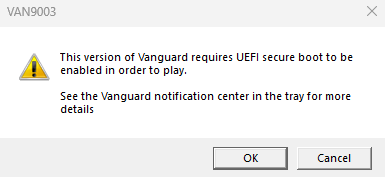
UEFI secure boot issue

This version of Vanguard requires UEFI secure boot to be enabled in order to play see the Vanguard notification center in the tray for more details
No description
52 Replies
Roman.
Roman.OP2w ago
i tried what it told me to do however it doesnt work still is there a way round it to fix this issue?
Mahan
Mahan2w ago
Sup Press windows+r Type msinfo32 Show screenshot
Roman.
Roman.OP2w ago
No description
Roman.
Roman.OP2w ago
this?
Mahan
Mahan2w ago
Disable vbs
Roman.
Roman.OP2w ago
whats vbs and how?
Mahan
Mahan2w ago
Press windows +r
Roman.
Roman.OP2w ago
ok
Mahan
Mahan2w ago
Type regedit Enter HKEY_LOCAL_MACHINE\SYSTEM\CurrentControlSet\Control\DeviceGuard Copy paste this at the top line Double-click EnableVirtualizationBasedSecurity and set the value to 0
momo
momo2w ago
no thats wrong
Mahan
Mahan2w ago
Oh Why
momo
momo2w ago
need to convet his disk to gpt then enable secure boot
Roman.
Roman.OP2w ago
thats all i need to do?
Mahan
Mahan2w ago
Your motherboard is not that old you can enable secure boot
momo
momo2w ago
yes
Roman.
Roman.OP2w ago
i tried but it didnt work idk why
momo
momo2w ago
but your system run on legacy you need to convert it to gpt right click on windows icon disk mangmant right click on disk 0 proprites volume show ss of it
Roman.
Roman.OP2w ago
No description
momo
momo2w ago
opem cmd as admin
Roman.
Roman.OP2w ago
ok
momo
momo2w ago
mbr2gpt /validate /disk:0 /allowfullos put this entr and show ss
Roman.
Roman.OP2w ago
No description
momo
momo2w ago
you have your system installed in your disk 0 right ?
Roman.
Roman.OP2w ago
idk tbh do you think formatting my pc is the best option?
momo
momo2w ago
no put this now mbr2gpt /convert /disk:0 /allowfullos entr and show ss
Roman.
Roman.OP2w ago
No description
momo
momo2w ago
show me all your disk go to this pc and show how many disks you have
Roman.
Roman.OP2w ago
Dw about the name i used to have diffrent os now its windows 11 normal one
No description
momo
momo2w ago
okay go to disk mangmant again and show ss there
Roman.
Roman.OP2w ago
No description
momo
momo2w ago
okay cmd as admin again mbr2gpt /validate /disk:1 /allowfullos put this show ss
Roman.
Roman.OP2w ago
No description
momo
momo2w ago
mbr2gpt /convert /disk:1 /allowfullos put this and show ss
Roman.
Roman.OP2w ago
No description
momo
momo2w ago
restart pc and come if your pc didnt start text here from phone
Roman.
Roman.OP2w ago
it started i am back now
momo
momo2w ago
go to disk mangmant disk 1 right click then proprties volume show ss
Roman.
Roman.OP2w ago
No description
momo
momo2w ago
huh check disk 0
Roman.
Roman.OP2w ago
it is disk 0
momo
momo2w ago
ah sorry check disk 1
Roman.
Roman.OP2w ago
No description
momo
momo2w ago
hmmm
Mahan
Mahan2w ago
Wha
momo
momo2w ago
check where is your windows files at pls and tell me
Roman.
Roman.OP2w ago
ggos which is bascially disk c
momo
momo2w ago
you sure ? @Roman.
Roman.
Roman.OP2w ago
ye
momo
momo2w ago
okay
momo
momo2w ago
No description
momo
momo2w ago
you see the one i marked right click on it and delete it when you delete it lmk done ? im not staying long here
Jidat
Jidat2w ago
Hm why is ur C a logical drive and not primary partition Convert it to primary partition Page file in D aswell Eh The page file shouldn't matter but it will not convert if there are logical drives on the disk 1

Did you find this page helpful?