crowdsec doesn't seem to read my npm plus logs
Hi (to whomever reads this and hopefully guides me)!
Background: I have a unraid server where i use npm plus as a reverse proxy and crowdsec to parse npm plus logs. I seem to have configured everything correctly with npm plus, i can access my service via the web. I think i have configured crowdsec correctly, it can access my npm plus logs and i have a parser and bouncer installed also.
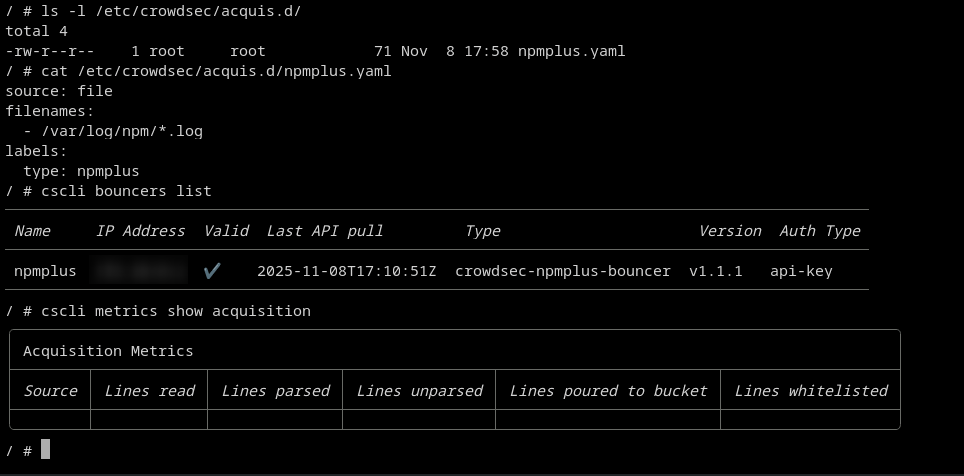
The problem/issue: When i run "cscli metrics show acquisition" in the crowdsec container it shows nothing, which makes me think that it isn't actually parsing any info. I'm guessing i can wait and see if crowdsec is making any decisions by itself but this seems like a pretty obvious error?
What might i have done wrong and how can i best check?
What i've done so far
-Checked that crowdsec can access the npm plus logs
-Checked that my acquis file is pointing to the correct folder and label
-Checked that i have a correct parser and bouncer
-Tested manually adding a ban to a VPN IP to test that the bouncer is working
Thanks in advance for any help or guidance
17 Replies
Important Information
Thank you for getting in touch with your support request. To expedite a swift resolution, could you kindly provide the following information? Rest assured, we will respond promptly, and we greatly appreciate your patience. While you wait, please check the links below to see if this issue has been previously addressed. If you have managed to resolve it, please use run the command
/resolve or press the green resolve button below.Log Files
If you possess any log files that you believe could be beneficial, please include them at this time. By default, CrowdSec logs to /var/log/, where you will discover a corresponding log file for each component.
Guide Followed (CrowdSec Official)
If you have diligently followed one of our guides and hit a roadblock, please share the guide with us. This will help us assess if any adjustments are necessary to assist you further.
Screenshots
Please forward any screenshots depicting errors you encounter. Your visuals will provide us with a clear view of the issues you are facing.
© Created By WhyAydan for CrowdSec ❤️
Adding a screenshot here from the terminal of my crowdsec container which hopefully clarifies my issue
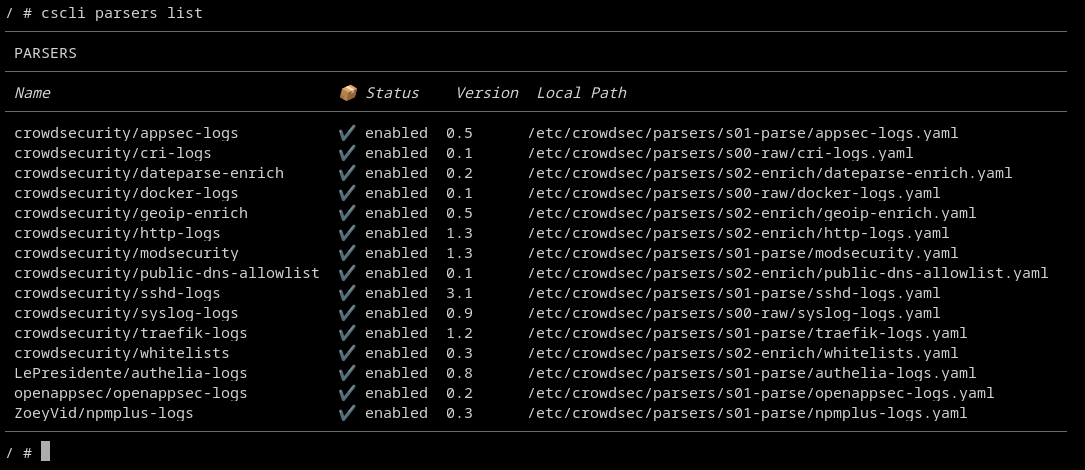
and just to show that i also have a parser for npm plus logs
The metric will not show up until at least one line was read from the file, so if you had no traffic it could be normal (and the metrics are reset when you restart crowdsec).
Can you paste the logs from the crowdsec container ? It should tail you if it starts tailing the log files.
If you manually tail the file, do you see new requests appearing ?
Ah ok that might makes sense, its a fresh install so might not have had much traffic yet.
I've attached my log and a fresh cscli metrics if that also helps.
From what i understand (which might be wrong ofc) the 817 empty answers (under local api bouncers decisions) are traffic which didn't create an alert/decision and the 22 non-empty answers are traffic which was blocked. Is that correct?
In that case shouldn't that mean that the parser has read my npm logs? I also don't see any active decisions when i try to list them with cscli decisions list.
Thnak you for the help so far
and when i tail the npm accesslog (tail /var/log/npm/access.log) it seems to correctly read the file
So everything seems to work i guess, just nothing relevant has showed up yet? 😅
the empty answer metric is related to LAPI: it will track when it did or did not sent new decisions to a bouncer when it asked for them, it's not relevant in your case.
For the logs, I'd need to have logs from when the container started.
And even if no request that was relevant for a scenario was made, the acquisition metrics will still be updated (the flow is acquisition->parser->scenario, so acquistion will happen no matter what)
Could you also show me how is the crowdsec container started ? (compose file if you have, otherwise the various mount path/env var/etc)
Ah ok thanks for the clarification, might be obvious but i'm pretty new to this
i restarted my crowdsec docker to show the logs from when it starts (if i understand you correctly)
And i attached my crowdsec config, this is done in unraid GUI
it did find the files
so in theory it should be working
Thats good to hear, can i maybe simulate an attack to test if it works?
I have a VPN so i can spoof being someone else
Or is that potentially stupid and it's better to jsut wait?
no that's definitely something you can do
Ok great do you know how i might do that or where i can read on it? This is outside my expertise so to say
There's a test scenario that triggers on a specific URL that should be installed by default: https://app.crowdsec.net/hub/author/crowdsecurity/scenarios/http-generic-test
Collections, AppSec Rules & Configurations | CrowdSec Hub
Manage collections, configurations, remediation components, and AppSec rules with CrowdSec Hub. Streamline security with tools and integrations for enhanced protection.
It's probably the easiest way to test
Make a request on
<your-domain>/crowdsec-test-NtktlJHV4TfBSK3wvlhiOBnl and you should be an alert in cscli alerts list
(this will not ban you, the scenario was designed to just make sure everything is working just before the bouncers)Great thanks! Sorry for asking but how do i make the request?
with your browser is probably the easiest way
if your domain is foo.com, just go to
foo.com/crowdsec-test-NtktlJHV4TfBSK3wvlhiOBnlAh ok, thanks
So just to be sure
First install the test collection and then make the request? Should i add the yaml to acquis.d?
the collection should already be installed , this scenario comes from the base HTTP collection, which is part (or should be at least) of all web servers collections.
You can check with
cscli scenarios list | grep http-generic-test
No need to change anything in your acquisition, you are already reading the npm logs