xiduzo - maybe a stupic question, but where/how...
maybe a stupic question, but where/how do I actually import the basic components?
20 Replies
They should be already in without any imports!
<resistor /> | tscircuit docs
A
<resistor /> is an extremely common element of electronic designs. It limits the flow of electricity and is critial to making sure digital signals are properly "pulled up" or "pulled down" to set their default value as 1 or 0try a <resistor like shown here
then try an led: https://docs.tscircuit.com/elements/led
<led /> | tscircuit docs
Light emitting diodes are diodes that emit light when current passes through them. They are commonly used as indicators on a circuit board such as a "power on indicator" or "data transfer in progress indicator
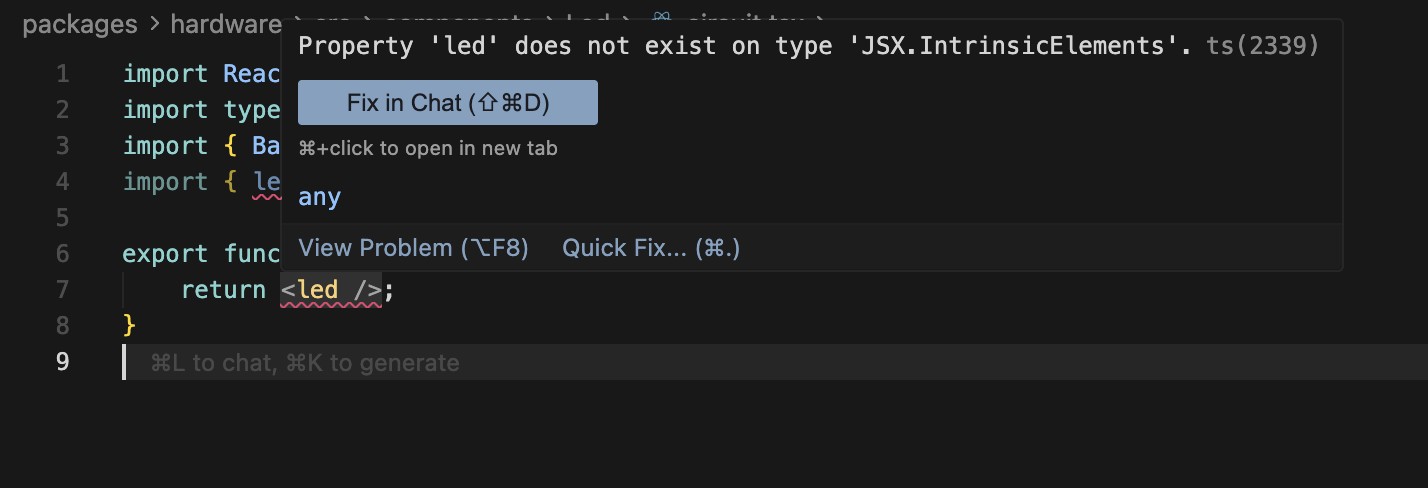
somehow my IDE does not recognise them?
I do have
configured
(yes
@tscircuit/core is not neccecary with tscircuit as it contains it, but Im just tying things out here!)
if you are just getting started, suggest you follow the basic examples before you try to do complex weird things 🙂
Quickstart CLI | tscircuit docs
The command line is the best way to use tscircuit. Using the CLI, you can just run
tsci dev in a project and see previews of your circuit just like any other local development tool!<board /> | tscircuit docs
Root element that contains all chips and traces to create a printed circuit board.
sure, will check it out. thanks
yeah so try to replicate the example in <board> first - that's the standard syntax and quite different from what you show.
before I try to dive into this rabbit hole - is it possible to include tscircuit inside of my current (React) application?
yes, there are a number of ways to do it, but first I suggest you do a basic circuit example on tscircuit.com per the docs above
@xiduzo yep would recommend starting with
tsci dev as Ray is suggesting, curious about your use case for because there are a couple ways to display on web (e.g. compiling a circuit to circuit json before displaying it can load faster for visitors, but then you can't dynamically change the circuit in browser)I have built a tool to make it easier for (non-)programmers to prototype with Arduinos, see https://microflow.vercel.app/.
It would be amazing if I can also generate a
circuit view based on the nodes and edges!Microflow
Microcontrollers made simple
oh awesome!
I am now looking into the
CircuitJsonPreview and
so that might be sufficient for my use case!yea that's a pretty low-level way to do it but pretty good!
if you want to build in the browser, you can try using
RunFrame, which is capable of building tscircuit code in the browser, it's the same thing our dev environment uses
Examples: https://runframe.tscircuit.com/?fixtureId=%7B%22path%22%3A%22examples%2Fexample01-resistor.fixture.tsx%22%7DGitHub
GitHub - tscircuit/runframe: Runs tscircuit code inside a webworker...
Runs tscircuit code inside a webworker, view PCBs, schematics and 3D previews - tscircuit/runframe
eventually it will need to run in an electron app (which is a browser too 😛 )
nice!
let us know how it goes!!! happy to help as you progress!!!!
awesome! I'll be sure to share some progress