Setting up Immich on home NAS (UGREEN). But failing to make it https publicly available
Hello
I've managed to set up Immich on my NAS using portainer. I used the following setup: https://docs.immich.app/install/portainer
This was very quick and easy, is this still the correct way to set up Immich?
Now I want to make Immich publicly available (for my family). I have a domain that is setup with DYNDNS to my home IP. I have tried the following:
- Install NgInx Proxy Manager with the following docker compose:
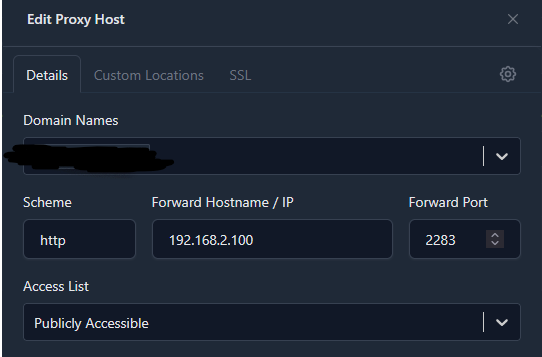
- Set it up as follows (see attachment 1)
- Port forward in my router as follows (see attachment 2)
Now when I visit the https:// of my domain (with the port added) I get the error:
When I visit the http:// of my domain (with the port added) It works. But I only want the https to be available.
Does anybody have any idea?
Or maybe making Immich publicly available is not a good decision, but what is the alternative if I want to share pictures with family?
Thank you
Schoof
I've managed to set up Immich on my NAS using portainer. I used the following setup: https://docs.immich.app/install/portainer
This was very quick and easy, is this still the correct way to set up Immich?
Now I want to make Immich publicly available (for my family). I have a domain that is setup with DYNDNS to my home IP. I have tried the following:
- Install NgInx Proxy Manager with the following docker compose:
- Set it up as follows (see attachment 1)
- Port forward in my router as follows (see attachment 2)
Now when I visit the https:// of my domain (with the port added) I get the error:
When I visit the http:// of my domain (with the port added) It works. But I only want the https to be available.
Does anybody have any idea?
Or maybe making Immich publicly available is not a good decision, but what is the alternative if I want to share pictures with family?
Thank you
Schoof