Routing a custom app through traefik
Looking for some guiadance, not sure if i am missing a step of just done something wrong. Spun up a non app store app and trying to get it exposed through runtipi reverse proxy. Compose image attached.
When attempting to web to it i get gateway timed out, so something has taken effect... but it's not quite there.
Is there anything else i need to do? Something i have done wrong?
I assume it's something app specific that i need to include in the compose so it know it listen to the reverse proxy but i dont know what im looking for to look for it?
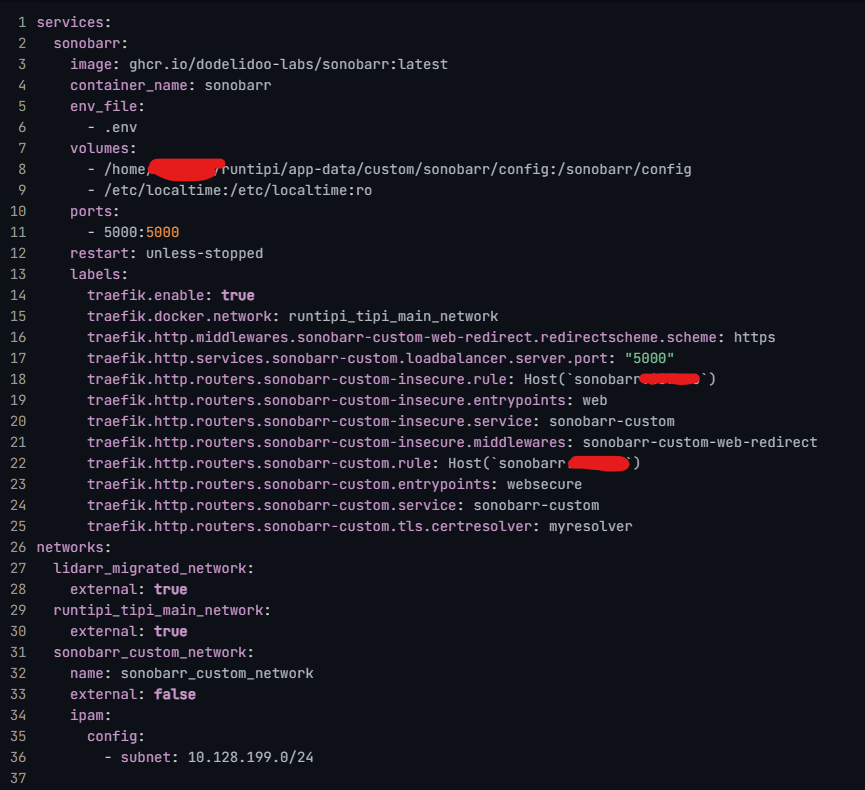
8 Replies
On a first glance the compose looks good to me.
But it's a screenshot, not Code, so it's hard to judge really.
First of all, is there a reason not to make it a runtipi app, or at least a custom app on runtipi? This way the traefik part would be taken care of automatically.
You could even make a custom app in tipi and then just copy the generated docker-compose
thanks for having a look. No reason not to make it a runtipi app other than i don't know how and that is another chunk of learning that i assumed would take longer than this.. and this is a side project of a side project lol.
i was going to make it a custom app but when looking quickly through the config options i didn't see anything to expose it through reverse proxy so just skipped over to what i already knew (docker-compose / dockge) to get the app up quickly then spent the time trying to learn how to put it through traefik.
I just figured out what was needed to fix it... but dont really understand why yet, so will need to do some more reading... if i dont know why then i didnt really learn anything.
I added the following under the sonobarr service section of the compse:
the custom app option doesn't require you to know anything about the reverse proxy topic. I guess this is the correct option for you
But ofc I am the last one that will stop you from wanting to learn anything
And you are correct about the network. In the screenshot you defined all networks but you didn't give one to the service. I missed that.
yea i was combing through the compose files for some of the runtipi app store apps and found the difference. i think i get why it's needed.. difference between saying it exists and saying to use it 🙂
but where in the custom app setting is where you tell it what domian name to use?
Tbh I never used that and I think the docs are not up to date yet. Pinging @Nicolas and @Stavros here, they are able to answer that
Could you try maybe to check the traefik dashboard at 8080? You'll need to open the port for it https://runtipi.io/docs/guides/customize-compose-and-traefik#create-a-custom-docker-compose-file
Customize Runtipi compose and traefik config
Homeserver management made easy
After saving you configuration,
Like any other app you can choose this in
Settings

ahh ok thank you!