R
Runtipi5d ago
Jack

Installing Journiv through Custom App flow

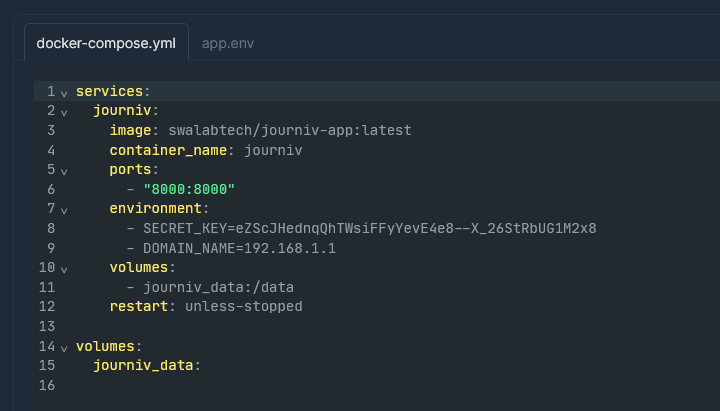
Hello! I am trying to add Journiv through the new custom app menu, and I've installed it from the Docker image, but when I start the container it doesn't seem to have permission to write to the volume I've created. I am running several other Tipi containers (Immich, for example) that can write to my filesystem with no problem. I don't know vwey much about Docker or volumes so it's possible it's trying to write to a folder I can't find. Attached is the error from the logs and the compose file. Thanks for any help!!

Journiv

Quick Start
Quickly install a slim version of Journiv to start trying all the features Journiv provides.
No description
No description
15 Replies
Jack
JackOP5d ago
I seem to have fixed the permissions problem, but now when I start the container up and try to connect I get an "Invalid host header" error in my browser
MOUETTE03
MOUETTE035d ago
Hello, try to add this: user: "1000:1000" below restart: unless-stopped
Jack
JackOP5d ago
Hi! I added that line and restarted but I'm still getting the "invalid host header" error. Weirdly the logs say "Request completed successfully" when I attempt to connect even though I can't get in
Jack
JackOP5d ago
huh! I can get in on the machine where tipi is running, but not from my main computer over the local network
No description
MOUETTE03
MOUETTE035d ago
Do you access via a domain or locally? Is the IP address of your tipi the same as the one entered in your docker compose?
Jack
JackOP5d ago
I access most of my stuff through a cloudflare tunnel and the cloudflared container but I am also able to get in locally when I'm at home
MOUETTE03
MOUETTE035d ago
Try to put the local address of your tipi in place of 192.168.1.1 to see if it works locally Or try to fill in this instead of the IP address in the docker-compose ${APP_DOMAIN}
Jack
JackOP5d ago
I think that worked! Just need to work out my cloudflare tunnel stuff now thank youi!!
MOUETTE03
MOUETTE035d ago
Great ! Is it the ip address that worked or app_domain ?
Jack
JackOP5d ago
Pasting in $APP_DOMAIN worked, at least as far as accessing the port locally. For some reason I can't get a cloudflare tunnel to resolve
MOUETTE03
MOUETTE035d ago
Another solution would be to go only through Cloudflare and if I understood the doc correctly add this under app_domaine : - DOMAIN_SCHEME=https Try this out in Docker-Compose to see if it works locally and via Cloudflare
Jack
JackOP5d ago
Now I'm getting the "invalid host header" page when I try and get in via cloudflare, which is better than it not resolving
MOUETTE03
MOUETTE035d ago
Runtipi should if I'm not mistaken have thisYou can try and replace Internal IP with your Runtipi IP
Jack
JackOP5d ago
I figured it out! I needed to set the HTTP header to "localhost" in Cloudflare settings

Did you find this page helpful?