Arduano - I added a jumper, is this the correct...

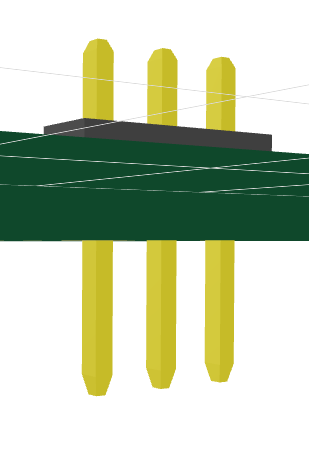
I added a jumper, is this the correct pin orientation by default? sorry I'm new to this. I'd assume the short pins would go through the board for soldering and long pins are the dupont male pins
<jumper
name="SSR"
footprint={"pinrow3"}
pinCount={3}
pinLabels={{ pin1: ["CTRL"], pin2: ["GND"], pin3: ["VCC"] }}
pcbY={-20}
/>
<jumper
name="SSR"
footprint={"pinrow3"}
pinCount={3}
pinLabels={{ pin1: ["CTRL"], pin2: ["GND"], pin3: ["VCC"] }}
pcbY={-20}
/>
No description
7 Replies
Seve
Seve4w ago
long pins should be bottom side by default yea (for male pins) are you looking to flip it? If you're buying components from jlcpcb you might want to look for the components you're going to buy- if not i think you could specify cadModel={{ rotation: { z: 180 } }} to flip it- although i'm not sure if you can use a footprinter string AND flip the model
Arduano
ArduanoOP4w ago
oh maybe I needed <pinheader/>
Seve
Seve4w ago
uhh i think in both cases it'll be oriented down
Arduano
ArduanoOP4w ago
just trying to make a dupont 3 pin male connector facing upwards
Seve
Seve4w ago
@! Rushabh | Linux Shill maybe you could look into this? We need to add it to footprinter but it doesn't change the footprint, it's just there to hint to jscad-electronics that the headers should be flipped, lmk
! Rushabh | Linux Shill
we can add something like pinrow3_faceup, pinrow3_facedown etc in foorprint string and i can parse it in jscad to change the orientation of the models @Seve What do you think or simply pinrow3_invert

Did you find this page helpful?