
SVG Sizing Problems
Sup lads, wasnt sure exactly what to title the post so apologies.
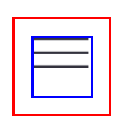
I'm having a difficult time at being able to get my svg's dimensions to be what I manually declared. In the photo, the red outline is the outline of the button, then the blue outline is for the svg. When I hover over the svg in the inspector, it of course goes to the edge of the blue outline but you can clearly see that the svg icon isnt for some reason becoming the same size?
I'll drop the code down below, hopefully it's everything you guys need to help. Thank you!
(Header.astro)
<button
class=""
aria-controls="primary-nav"
aria-expanded="false"
aria-label="Open menu"
>
<HamburgerIcon
class="icon-hamburger"
width={25}
height={25}
viewBox="0 0 25 25"
/>
<CloseHamburgerIcon class="icon-close" width={25} height={25} />
</button>
button {
padding: .5rem;
}
<svg xmlns="http://www.w3.org/2000/svg" width="24" height="15"><g fill="#33323D" fill-rule="evenodd"><path d="M0 0h24v1H0zM0 6h24v1H0zM0 12h24v1H0z"/></g></svg>
I'm having a difficult time at being able to get my svg's dimensions to be what I manually declared. In the photo, the red outline is the outline of the button, then the blue outline is for the svg. When I hover over the svg in the inspector, it of course goes to the edge of the blue outline but you can clearly see that the svg icon isnt for some reason becoming the same size?
I'll drop the code down below, hopefully it's everything you guys need to help. Thank you!
(Header.astro)
<button
class=""
aria-controls="primary-nav"
aria-expanded="false"
aria-label="Open menu"
>
<HamburgerIcon
class="icon-hamburger"
width={25}
height={25}
viewBox="0 0 25 25"
/>
<CloseHamburgerIcon class="icon-close" width={25} height={25} />
</button>
button {
padding: .5rem;
}
<svg xmlns="http://www.w3.org/2000/svg" width="24" height="15"><g fill="#33323D" fill-rule="evenodd"><path d="M0 0h24v1H0zM0 6h24v1H0zM0 12h24v1H0z"/></g></svg>

A friendly place for developers to meet other devs, ask questions, get help, and just have a good time 🙂.
36,263Members
Resources
Similar Threads
Was this page helpful?
