
HDR on Nvidia
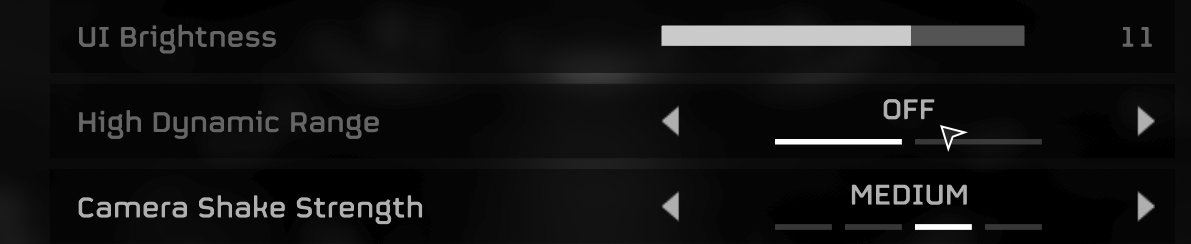
Simple question - How do I get HDR enabled in my games? I have it enabled in the OS, but I can't get my games to see that I have a HDR display. Helldivers for instance will show the setting but it'll be greyed out. As the title says, I'm running a Nvidia system and I think that's what's making this hard. I've followed YouTube tutorials but I'm just not convinced those were directed towards Nvidia users. I appreciate any help, but I really prefer it to be kept simple since I'm new to this whole thing.
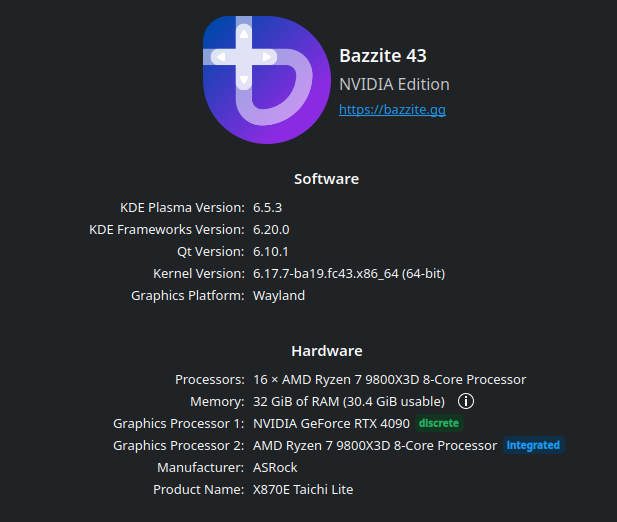
System specs are in the included attachments
System specs are in the included attachments
Solution
@Nockk In Steam, right click your game and under General there is a launch options text box. You can put commands here that set environment variables that configure Proton for that game. To enable HDR you need to enter the following
Not the most intuitive thing, but once you get the hang of it it's pretty straightforward.
Just make sure brightness in Bazzite settings is cranked when HDR is on. If you ran the calibration and limited your brightness for comfortable desktop viewing it will also limit the brightness in game. It doesn't handle brightness for SDR and HDR content separately like Windows.
PROTON_ENABLE_WAYLAND=1 PROTON_ENABLE_HDR=1 ENABLE_HDR_WSI=1 %command%Not the most intuitive thing, but once you get the hang of it it's pretty straightforward.
Just make sure brightness in Bazzite settings is cranked when HDR is on. If you ran the calibration and limited your brightness for comfortable desktop viewing it will also limit the brightness in game. It doesn't handle brightness for SDR and HDR content separately like Windows.

