pretty interesting fuckup lol
pretty much tried setting up rdp again after 2 years. same pc, worked pretty much fine before except one slight slip-up i did (was sorta the reason #14 on troubleshooting guide exists lol).
to keep it short, i did the powershell method of editing the termsrv.dll file, i assume same steps and everything. i say “i assume” simply because i did fuck up a bit and it was probably there, but i did check and don’t think i did anything different than the tutorial.
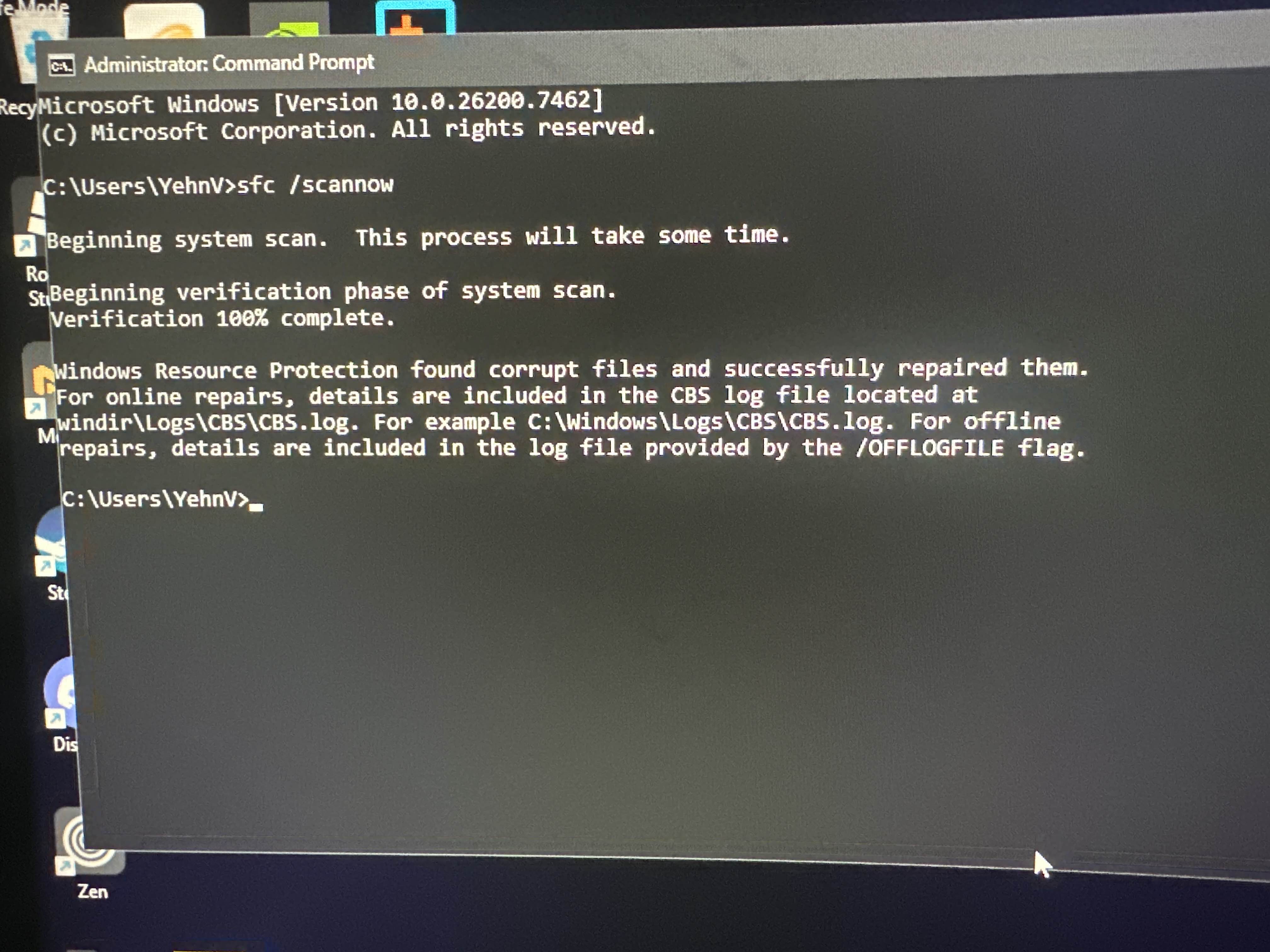
so after doing that, i tried doing the rdp stuff, starting it up, finishing that entire process. pretty much got that #14 error again, fixed it up in like <5 minutes, everything was good. fixing it up, i got this error (image 1), normal for what i messed up i guess.
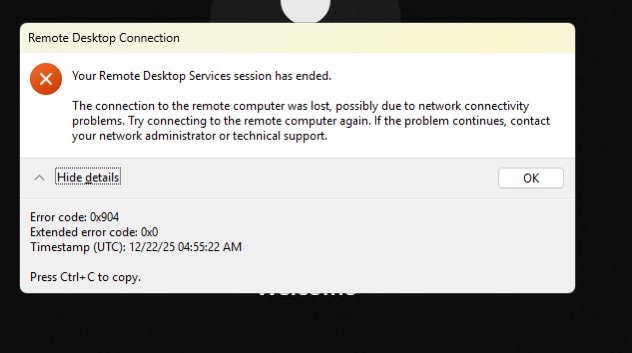
after fixing the error, i pretty much did the entire process, double and triple checking everything in the tutorial and what i did, all aligns up from what i could tell. now i load up rdp to try and use it, and i get a new error (image 2). looks closest to #8 on the troubleshooting guide, yet a different error entirely. i don’t actually know why this happened, and im still kinda confused about it and wondering why it happened. my internet and its connection is fine and so i tried launching rdp again, only to get the same error. i guess this is what i mostly find interesting about this.
i kinda forgot what i exactly did next, but pretty much tried running /sfc scannow or something. ended up getting the same #14 (the remote procedure call failed) error, i might’ve restarted my pc or something as i said i forgot. if it was just the same error i got, i’d just fix it and go on with my day, macro without rdp and ask about the error tomorrow. but, when i tried fixing it and doing /sfc scannow at the end (same result as image 1), restarted my pc, i still got the same “the remote procedure call failed” error. although following the same steps, which fixed it last time, it didn’t fix this time. i’d also like to note, unsure of its importance, but after restarting my pc the “remote procedure call failed” error popped up rather quickly, like the first thing that appeared on my screen.
i tried fixing it two more times after, even attempting to try the
so pretty much, somehow fucked up my pc, unable to get back in, and left confused
to keep it short, i did the powershell method of editing the termsrv.dll file, i assume same steps and everything. i say “i assume” simply because i did fuck up a bit and it was probably there, but i did check and don’t think i did anything different than the tutorial.
so after doing that, i tried doing the rdp stuff, starting it up, finishing that entire process. pretty much got that #14 error again, fixed it up in like <5 minutes, everything was good. fixing it up, i got this error (image 1), normal for what i messed up i guess.
after fixing the error, i pretty much did the entire process, double and triple checking everything in the tutorial and what i did, all aligns up from what i could tell. now i load up rdp to try and use it, and i get a new error (image 2). looks closest to #8 on the troubleshooting guide, yet a different error entirely. i don’t actually know why this happened, and im still kinda confused about it and wondering why it happened. my internet and its connection is fine and so i tried launching rdp again, only to get the same error. i guess this is what i mostly find interesting about this.
i kinda forgot what i exactly did next, but pretty much tried running /sfc scannow or something. ended up getting the same #14 (the remote procedure call failed) error, i might’ve restarted my pc or something as i said i forgot. if it was just the same error i got, i’d just fix it and go on with my day, macro without rdp and ask about the error tomorrow. but, when i tried fixing it and doing /sfc scannow at the end (same result as image 1), restarted my pc, i still got the same “the remote procedure call failed” error. although following the same steps, which fixed it last time, it didn’t fix this time. i’d also like to note, unsure of its importance, but after restarting my pc the “remote procedure call failed” error popped up rather quickly, like the first thing that appeared on my screen.
i tried fixing it two more times after, even attempting to try the
DISM /Online /Cleanup-Image /Restorehealth command, but that command just didn’t work at all. i’m unsure if that’s due to it just not being able to work in the safe-mode i was in or if that’s due to another error. i then tried the /sfc scannow command again, with the same result which produced the same result. so pretty much, somehow fucked up my pc, unable to get back in, and left confused