HGL
HGLfoolish-indigo
Dishonored Save Sync doesn't work as intended
Hello,
I was playing Dishonored on my Steamdeck and tried the 'Cloud Save Sync' functionality, but it seems it doesn't work properly.
These were the steps I've taken:
1. Steamdeck:
- Played Dishonored on Steamdeck, created save files.
- Configured Cloud Save Sync folder to the Dishonored save folder on Steamdeck.
- Did manual upload sync to cloud.
2. PC:
- Installed Dishonored on PC with Heroic launcher.
- Configured Cloud Save Sync folder to the Dishonored save folder on PC.
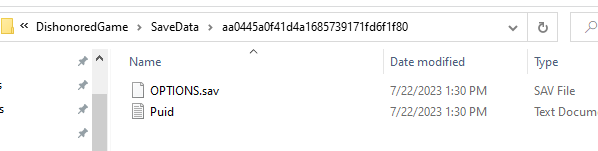
- Pressed Manual Sync download and I only got these files:
OPTIONS.sav and Puid.txt
But no game saves...
After pressing manual download sync, these were the messages I've got:
Progress:
[Core] INFO: Trying to re-use existing login session...
[cli] INFO: Got 5 remote save game(s)
[cli] INFO: Checking "Dishonored - Definitive Edition" (d2da64bd4c4e422da4b1a88041492a3a)
[cli] INFO: Overriding save path with "C:\Users\Admin\Documents\My Games\Dishonored\DishonoredGame\SaveData\aa0445a0f41d4a1685739171fd6f1f80"...
[cli] INFO: Save game for "Dishonored - Definitive Edition" is up to date, skipping...
Legendary update available!
- New version: 0.20.33 - "Undue Alarm"
- Release summary:
[] Improved handling of SDL changes
[] Added safeguards to prevent two simultaneous instances from corrupting the database
[] Added support for running uninstallers
[] More gracefully handles account errors
See full changelog for additional details.
I was playing Dishonored on my Steamdeck and tried the 'Cloud Save Sync' functionality, but it seems it doesn't work properly.
These were the steps I've taken:
1. Steamdeck:
- Played Dishonored on Steamdeck, created save files.
- Configured Cloud Save Sync folder to the Dishonored save folder on Steamdeck.
- Did manual upload sync to cloud.
2. PC:
- Installed Dishonored on PC with Heroic launcher.
- Configured Cloud Save Sync folder to the Dishonored save folder on PC.
- Pressed Manual Sync download and I only got these files:
OPTIONS.sav and Puid.txt
But no game saves...
After pressing manual download sync, these were the messages I've got:
Progress:
[Core] INFO: Trying to re-use existing login session...
[cli] INFO: Got 5 remote save game(s)
[cli] INFO: Checking "Dishonored - Definitive Edition" (d2da64bd4c4e422da4b1a88041492a3a)
[cli] INFO: Overriding save path with "C:\Users\Admin\Documents\My Games\Dishonored\DishonoredGame\SaveData\aa0445a0f41d4a1685739171fd6f1f80"...
[cli] INFO: Save game for "Dishonored - Definitive Edition" is up to date, skipping...
Legendary update available!
- New version: 0.20.33 - "Undue Alarm"
- Release summary:
[] Improved handling of SDL changes
[] Added safeguards to prevent two simultaneous instances from corrupting the database
[] Added support for running uninstallers
[] More gracefully handles account errors
See full changelog for additional details.