

 F
FLoRA training is not that fast
Fit is like 1.3 second / it vs 1.6 second / it
Fye comfy is hard

 H
HI'm thinking upscale and crop may still pose a problem if the aspect ratio is not square on the original image. I'm thinking I may need to sacrifice some detail/body on those in order to get a square fit? Does your resizer script help with that or will it not cut out body parts to make it square?
Fi have 2 scripts
Fwhen you run both
Fyou will get square
Fwith best quality
Hthanks, will I need to upscale first to above 1024x1024 if the images are smaller than that size before running the scripts?
 M
MI would also like to say a few words about the sample photos. I am currently training a Lora, where all the training photos are upper body shots. My training burned very fast and I just went down to a d_coef of 0.65 to get a good lora. So that's why it's good to take your sample shots from as many angles and distances as possible, because you can make a stronger and more flexible Lora. Just taking the same type of photos will quickly get stuck and the model will learn too much.
 Z
ZGitHub
Mamba-Chat: A chat LLM based on the state-space model architecture 
- GitHub - havenhq/mamba-chat: Mamba-Chat: A chat LLM based on the state-space model architecture
 A
Ait works fine with sdxl but not regular sd1.5 training, weird
 M
MHey guys
 P
Pmy provided dataset is 768x1024 for realistic and image processing is 1024 in max resolution parameter. I followed the tutorial, first I adjusted the aspect ratio with the cropped.py script then I pre-processed the image at 768x1024 in the train tab. I have provided class files in the same resolution, however, the images it generates in the directory are 880x1176. I think I'll have to use it at 512x512 with realistic_vision_v5.1.
 P
PI gave up on Windows, I'm using the latest version of Dreambooth on WSL 2 Ubuntu.
PYou were right, the problem was that the dataset was 768x1024 and the classes were 1024x768, I adjusted the dataset to 1024x768 and now it has gone to the cache latents phase. I think it will work now.
PI haven't used ComfyUI yet, but the error is similar to the dreambooth save preview. If it uses transforms it could be the problem with the new versions in Torch 2.0. Try using an old version that used Torch before 2.0. Then if I have time and find out something about it I can share it. I have fixed many issues in my local version of dreambooth.
 T
Tthanks. i fixed error but i has got another error. lol
TValueError: Cannot load F:\AI\ComfyUI_windows_portable\ComfyUI\models\MagicAnimate\control_v11p_sd15_openpose because down_blocks.0.attentions.0.transformer_blocks.0.attn2.to_k.weight expected shape tensor(..., device='meta', size=(320, 1280)), but got torch.Size([320, 768]). If you want to instead overwrite randomly initialized weights, please make sure to pass both
low_cpu_mem_usage=Falseignore_mismatched_sizes=True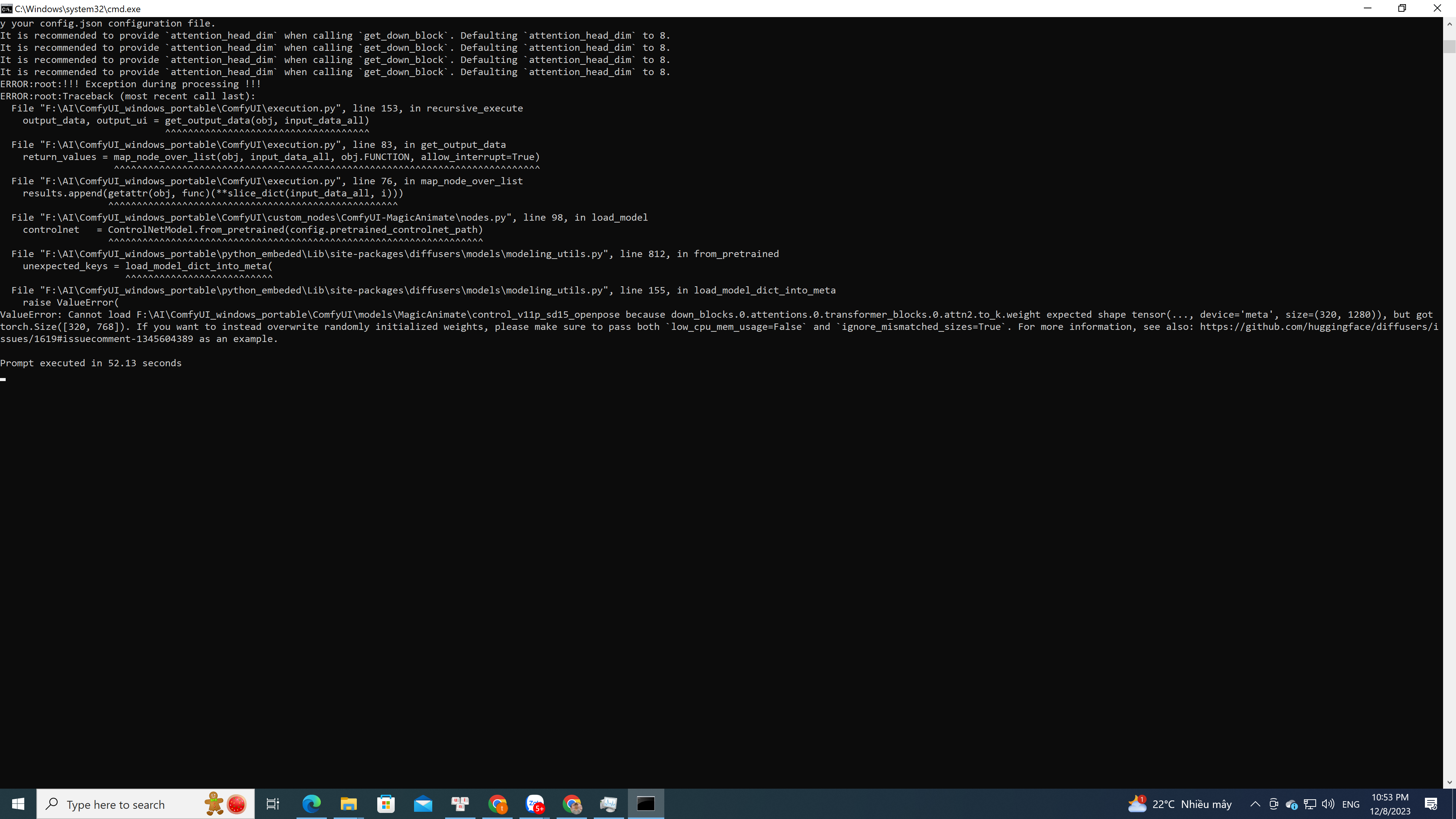
GitHub
Have scoured the docs for an answer to this, to no avail. Is it possible to add additional input channels to a model after initializing it using .from_pretrained. For example (taken from your Dream...
Pi have installed comfy ui in my ubuntu
Pshare link for this model you are using
TGitHub
Easily use MagicAnimate within ComfyUI. Contribute to thecooltechguy/ComfyUI-MagicAnimate development by creating an account on GitHub.
Tit is workflow which i used
Poh I got there and was looking at this workflow https://comfyworkflows.com/workflows/2e137168-91f7-414d-b3c6-23feaf704fdb
Share & discover ComfyUI workflows.
Pi will check yours
Tyes.  the same
the samePi found this video https://www.youtube.com/watch?v=Zie-TLS5ze8 it another way without comfyUI i will test it later.
TShare & discover ComfyUI workflows.
Toh thanks u. it is youtube. last day, i i didn't found in youtube.
PI'm new at this. After installing https://github.com/comfyanonymous/ComfyUI is it enough or do I need to also install: OpenposePreprocessor, VHS_VideoCombine,VHS_LoadVideo in custom_nodes ?
GitHub
The most powerful and modular stable diffusion GUI with a graph/nodes interface. - GitHub - comfyanonymous/ComfyUI: The most powerful and modular stable diffusion GUI with a graph/nodes interface.
Thmm i write E not well.
the first, i install comfyui
the next, i install manganer node
if u do any workflow, i use "load" in tank. it's help u install miss node.
the first, i install comfyui
the next, i install manganer node
if u do any workflow, i use "load" in tank. it's help u install miss node.
Tgo to Manager (after u install manganer node), >> install missting custom node >> check node need install. and restart Comfyui.
Pok i will try this
Pafter uploading the image, the video and the pose are expected to appear, correct? on mine it seems that he was unable to download the video.
 E
EHello everyone. I’d love your opinion on a topic. I’ve been experimenting with facial recognition softwares like roop, reactor, wav2lip, etc. Something I notice though is that the outputs are almost always significantly lower resolution than the beginning input. I’ve tried several up scalers to mitigate this, including doing frame by frame upscale to no avail. Do any of you know a good upscale tie a method I can try by chance? Thanks!!!
 Z
Zi keep getting huggingface errors while trying to install locally on my machine for magic generate - huggingface_hub.utils._validators.HFValidationError: Repo id must be in the form 'repo_name' or 'namespace/repo_name': 'magic-animate/pretrained_models/stable-diffusion-v1-5'. Use
repo_type S
Shey guys, i was just using this tutorial to train on Dreambooth on Google Colab. https://www.youtube.com/watch?v=mnCY8uM7E50&t=788s
YouTubeSECourses
Our Discord : https://discord.gg/HbqgGaZVmr. How to do free Stable Diffusion DreamBooth training on Google Colab for free. If I have been of assistance to you and you would like to show your support for my work, please consider becoming a patron on  https://www.patreon.com/SECourses
Playlist of Stable Diffusion Tutorials, Automatic1111 and Goo...
https://www.patreon.com/SECoursesPlaylist of Stable Diffusion Tutorials, Automatic1111 and Goo...
Sbut i want to convert the results into ckpt
Shelp is really appreciated 
Splease :"")
S"Convert weights to ckpt to use in web UIs like AUTOMATIC1111."
doesnt work
doesnt work
Sthis is the error it shows
 S
Splease help :"""""")
Fi love GPT 4 so much
Fcoding single gradio app that will enchance video and faces with codeformer
Ftrue. no one is releasing bigger resolution model
 F
Fuse my auto installer. download latest one. i fixed all
 F
Fyou need to give accurate folder path and it will work
FYouTubeSECourses
Our Discord : https://discord.gg/HbqgGaZVmr. This is the video where you will learn how to use Google Colab for Stable Diffusion. If I have been of assistance to you and you would like to show your support for my work, please consider becoming a patron on https://www.patreon.com/SECourses
Playlist of Stable Diffusion Tutorials, #Automatic1111...
https://www.patreon.com/SECoursesPlaylist of Stable Diffusion Tutorials, #Automatic1111...
EThank you for answering!
Do you think an outside 3rd party upscale is an option? Or is it that once the video is generated, it is what it is and it can’t be improved?
Do you think an outside 3rd party upscale is an option? Or is it that once the video is generated, it is what it is and it can’t be improved?