
<@205854764540362752> What's the best way to use open source to transcribe a 2 hour video on my loca
@Furkan Gözükara SECourses What's the best way to use open source to transcribe a 2 hour video on my local machine?
 A
A
 ZAZAZAZZAZZ
 B
B I was eager to try Supir locally and found this community. I decided to join the Discord and the Patreon. Unfortunately, I'm getting an error so I hope some of you smart and kind people might know what's going on. I downloaded "SUPIR_v22.zip"from the Patreon page and ran the "windows_install.bat" file. After a long wait for things to finish installing, I ran "direct_start_no_options.bat". Immediately after running that BAT file, I'm getting the following error (please check screenshot attached). I'm using Python 3.10.11, (I also tried 3.10.9), Windows 10 x64 Pro with the latest updates. My hardware is as follows: Ryzen 7950x 16-core 5.7 Ghz, 64GB DDR5-6400, GeForce RTX 3090 24GB. Any ideas what could be the problem? Thank you so much in advance!
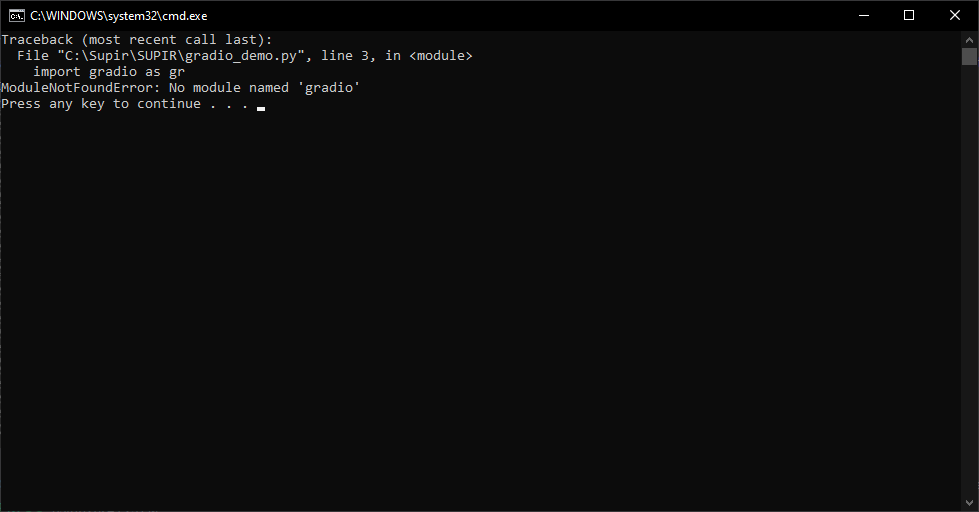 BZ
BZ FFFFFFFFFFFF
 ZZZ
ZZZ JJZZFFFFF
 A
A
 B
B S
S SS
SS Are you ready to embark on a journey of installing AI libraries and applications with ease?
  In this video, we'll guide you through the process of installing Python, Git, Visual Studio C++ Compile tools, and FFmpeg on your Windows 10 machine.
  We'll also show you ho...
 FFBFF
FFBFF

