Hello everyone. I am Dr. Furkan Gözükara. PhD Computer Engineer. SECourses is a dedicated YouTube channel for the following topics : Tech, AI, News, Science, Robotics, Singularity, ComfyUI, SwarmUI, ML, Artificial Intelligence, Humanoid Robots, Wan 2.2, FLUX, Krea, Qwen Image, VLMs, Stable Diffusion
Guys I am training on my 3090 ti 24GB,(I also own a 48GB A6000 should I use that or its the same result?) Do I have to change anything on instance prompts or parameters? Those are all blank.
All i do is run kohya, load the 24gb json settings, change directories to my tensors, images and then hit train, i get errors:
\Desktop\Kohya\kohya_ss\venv\lib\site-packages\gradio\queueing.py", line 532, in process_events response = await route_utils.call_process_api(
\Desktop\Kohya\kohya_ss\venv\lib\site-packages\gradio\route_utils.py", line 276, in call_process_api output = await app.get_blocks().process_api(
\Desktop\Kohya\kohya_ss\venv\lib\site-packages\gradio\blocks.py", line 1928, in process_api result = await self.call_function(
\Kohya\kohya_ss\venv\lib\site-packages\gradio\blocks.py", line 1514, in call_function prediction = await anyio.to_thread.run_sync(
\Desktop\Kohya\kohya_ss\venv\lib\site-packages\anyio_backends_asyncio.py", line 2177, in run_sync_in_worker_thread return await future
\Desktop\Kohya\kohya_ss\venv\lib\site-packages\anyio_backends_asyncio.py", line 859, in run result = context.run(func, args)
\Desktop\Kohya\kohya_ss\venv\lib\site-packages\gradio\utils.py", line 832, in wrapper response = f(args, **kwargs)
\Desktop\Kohya\kohya_ss\kohya_gui\lora_gui.py", line 1171, in train_model "network_module": network_module,
\Desktop\Kohya\kohya_ss\kohya_gui\lora_gui.py", line 1171, in train_model "network_module": network_module, UnboundLocalError: local variable 'network_module' referenced before assignment
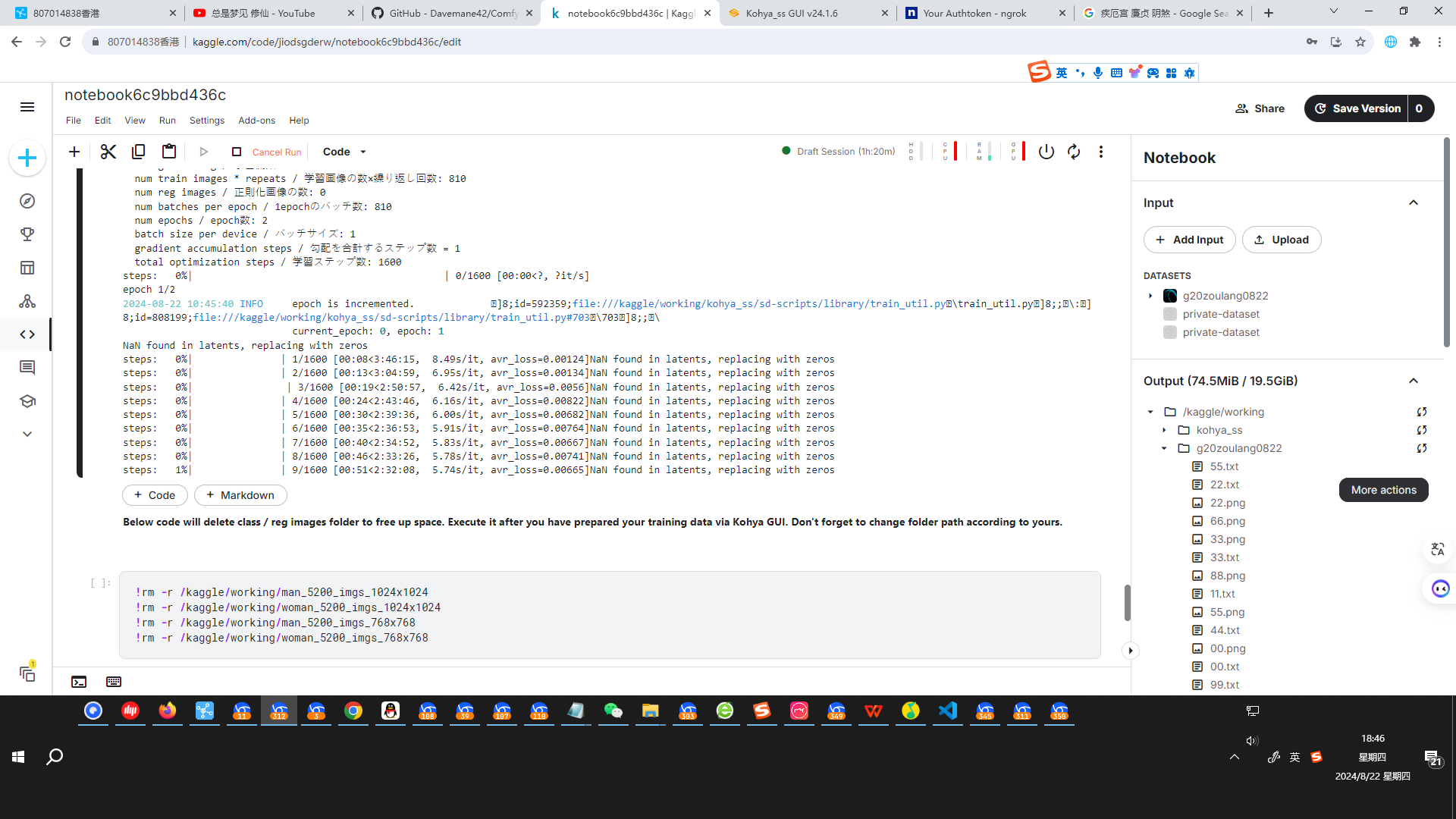
@Dr. Furkan Gözükara Traceback (most recent call last): File "/opt/conda/bin/accelerate", line 8, in <module> sys.exit(main()) File "/opt/conda/lib/python3.10/site-packages/accelerate/commands/accelerate_cli.py", line 47, in main args.func(args) File "/opt/conda/lib/python3.10/site-packages/accelerate/commands/launch.py", line 1008, in launch_command multi_gpu_launcher(args) File "/opt/conda/lib/python3.10/site-packages/accelerate/commands/launch.py", line 666, in multi_gpu_launcher distrib_run.run(args) File "/opt/conda/lib/python3.10/site-packages/torch/distributed/run.py", line 797, in run elastic_launch( File "/opt/conda/lib/python3.10/site-packages/torch/distributed/launcher/api.py", line 134, in call return launch_agent(self._config, self._entrypoint, list(args)) File "/opt/conda/lib/python3.10/site-packages/torch/distributed/launcher/api.py", line 264, in launch_agent raise ChildFailedError( torch.distributed.elastic.multiprocessing.errors.ChildFailedError: ============================================================ /kaggle/working/kohya_ss/sd-scripts/sdxl_train.py FAILED ------------------------------------------------------------ Failures: <NO_OTHER_FAILURES> ------------------------------------------------------------ Root Cause (first observed failure): [0]: time : 2024-08-22_10:17:12 host : 979028f82d51 rank : 0 (local_rank: 0) exitcode : 1 (pid: 1222) error_file: <N/A> traceback : To enable traceback see: https://pytorch.org/docs/stable/elastic/errors.html ============================================================ 10:17:13-143688 INFO Training has ended. , what is wrong, i use P100
Good morning! How can I create photos of myself in Stable Diffusion via RunPod? I'm using the SwarmUI interface. I've looked for tutorials on YouTube, but I couldn't find one that explains how to do this in RunPod.
In this tutorial, you will learn how to install Automatic1111 Web UI for SDXL. How to use LoRAs with Automatic1111 SD Web UI. How to install Kohya SS GUI scripts to do Stable Diffusion training. How to train LoRAs on SDXL model with least amount of VRAM using settings. All of the details, tips and tricks of Kohya trainings. How to do x/y/z plot ...
If you don't have a GPU, or have a strong GPU, or you are using Mac and your computer not supporting Stable Diffusion training, SDXL training, then this is the tutorial you are looking for. In this tutorial, we will use a cheap cloud GPU service provider RunPod to use both Stable Diffusion Web UI Automatic1111 and Stable Diffusion trainer Kohya ...
Get more from SECourses: Tutorials, Guides, Resources, Training, FLUX, MidJourney, Voice Clone, TTS, ChatGPT, GPT, LLM, Scripts by Furkan Gözü on Patreon