![Rat Rig Community [Unofficial]](https://cdn.discordapp.com/icons/582187371529764864/08375bea6b5b9088b6d4cfc2b6e25fba.webp?size=48)
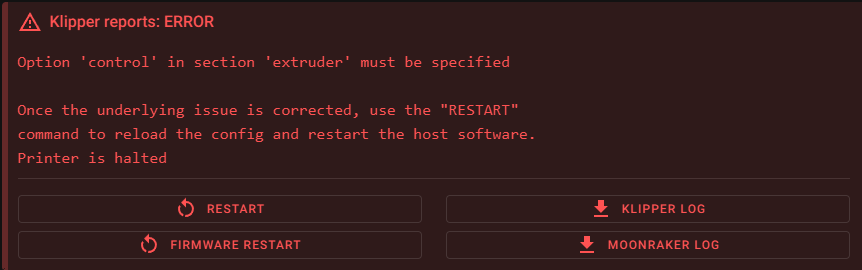
Option 'control' in section 'extruder' must be specified
Updated from RatOS 1.2.4 to 2.1.0, updates and setup all went smoothly, but somehow my Orbiter 1.5 doesnt work properly anymore.
In the printer.cfg under the [extruder] category, I noticed that 'control' and the PID settings for the extruder aren't commented out anymore (no # in front of the lines anymore), this used to be the case in my old printer.cfg. If I put a # in front of those, I get the red error message as seen in the screenshot. if I dont put a # in front of those lines, my extruder wont extrude nor retract filament. it just shakes and sounds like its skipping all its steps.
What am I missing here?
In the printer.cfg under the [extruder] category, I noticed that 'control' and the PID settings for the extruder aren't commented out anymore (no # in front of the lines anymore), this used to be the case in my old printer.cfg. If I put a # in front of those, I get the red error message as seen in the screenshot. if I dont put a # in front of those lines, my extruder wont extrude nor retract filament. it just shakes and sounds like its skipping all its steps.
What am I missing here?
![Rat Rig Community [Unofficial] banner](https://cdn.discordapp.com/banners/582187371529764864/4ee3e42e227d6aac26f048a3e69d5924.webp?size=480)
The #1 unofficial Rat Rig Community on Discord!
14,034Members
Resources
Similar Threads
Was this page helpful?
![Rat Rig Community [Unofficial]](https://cdn.discordapp.com/icons/582187371529764864/08375bea6b5b9088b6d4cfc2b6e25fba.webp?size=16)