Hello everyone. I am Dr. Furkan Gözükara. PhD Computer Engineer. SECourses is a dedicated YouTube channel for the following topics : Tech, AI, News, Science, Robotics, Singularity, ComfyUI, SwarmUI, ML, Artificial Intelligence, Humanoid Robots, Wan 2.2, FLUX, Krea, Qwen Image, VLMs, Stable Diffusion
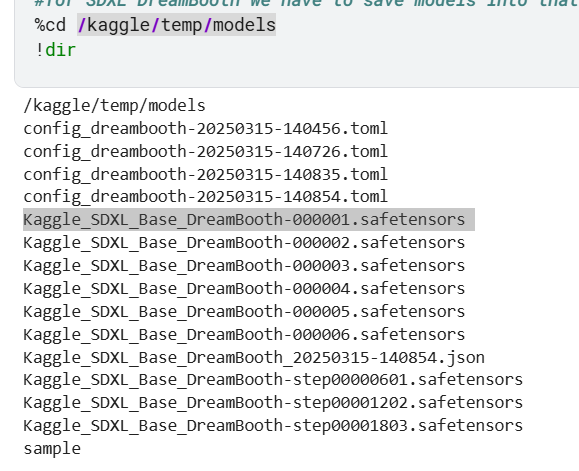
I saved 3 models during the training steps (1 at every 601 steps). apart from these 3, there are 6 models in the same folder namely Kaggle_SDXL_Base_DreamBooth-000001.safetensors. what are these models? can these be used to extract lora from dreambooth models(Kaggle_SDXL_Base_DreamBooth-step00001803.safetensors)
I'm testing the model results, I see in some generated photos the background and clothes of training images are coming up. If I include captions while training, will this issue be resolved?
Hi Dr Furkan, Shaun here. I'm planning to fine-tune an SDXL model checkpoint on a large number of images, hoping to improve its base performance. Some examples are like JuggernautXL , RealVis XL etc. Were they trained using dreambooth as well? Is dreambooth the best method to train a general model? As a lot of the examples of dreambooth seem to be only about training on a specific subject.
I'm using 13 images now with 4 unique backgrounds and clothes, can you tell me how many images are needed? how many steps should I train? config file has train batch size as 2, should I try train batch size =1. Does it help if I remove the background in the train images?
Is it possible to install Super (super resolution upscaler) on MacBook? As far as I understand, Super can be run on macOS, but it is important to note that some features may require CUDA support (which is limited on MacBook). If you have already used it on Mac, please share your experience!
Is it possible to do a full SDXL Dreamboot or Dreamboot FLUX training via Google Colab? Or, in your experience, is it better to use cloud services such as Massed Compute or RunePod (I heard recommendations from Doc)?
I would be grateful for advice on the best option.
Hello Furkan, Here is JP. I recently contacted you on YouTube to report a difficulty that I have performing a with Dreambooth Flux training with Kohya and you suggested to contact you through discord, thus here I am. Let me just first say that I really appreciate what you are doing here for all of us noobs interested in AI creation. I am a 60 years old doctoral program manager (with also several PhD students coming from Turkey!) in chemistry and I only discovered recently this interesting area of AI picture creation. How fascinating! But without your great tutorials, I would certainly not manage! I watch them again and again until I finally manage to solve my problems.
Coming to the latest problem, I do not manage to create any Flux dreambooth with your Kohya installation on my PC, unfortunately. I was already successful with Kohya Flux Lora trainings, also with OT Finetuning SDXL trainings, all loca trainings on my PC, but now there seem to be a problem (crash) at the moment Kohya wants to save the first safesensors file. I am running the training on a RTX4080 super with 16GB VRAM (could not afford more, unfortunately), choose your 16GB config (which leads to a VRAM usage of about 14,4 GB, shared usage of 18,3/31.5). Speed is approximately 5s/it, which is ok, I think. I tried with different number of steps (200, 100 ….down to much less), had started with 124 pics (1 repeat), am now down to 15 to for testing purpose. Everything goes fine until Kohya tries to save the first intermediate epoch/safetensor file. Then it crashes, terminates the training, as if it could not save the file. I tried to have it saved at many different places, it makes no difference. Could it be that the size is too big? As already mentioned, I had no problem with the Kohya Flux Loras and OT SDXL Finetunings.
When Kohya tries to save the first safetensors file, it does not say anything, but just crashes. My screen goes dark for a couple of minute. Then I can again check what happened. The console says that the training has ended. I can end you the full log, if you want to try to see what happened. It starts with “--- Logging error --- Traceback (most recent call last): File "C:\Python310\lib\logging__init.py", line 1104, in emit self.flush() File "C:\Python310\lib\logging__init.py", line 1084, in flush self.stream.flush() OSError: [Errno 22] Invalid argument Call stack: File "C:\Python310\lib\threading.py", line 973, in _bootstrap self._bootstrap_inner() etc. “
Following the advices of ChatGPT, I check for critical errors in the “Windows Event Viewer Logs“ and found indeed several ones at the time of the crash. I can send you the evtx file, if it helps. I also looked into the “reliability monitor” and there you can also see warnings and application failures at the crash time. What can be the reason?! Thanks for your help in advance! Greetings from Berlin JP
If you are interested in using AI, generative AI applications, open source applications in your computer, than this is the most fundamental and important tutorial that you need. In this tutorial I show and explain how to properly install appropriate Python versions accurately, how to switch between different Python versions, how to install diffe...
and tell me where to find kaggle code? my main task is to make a photo of the generation with the face of a real person, but replace the body with another. Is there an option how to do this? gpt chat tells me that I should do a full training of dreambooth, then somehow place it in 3D, longer modify or replace the body. What do you advise? Also, I will need generations without censorship (18+)