@prisma/extension-accelerate v2.0.1 breaks types
my selects/includes no longer change the shape of the returned objects
additionally, extension-accelerate continues to not have changelog or source code, so it's hard to guess what happened
23 Replies
Howdy, friend! I'm the Prisma AI Help Bot — fast answers from me, or slow, hand-crafted wisdom from a dev? Choose wisely, adventurer.
Hey!
v2.0.1 was released a few hours ago, can you let me know if the same issue occurs in 2.0.0 as well?
Also, can you give me a quick code snippet of what was working as expected before and what isn't working now.
I'll raise it with Accelerate team
it does not, i just spent 30 minutes isolating the type failures to the v2.0.0 to v.2.0.1 upgrade
Sorry about that 🙏
It would be very helpful if you could share a code snippet of query working before and the error you are getting now
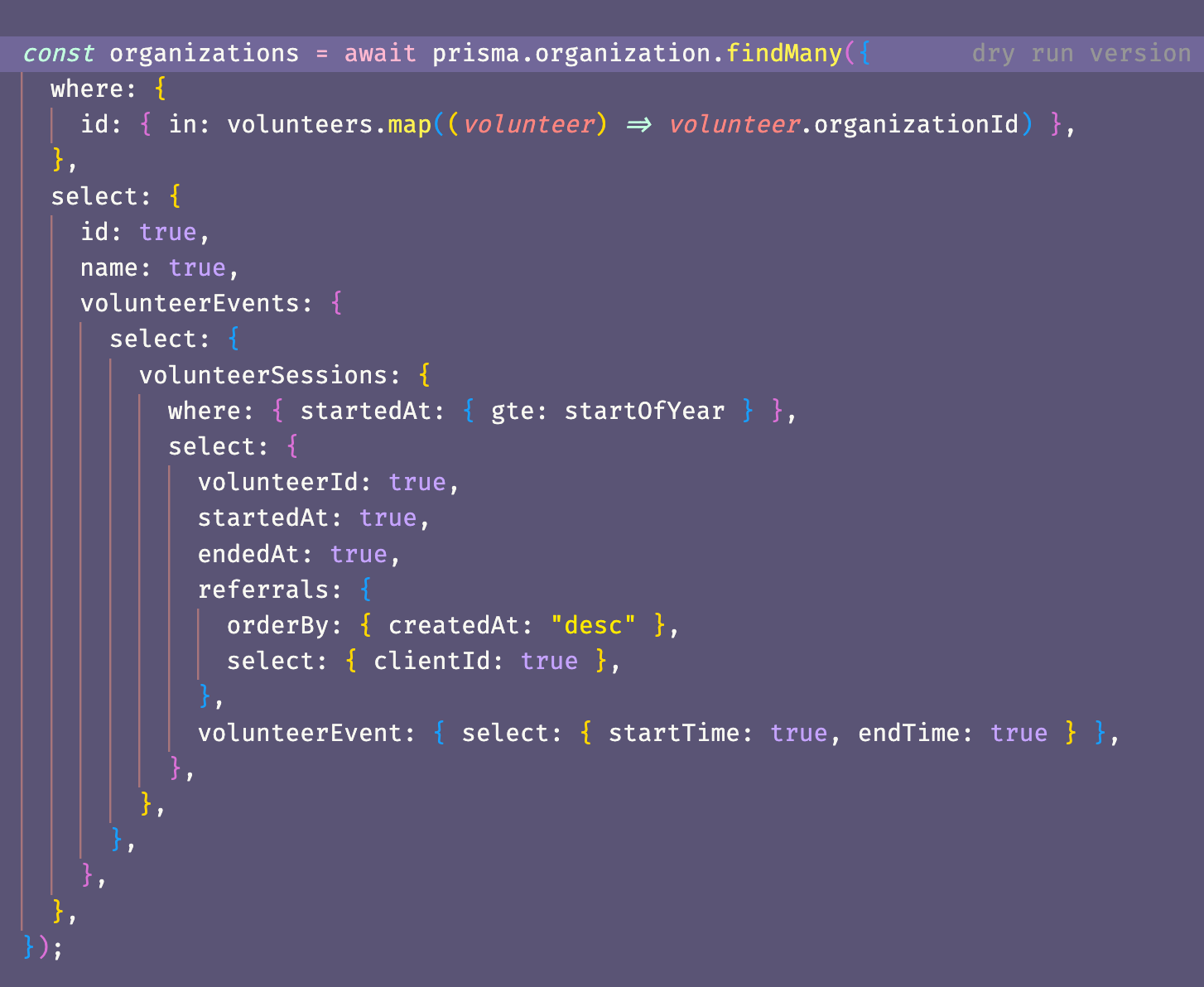
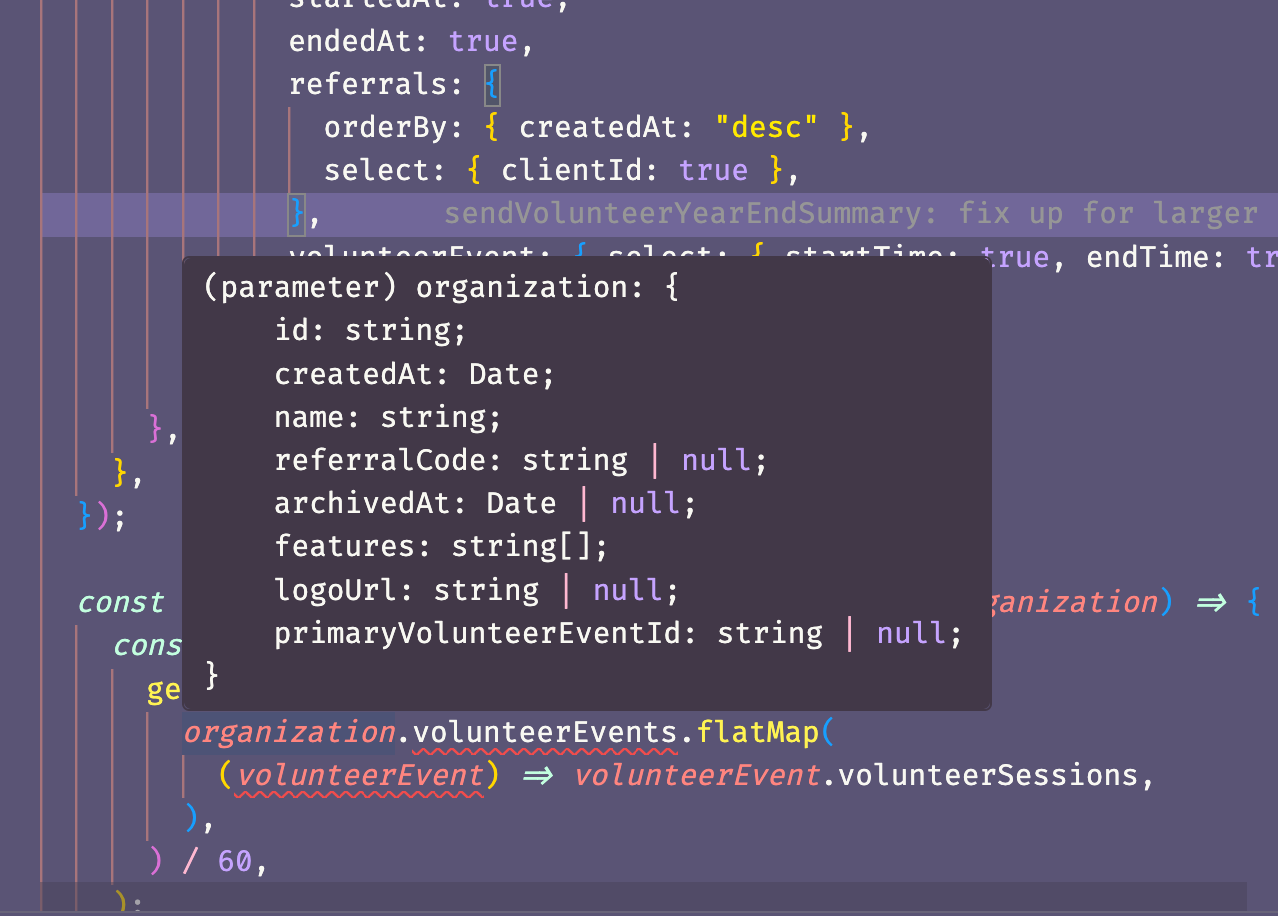
so you can see the select shows that organization should have a volunteerEvents child array, but the type does not have that array
making me feel like the select is not being passed along to the underlying type magic in prisma correctly
Okay, just to confirm, this same query works as expected if you downgrade accelerate extension to version 1.3.0, right?
sorry, i also want to add that i know i'm often a canary because i update packages hours after they are released lol, so i understand that i'm opting into discovering things
it works if i downgrade to 2.0.0
it was exactly in 2.0.1
Hey @samuelcole, sorry for this. I quickly checked this and I cannot reproduce it with a query similar to yours. Is there any chance you could provide a reproduction that includes your schema, query and
tsconfig.json?
hmm, i don't really have time today to build a reduction 😕
oh this might be interesting, this is how i build the prisma client:
I am having this same issue. In my case when using any v2+ version I get these same errors with types breaking. I have downgraded to 1.3.0 in the meantime.
Also I looked around for a changelog but could not find one, I noticed someone else brought this up in another thread.
In my case when using any v2+ version I get these same errors with types breaking.including 2.0.0? 2.0.0 did not include any type-related changes
just checking in: i'm still unable to update to 2.0.1
Same here. It seems it no longer correctly types relationships added to the finds via select or incljude
i'm still locked to 2.0.0, which considering there isn't any changelog, i don't even know what i'm missing 😁
I also ran into this today. With accelerate 2.0.1, the results of a nested select query would show nested properties as not existing. Downgrade to 2.0.0 fixes the issue. example:
Property 'purchases' does not exist on type {....}
prisma and @prisma/client 6.9.0, @prisma/extension-accelerate 2.0.1.
remix 2.15.3, vite 6.3.3
generator client {
provider = "prisma-client-js"
previewFeatures = ["typedSql", "tracing"]
}
datasource db {
provider = "postgresql"
url = env("ACCELERATE_DATABASE_URL")
directUrl = env("DATABASE_DIRECT_URL")
}
Is there any update here?
I raised concerns about this v2 and it's lack of releases notes, but we are now a few weeks in and no responses
Hey, sorry for the lack of updates. We managed to reproduce this, it looks like it affects only certain queries which load relationships in
select (and there's no apparent logic in which queries the types end up broken, as generally it works; I believe it's likely related to the schema and the number of fields in models), there's some funky TypeScript stuff going on where tsc gives up on specific types it seems. We're looking into it.I see 2.0.2 is out - does it fix it? are there release notes now ?
NVM - 2.0.2 is still broken and unusable with relationships, and there are no relesae notes for those that try
this is the kind of stuff that makes paying customers like myself leave for other providers....
@Ramparts I have already shared the feedback about release notes and we plan to include them here: https://www.prisma.io/changelog
Regarding the new update still being broken, can you share a small example, I tried reproducingthe error but was unable to:
https://github.com/prisma/prisma/discussions/27603#discussioncomment-13696804
thanks for that nurul
@aqrln said they could reproduce it. Is there a reason the extension isn't opensource on github like the main client ? it would be a lot easier to diff the source to see then what change made in 2.0.1 from 2.0.0 broke it, and potentially even submit PRs !
i was curious, and it looks like 2.0.2 is still broken for our codebase
we have:
and the resulting object does not have
locationsOk, thanks for letting us know. I am checking this internally.