
Secondary internal SSD unrecognized after Windows BSoD
Huh so: my config first
- 500GB M2 NVMe Linux Boot drive (BTRFS + LUKS)
- 500GB M2 NVMe Windows Boot drive (NTFS)
- 1TB SATA SSD shared storage (BTRFS)
- 2TB SATA SSD shared storage (BTRFS) <-- This one has problem
The 2TB drive is used for shared games, Steam libraries etc.
I was on windows downloading a game and a couple other things (discord+firefox) when BSoD (reason: memory management or smth). Restart on windows, drive not found in file manager, but is in disk manager, Unknown partition.
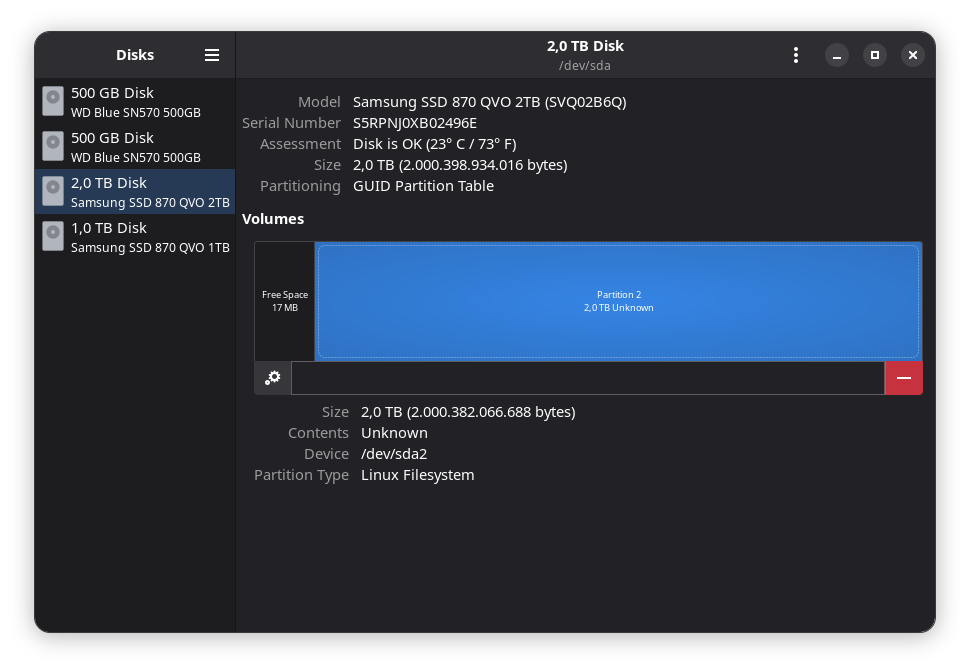
Go back to linux, I can access the drive and my files at their usual place from boot (/mnt/[drive]), but get this in Disks app. No other partition from any drive is shown to be mounted at that mount point. The disk used to be full BTRFS but got a 17MB Microsoft reserved partition (which i've subsequently deleted) after the BSoD and the BTRFS partition was not recognized (Partition Type: Free Space or smth, which i've changed back to BTRFS (The data is mostly steam games, annoying to replace but not impossible if I mess something up)
Any idea what's going on? I will likely just format the drive after copying off the couple files I can't replace but I wanted to see if y'all had any idea. I've had issue with having to Take Recursive Ownership after rebooting from windows to bazzite to access my games so I know Windows and linux sharing the filesystem is finicky but it's so much more space efficient heuuurgh
- 500GB M2 NVMe Linux Boot drive (BTRFS + LUKS)
- 500GB M2 NVMe Windows Boot drive (NTFS)
- 1TB SATA SSD shared storage (BTRFS)
- 2TB SATA SSD shared storage (BTRFS) <-- This one has problem
The 2TB drive is used for shared games, Steam libraries etc.
I was on windows downloading a game and a couple other things (discord+firefox) when BSoD (reason: memory management or smth). Restart on windows, drive not found in file manager, but is in disk manager, Unknown partition.
Go back to linux, I can access the drive and my files at their usual place from boot (/mnt/[drive]), but get this in Disks app. No other partition from any drive is shown to be mounted at that mount point. The disk used to be full BTRFS but got a 17MB Microsoft reserved partition (which i've subsequently deleted) after the BSoD and the BTRFS partition was not recognized (Partition Type: Free Space or smth, which i've changed back to BTRFS (The data is mostly steam games, annoying to replace but not impossible if I mess something up)
Any idea what's going on? I will likely just format the drive after copying off the couple files I can't replace but I wanted to see if y'all had any idea. I've had issue with having to Take Recursive Ownership after rebooting from windows to bazzite to access my games so I know Windows and linux sharing the filesystem is finicky but it's so much more space efficient heuuurgh
Solution
Heh I deleted the "linux filesystem partition" from the screenshot above, and it just turns my drive into a recognized BTRFS partition like before. What the fuck? Now to make sure the disk is detected on windows.

