Not booting into GNOME setup after install
Hi, I had blendOS installed in my ssd and I didnβt want my drive to be encrypted anymore so Iβve tried to do a fresh install in my ssd the problem is that now when I boot it shows this error:
[FAILED] Failed to start Generate locales using locale-gen.
And instead of booting into the GNOME setup, it boots into the login screen(attached image) but I didnβt create a user because the setup didnβt run. Any idea what could be causing this? Any help is appreciated π
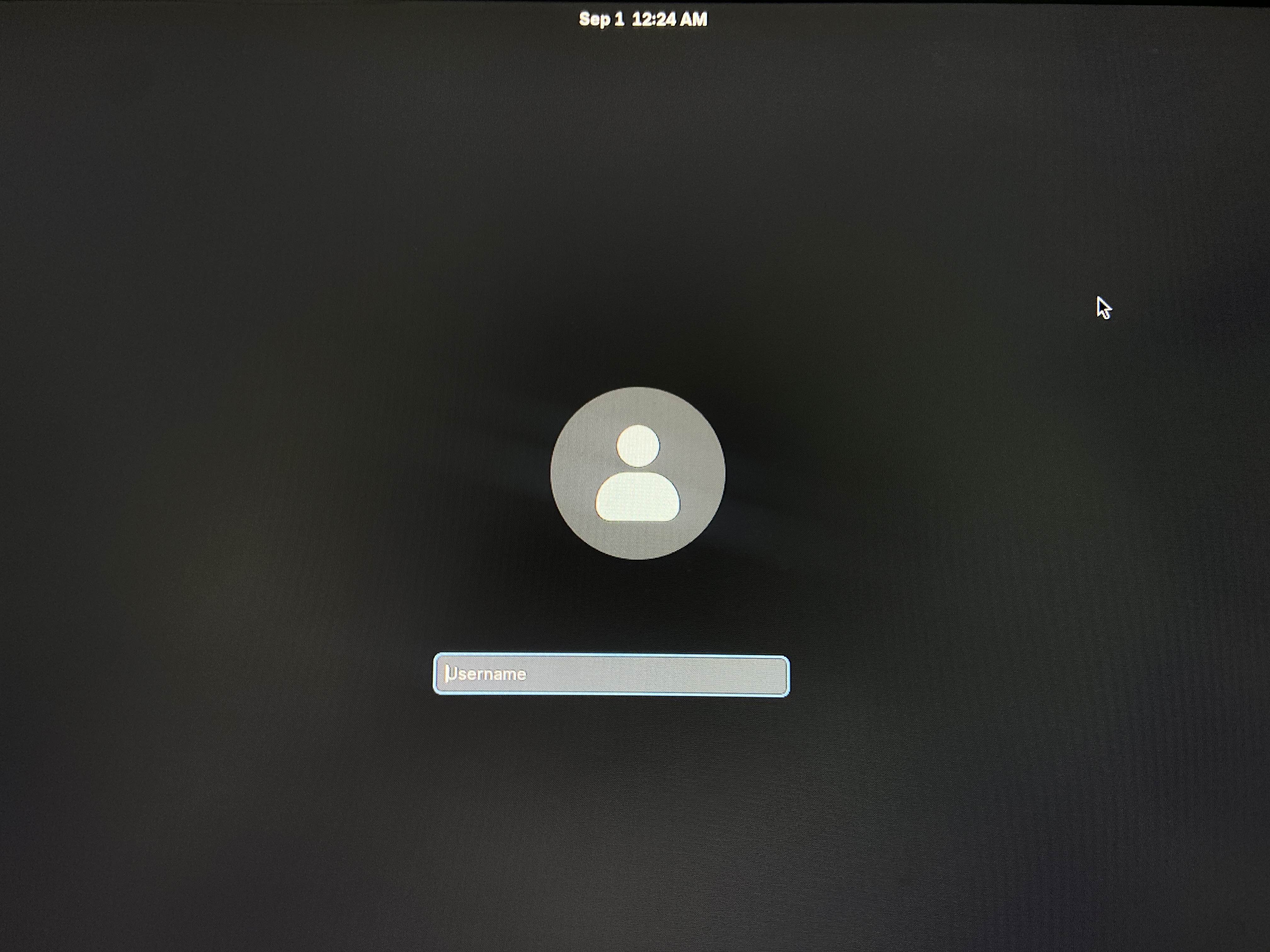
32 Replies
this should be the
gnome-initial-setup user
which should have no passwordwhat kind of cursed setups do you people have, i can never replicate half these issues lol
well i'll give it a try anyways :p
wasn't able to replicate it
Unfortunately that user didn't work, I was able to boot into single-user mode and create a new sudoer user and login fine, but when I did the akshara update using the blendos-base track everthing was downloaded but at the end I got the ERROR with:
umount: /.new_rootfs/: no mount point specified.
Even after rebooting and trying again it didn't work.
Tbh I don't know if I did anything wrong, I don't think my setup is that different, I have two SSDs I'm just trying to install blendOS in my second SSD, my first one has WIndows 10 on it. The first time I installed blendOS in the same secondry SSD everthing went smoothly, but now when i tried to do the fresh install on top of that blendOS on that secondary SSD the setup didnt go as expected
At first i tried to do the fresh install with the same ISO I had downloaded like a month ago, that didn't work, so I installed the lastest ISO using Rufus(like i did on my first install), that didnt work as well, and before opening this support post I've tried installing it with Ventoy which is the favorite option in the docs, but that also didn't work π
Hi, any ideas on what i could do?
Rufus in ISO or DD mode
ISO mode is not officially supported
DD mode
Now that I think about it Iβm going to queue an ISO refresh soon which will push a new ISO out to mirrors
Just like in the install guide
And have a new build ID
Ok I'll try it again then, maybe that will fix it
Refreshes do happen automatically but only on gitlab
Since rerunning the pipeline doesnβt make a new commit
The gitlab mirror
Ok, tysm
When the new build is availiable is there an announcement in the discord?
No but the build ID shown on the download page will change
You can also subscribe to the commit RSS feed
https://git.blendos.co/blendOS/image-builder/commits/main?format=atom
or use #π¦βgit
Unfortunately the new build didn't work as well. I've tried wiping the drive myself to install blendOS, but i still get the same problem π
Any more ideas on what I could try?
well if you're able to get in at all, then journalctl logs would be great
besides that, just for the sake of testing, maybe try to run it in a vm? just to make sure there's nothing insanely cursed going on. if it still doesn't work in there, then i'll probably just give up :p
Yeah.. I'm running into the same issue funny enough.
CONTEXT: my main system I corrected my system.yaml file since it actually hasn't been updating properly since well.. I made a slight error that's been corrected.
I reboot and cooked.com.
With that said.
I took the .iso I had and started up BlendOS on an side drive to begin file transfers.
Problem with that is somehow I am also experiencing an inability to boot into DE & stuck in CLi mode or TTY.
Problem with that is you cannot login, bc you haven't made a login yet. Or atleast when I re-installed I didn't see an option.
yeah there's nothing to create a login, and we have zero idea what's going on so uh
good luck?
https://old.rxddit.com/r/BlendOS/comments/1nkbggx/help_blendos_boots_into_command_line seems similar but this guy was able to sign in on the TTY
Help: blendOS boots into command line!
rxddit.com
u/Reedemer0fSouls on r/BlendOS
Just did a system update, and now blendOS boots into command line only. Tried Alt+F1 to switch to GNOME, but nothing happenes. Managed to load (some sort of) GNOME using gnome-session --wayland, but that is too crippled to be of much use (no network, among many other issues). sudo akshara update returns "failed checksum verification," not to men...
Well these are happening as of recent.
It might be worthy of investigating.
yeah it is, but we can't reproduce it, nor do we have any idea what could be causing it
idek where i'd start
I'll try to contribute where I can.
Information wise.
I'll give it a go in a little bit.
As I've said before I was able to boot into single-user mode and create a new sudoer user and login fine, but i cant do akshara update. As soon as I have the time I'll try to get the journalctl logs so we can try to reproduce this error
Thank you for your time, I eagerly await your next reply.
I'm going to see if I can reproduce the OS-installation booting into TTY on a fresh drive.
Something I noticed is that it happened when I didn't enable encryption?
Though when I did it installed?
Not saying its related something I noticed, I would need to retest at best.
.ns_ received a thank you Jao!
Not sure if this has any relevance, but here goes: https://www.reddit.com/r/BlendOS/comments/1nnxyq8/fresh_install_fails_after_reboot/
Reddit
From the BlendOS community on Reddit: Fresh install fails after reboot
Explore this post and more from the BlendOS community
Instead of making a similar post I'll also add that I noticed that at the time I wanted a test system for BlendOS when my system nuked itself.
So I planned on installing BlendOS via a 2nd drive + no encryption options.
The install from a fresh .iso returned the same result. What changed was I set a encryption password and it installed properly.
Today, I decided to try installing again while my drive has space for that & I installed again without Encryption.
This time it did install.
But upon selecting Arch Linux in the Efi, and attempting to boot.
It seems to fail to enter GNOME properly, let alone TTY mode.
It just hands on a black screen with a single _
So BlendOS might be broken if you don't use Encryption.
Cannot verify, and I don't have an account setup for Gitlab yet, but this seems related to this thread.
I remember being able to install w/o encryption a way back; as a matter of fact, I don't think I ever installed with encryption. So this looks to me to be a more recent development.
Is any of the devs looking into this please?
as of pretty recent, i had a perfect install in a vm without encryption
the only thing that's changed since then are upstream packages
Yeah, looks like it's been fixed.
Hi I know it's been a long time, but the problem still persist for me I've tried today installing the latest version with or without encryption and both didn't work, I still boot into the same GNOME login screen. With that being said I created a sudo user for me to log in and get the journalctl logs
@α΅α΅ α΅α΅ α΅α΅ α΅α΅ Ns α΅α΅ α΅α΅ α΅α΅ α΅α΅, you've gained the level
1@#1 mixed number hater hi sry to bother, do you have any idea what could be happening based on the journalctl ?