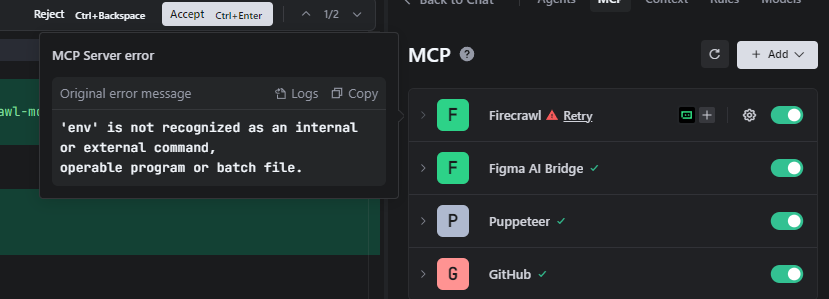
I'm trying to use it in TRAE and I'm getting this error, what could it be?
'env' is not recognized as an internal or external command,
operable program or batch file.
3 Replies
I tried to install cross-env but still without success.
{
"mcpServers": {
"Firecrawl": {
"command": "env FIRECRAWL_API_KEY=deleted for post here npx -y firecrawl-mcp",
"args": [],
"env": {
"FIRECRAWL_API_KEY": "",
"FIRECRAWL_RETRY_MAX_ATTEMPTS": "3",
"FIRECRAWL_RETRY_INITIAL_DELAY": "1000",
"FIRECRAWL_RETRY_MAX_DELAY": "10000",
"FIRECRAWL_RETRY_BACKOFF_FACTOR": "2",
"FIRECRAWL_CREDIT_WARNING_THRESHOLD": "1000",
"FIRECRAWL_CREDIT_CRITICAL_THRESHOLD": "100"
}
}
}
}
@Hugo Faria Are you on Windows?
if so, you'll require to set env explicitely or try with add this in your config:
Refer to the Windows section (Manual installation) - https://docs.firecrawl.dev/mcp-server#manual-installation-2