Editing timestamps not working correctly
 Usage💻Web🗄️Server
Since version 2.4.0, editing timestamp has stopped working correctly.
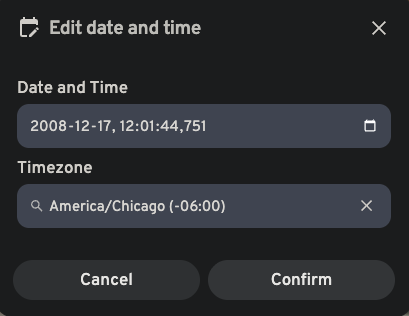
Please see attached screenshot. I set the time as 12:01:44 in timezone -06. Now, when I open the newly created .xmp file, the timestamp is wrong:
<exif:DateTimeOriginal>2008-12-17T18:01:44.751+00:00</exif:DateTimeOriginal>. That is 18:01:44 in timezone +00.
Surprisingly the metadata for the pictures still shows the values entered, but the sorting is done according to the .xmp file.
One could argue that they are technically the same, but stripping the timezone information messes everything up, and it's very easy for pictures to show on the next day (or previous) and obviously out of order, depending on the time taken.
Please resolve this issue.
The only workaround I've found is to manually update the .xmp file with the correct timestamp and timezone and then click "Refresh metadata" on the web. Only then, both the .xmp and the UI match.
Please see attached screenshot. I set the time as 12:01:44 in timezone -06. Now, when I open the newly created .xmp file, the timestamp is wrong:
<exif:DateTimeOriginal>2008-12-17T18:01:44.751+00:00</exif:DateTimeOriginal>. That is 18:01:44 in timezone +00.
Surprisingly the metadata for the pictures still shows the values entered, but the sorting is done according to the .xmp file.
One could argue that they are technically the same, but stripping the timezone information messes everything up, and it's very easy for pictures to show on the next day (or previous) and obviously out of order, depending on the time taken.
Please resolve this issue.
The only workaround I've found is to manually update the .xmp file with the correct timestamp and timezone and then click "Refresh metadata" on the web. Only then, both the .xmp and the UI match.