
 J
J@Dr. Furkan Gözükara I'm curious after watching a few of your tutorials – what do you currently recommend as the best way to train a model to generate super realistic portraits of yourself? Kohya LoRA? Automatic1111 UI?
JI'm using a macbook, so currently using rundiffusion.com to be able to generate images. I've been using the popular Google Colab "TheLastBen" to train my dreambooth models previously. It works great thb, but a bit inconsistent, especially now as I started experimenting generating photos for other people

![The Elessar [OBOI]](https://cdn.discordapp.com/avatars/694921902707441664/6e14b8002d76d26f281af6ee3ed8a7eb.webp?size=40) T
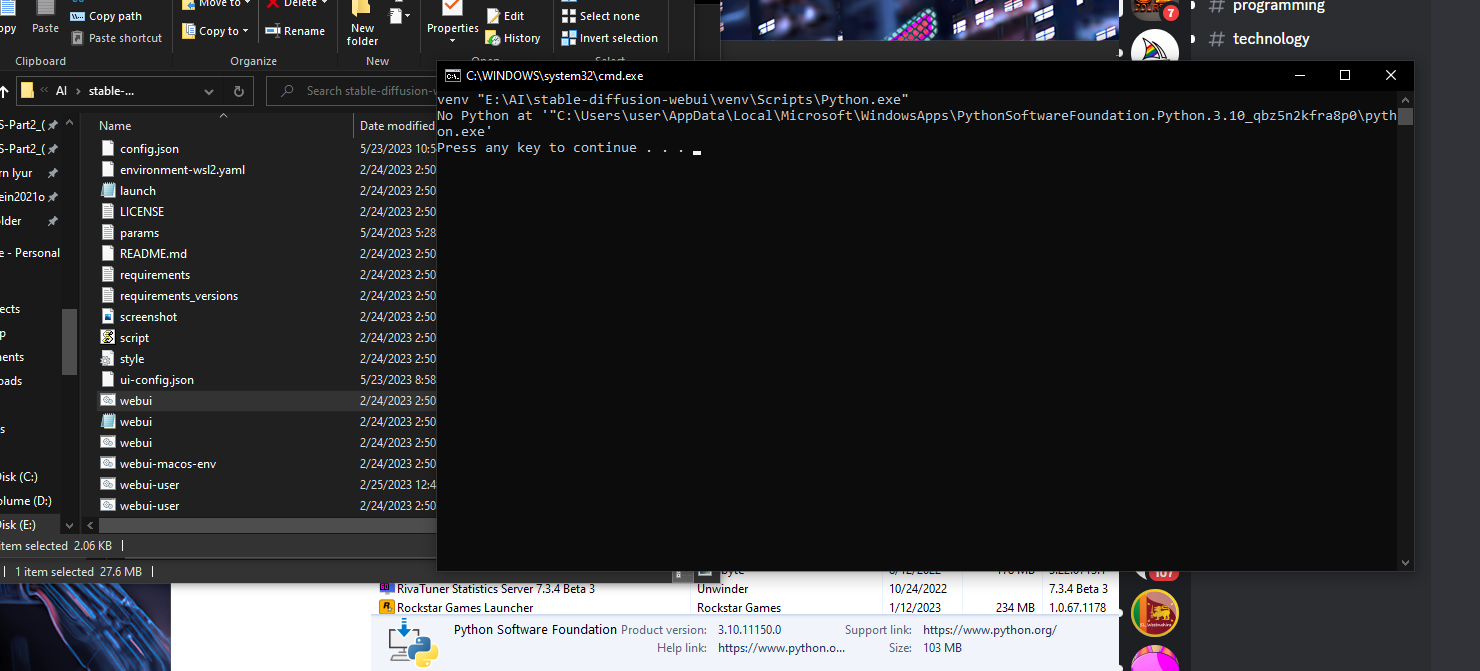
Thello, this happens because you used the version supplied by the microsoft store. you should download and install the version available through python.org
TYouTubeSECourses
How to install Python, have multiple Python installations, set system wide default Python version. How to compose venv for any Python installation, change Python default path, and install SD web UI properly. Discord: https://bit.ly/SECoursesDiscord.
If I have been of assistance to you and you would like to show your support for my work, please...
If I have been of assistance to you and you would like to show your support for my work, please...

 S
Schange the port, or a restart will help as there is some application still running on this port
 S
Skilling the task at this port also works
 S
SI feel Dreambooth gives the best accuracy, so if you got money, or good pc which means the same, if you got money, dreambooth will give the best results followed by Kohya and lora pretty much at the same level.. It is my experience

 A
ATakes more effort and more commands to detemine the process id and then to kill it
Srestart the PC, the best option.. then
AAlso if Web Ui crashes during training, there will be multiple process ids to kill, so this command is better.
AFor Windoews, Linux is not garbage like Windows
Syea, true
AIs that when you don't have pregenerated classification images? There is a new commit on the Dreambooth dev branch that should fix it if you pull the dev branch. I will test it today.
Tthere is a good guide to follow in order to have dreambooth working under windows? i managed to start it, but gives me warnings about cuda setup (with linux path errors)
![The Elessar [OBOI]](https://cdn.discordapp.com/avatars/694921902707441664/6e14b8002d76d26f281af6ee3ed8a7eb.webp?size=16) A
AWhat error are you getting?
TApplying optimization: xformers... done.
CUDA_SETUP: WARNING! libcudart.so not found in any environmental path. Searching /usr/local/cuda/lib64...
CUDA SETUP: WARNING! libcuda.so not found! Do you have a CUDA driver installed? If you are on a cluster, make sure you are on a CUDA machine!
CUDA SETUP: Loading binary C:\A1111\stable-diffusion-webui\venv\lib\site-packages\bitsandbytes\libbitsandbytes_cpu.so...
CUDA_SETUP: WARNING! libcudart.so not found in any environmental path. Searching /usr/local/cuda/lib64...
CUDA SETUP: WARNING! libcuda.so not found! Do you have a CUDA driver installed? If you are on a cluster, make sure you are on a CUDA machine!
CUDA SETUP: Loading binary C:\A1111\stable-diffusion-webui\venv\lib\site-packages\bitsandbytes\libbitsandbytes_cpu.so...
CUDA SETUP: Problem: The main issue seems to be that the main CUDA library was not detected.
CUDA SETUP: Solution 1): Your paths are probably not up-to-date. You can update them via: sudo ldconfig.
CUDA SETUP: Solution 2): If you do not have sudo rights, you can do the following:
CUDA SETUP: Solution 2a): Find the cuda library via: find / -name libcuda.so 2>/dev/null
CUDA SETUP: Solution 2b): Once the library is found add it to the LD_LIBRARY_PATH: export LD_LIBRARY_PATH=$LD_LIBRARY_PATH:FOUND_PATH_FROM_2a
CUDA SETUP: Solution 2c): For a permanent solution add the export from 2b into your .bashrc file, located at ~/.bashrc
Running on local URL: http://127.0.0.1:7860
CUDA_SETUP: WARNING! libcudart.so not found in any environmental path. Searching /usr/local/cuda/lib64...
CUDA SETUP: WARNING! libcuda.so not found! Do you have a CUDA driver installed? If you are on a cluster, make sure you are on a CUDA machine!
CUDA SETUP: Loading binary C:\A1111\stable-diffusion-webui\venv\lib\site-packages\bitsandbytes\libbitsandbytes_cpu.so...
CUDA_SETUP: WARNING! libcudart.so not found in any environmental path. Searching /usr/local/cuda/lib64...
CUDA SETUP: WARNING! libcuda.so not found! Do you have a CUDA driver installed? If you are on a cluster, make sure you are on a CUDA machine!
CUDA SETUP: Loading binary C:\A1111\stable-diffusion-webui\venv\lib\site-packages\bitsandbytes\libbitsandbytes_cpu.so...
CUDA SETUP: Problem: The main issue seems to be that the main CUDA library was not detected.
CUDA SETUP: Solution 1): Your paths are probably not up-to-date. You can update them via: sudo ldconfig.
CUDA SETUP: Solution 2): If you do not have sudo rights, you can do the following:
CUDA SETUP: Solution 2a): Find the cuda library via: find / -name libcuda.so 2>/dev/null
CUDA SETUP: Solution 2b): Once the library is found add it to the LD_LIBRARY_PATH: export LD_LIBRARY_PATH=$LD_LIBRARY_PATH:FOUND_PATH_FROM_2a
CUDA SETUP: Solution 2c): For a permanent solution add the export from 2b into your .bashrc file, located at ~/.bashrc
Running on local URL: http://127.0.0.1:7860
AIs that with CUDA version 12.1 ?
Abitsandbytes doesn't work properly with 12.1, you have to compile it from source, rather use CUDA 11.8
Tlooks like i dont' have any CUDA library dev installed, it is that?
AYou need to install a CUDA driver, not sure how to do that for Windows
Tfound an installer, let's see if this sorts
Tthank you
AJust try 11.8 and not 12.1, 12.1 has alpha features which tend to cause issues and I don't think the bitsandbytes Python module which provides the 8bit Adam optimizer supports it without compiling the module from source.
Tyes, i found an archived 11.8 version on nvidia website
 F
Fon runpod currently i am using dev version it is working
Fcurrently i am working on a new workflow. until that time i find dreambooth + realistic vision
Flooks like time to time we need to delete venv entirely
Fmy previous installation was adding noise to the generated images
Fnew installation didnt make
Fgenerated over 5k 768x1024 px class images
Falso tested different models for realism
Fand realistic vision is still the best realistic one
Fthere was a github repo which had real photos of real people
Fdo you remember its address
Fvery weird
F1 extension is causing defects in image
 A
AWhich extension?
Fdont know yet
Fi have these
F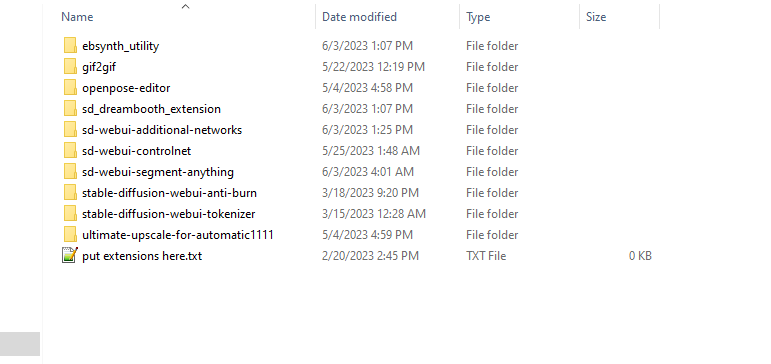 F
Fpreparing the best ever class images dataset
Fcant find a good model that can properly identify abnormal images :/
Fmaybe i should fetch real images from unsplash
 D
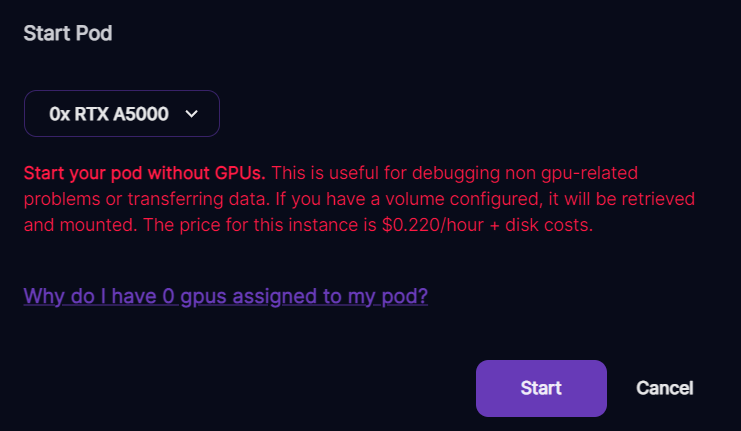
Dif you get this, is the best thing to do wait or to transfer to another gpu instance
 N
Nyes I want it to generate class images because I dont have any. DrFurkan said dev is working for him so maybe its just a matter of updating it for the template somehow?
ADepends whether you are able to wait or not, you can try waiting, otherwise transfer your data to another pod if you don't want to wait, because you have no idea how long you will have to wait for a GPU to become available.
Fi decided to collect real images
Fwritten script to download from unsplah
Fcan be used even for fine tuning