
Is there an easy way to get a prepared d1 statement as text (with the bindings applied) ?
Is there an easy way to get a prepared d1 statement as text (with the bindings applied) ?
 MM
MM
 I
Ierror.cause M
M.cause IM
IM L
L MM
MM MMMMM
MMMMMparseInt IMM
IMMALTER TABLE statements released within the week or so.Mcurrent_timestamp, current_time, and current_date should now work outside of CREATE TABLE statements now:I I
I I
Iwrangler d1 migrations apply productionM-y flag (not supported yet). You should be able to echo | wrangler d1 migrations apply <db-name> to non-interactively confirmIIMM K
Kall()raw()first()Execute returned results - did you mean to call query?
Itable as the name of a column, it fails to delete rows from the UI. I presume it isn't adding ' or "
 MMMI
MMMIALTER TABLE works! 
 I
IDROP COLUMN supported? It's giving me a not authorized...  K
K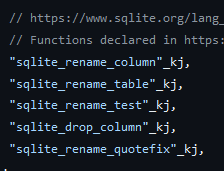 IMMI
IMMIALTER TABLE did work already  GM
GM
 M
Me68dccd4-7bf7-4860-ba18-17978966ec10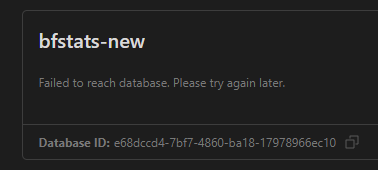
 UU
UU )M
)M➜ wrangler d1 execute db-enam --command "SELECT json_object('hello', 1, 'world', 2, 'foo', 3, 'bar', 4, 'baz', 5, 'quux', 6, 'floop', 7)"
🌀 Mapping SQL input into an array of statements
🌀 Parsing 1 statements
🚣 Executed 1 commands in 0.1332309991121292ms
┌──────────────────────────────────────────────────────────────────────────────────────────┐
│ json_object('hello', 1, 'world', 2, 'foo', 3, 'bar', 4, 'baz', 5, 'quux', 6, 'floop', 7) │
├──────────────────────────────────────────────────────────────────────────────────────────┤
│ {"hello":1,"world":2,"foo":3,"bar":4,"baz":5,"quux":6,"floop":7} │
└──────────────────────────────────────────────────────────────────────────────────────────┘ALTER TABLEALTER TABLEALTER TABLEcurrent_timestampcurrent_timecurrent_dateCREATE TABLE➜ wrangler d1 execute db-enam --command "SELECT current_timestamp, current_time, current_date" --json | jq '.[].results'
[
{
"current_timestamp": "2023-06-09 16:16:37",
"current_time": "16:16:37",
"current_date": "2023-06-09"
}
]wrangler d1 migrations apply production-yecho | wrangler d1 migrations apply <db-name>table'DROP COLUMNALTER TABLE <table> DROP COLUMN <column>;
ALTER TABLE <table> DROP <column>;





