
What do you mean by the right directory? The root directory?
What do you mean by the right directory? The root directory?
 C
Cfunctions/utils.ts, will that automatically become a route too, or does it need a onRequest or onRequestGet/Post/etc to become a route (which becomes listed in _routes.json which is automatically generated) HH
HHonRequest* export is presentC S
S
 S
S B
Bnpx wrangler pages dev -- npm run dev http://127.0.0.1:8788/helloworld = "Hello World"nuxt.js) and i don't know how to override this / configure it to point to the pages function.B C
Cfunctions) which import npm packages? (e.g. functions/index.ts -> src/schema.ts -> zod)HB/serverdirectory? I've spent hours pouring over docs and I can't figure out how to do it. I'd be happy to write / contribute a documentation snippet or just include it in that github for others, I just don't know what to do.BB will give this a try!B
 E
Egoogle-auth-library that will work in a function? AA
AA S
S/functions to secure some pages. But when the url has double slashes //, wrangler doesn't run the middleware for the url.
 S
S/functions/secure directory to be applied on all routes of /secure./out/secure directory contains a file one.html which should be served at /secure/one (but first the middleware needs to be invoked)/secure/one route but not on the //secure/one, whenever someone uses a double slash before the middleware directory, wrangler doesn't run the middleware and instead directly serve the pages./secure/one route – https://double-slashes-issue.pages.dev/secure/one//secure/one route – https://double-slashes-issue.pages.dev//secure/one/secure/one?allow route – https://double-slashes-issue.pages.dev/secure/one?allow (that's actually allowed by middleware) S
S DC
DCnpx wrangler pages dev . (. contains a directory with functions) and getting the following error: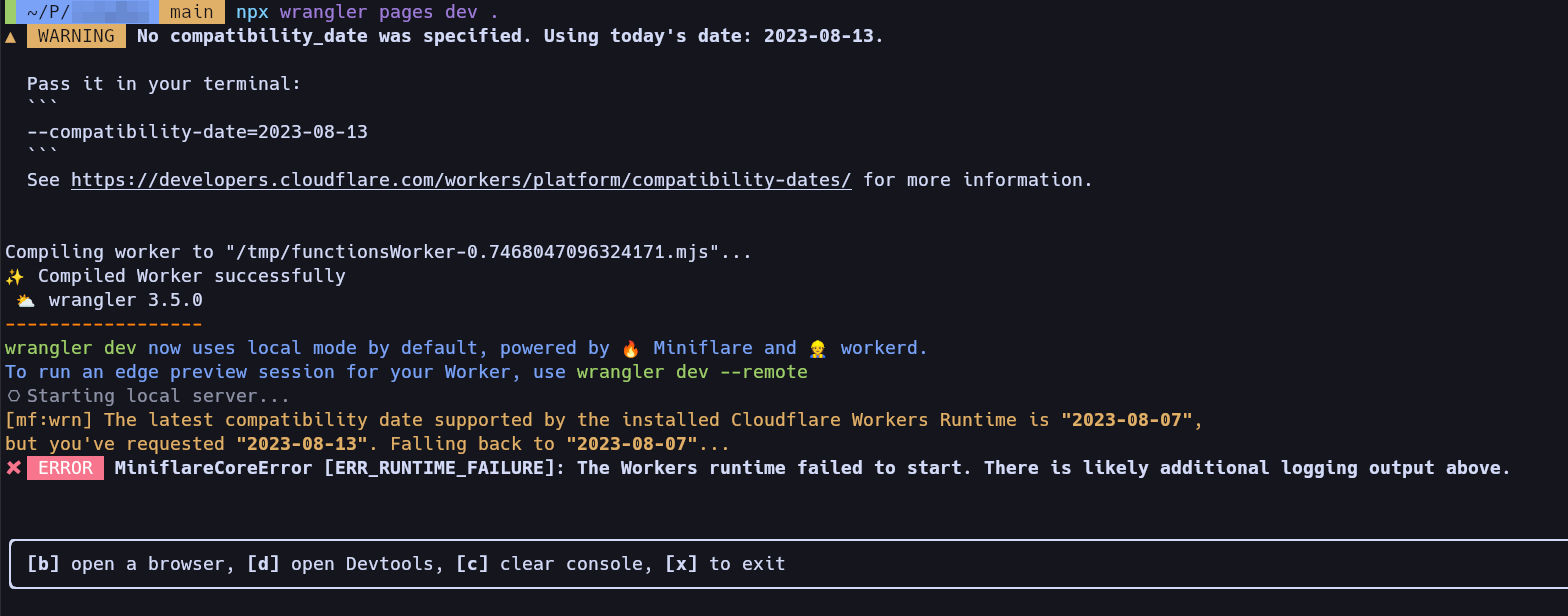
 JC
JCworkerd/util/symbolizer.c++:99: warning: Not symbolizing stack traces because $LLVM_SYMBOLIZER is not set. To symbolize stack traces, set $LLVM_SYMBOLIZER to the location of the llvm-symbolizer binary. When running tests under bazel, use --test_env=LLVM_SYMBOLIZER=<path>.Cllvm-symbolizer is in $PATH.JCLLVM_SYMBOLIZER=(which llvm-symbolizer) npx wrangler@3.4 pages dev . seems to work!JJ C
C J
Jaddress already in useJworkerd process open somewhereCCkilled itfunctions/utils.tsonRequestonRequestGet/Post/etc_routes.jsononRequest*npx wrangler pages dev -- npm run devhttp://127.0.0.1:8788/helloworld = "Hello World"nuxt.jsfunctionsfunctionsfunctions/index.tssrc/schema.tszod/servergoogle-auth-librarynitro: {
preset: 'cloudflare-pages'
},/functions///functions/secure/secure/out/secureone.html/secure/one/secure/one/secure/one//secure/one//secure/one/secure/one?allownpx wrangler pages dev ..workerd/util/symbolizer.c++:99: warning: Not symbolizing stack traces because $LLVM_SYMBOLIZER is not set. To symbolize stack traces, set $LLVM_SYMBOLIZER to the location of the llvm-symbolizer binary. When running tests under bazel, use --test_env=LLVM_SYMBOLIZER=<path>.llvm-symbolizer$PATHLLVM_SYMBOLIZER=(which llvm-symbolizer) npx wrangler@3.4 pages dev .address already in useworkerdkill
