

 H
H unless they added that recently, they shouldn’t be workingH
Were you doing it via Git?
 D
DNo
HDirect Uploads don’t run through a build, so something else must be happening…
DThe app is already built before I upload
HMaybe that’s why D1 didn’t work, since it has to be run through Wrangler to work
HThough there may be an update that removes the need for a shim
HWe do still recommend using Wrangler when using Functions though
DI'm only talking about the deployed app here, not local development
HD1 or not
HNo, I mean using wrangler pages deploy
DOk well when I upload via the web UI — which doesn't mention this limitation — I would get a KV binding and a binding to
__D1_BETA__DBIIRC, D1 Bindings, under the hood, are just a fetcher instance. When building with Wrangler, it will insert a shim that takes all the calls to env.D1, formats it a certain way, then passes it in to the Beta DB binding you found
HSo since you didn’t run wrangler to deploy it, it never inserts the shim, and thus D1 queries don’t work

 A
AThat's interesting, thanks. Will dig a bit deeper when i get the time into if I can reproduce both broken/correct state with something on my side
 K
KYou can't
JSON.stringifyIf you just want a quick idea of what's in it, try this instead:
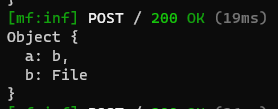
 B
BHi. I have a Nuxt project with Git integration to deploy at Cloudflare Pages. I have no functions at all (no
I have no functions at all. Any help would be appreciated.
/functionsI have no functions at all. Any help would be appreciated.

 D
DYou might be trying to use SSR, SSR depends on functions to load the page
DWithout functions you would probably have to make it a static site for it to work
 J
JQuestion specifically on Pages. I have a case where I have a template page and a Function, specifically HTMLrewriter. Whenever that template page is visited, the Function runs to - say, replace the inner content of
For whatever reason, it just hasn't been working for me, and I think it's because I can't really wrap my head around either requests or routing. So, two questions:
(1) Is the function at
(2) I'm not really sure I'm understanding requests - I would assume visiting the page is a form of a request, which would call the worker? But it's just not working for me, unless the problem lies with the rest of the code.
I've scoured the documentation and I guess I just need someone to explain it with a bit more words
<p>For whatever reason, it just hasn't been working for me, and I think it's because I can't really wrap my head around either requests or routing. So, two questions:
(1) Is the function at
/functions/index.jsindex.html(2) I'm not really sure I'm understanding requests - I would assume visiting the page is a form of a request, which would call the worker? But it's just not working for me, unless the problem lies with the rest of the code.
I've scoured the documentation and I guess I just need someone to explain it with a bit more words
 I
IThis may be more relevant to workers in general, but is there any way to set the timezone on a production function, or change it on wrangler? I built lots of time related logic, and then realized it all breaks in prod because the workers run on UTC and my local machine runs on my time zone
IThis timezone and general time stuff is driving me crazy

 I
IYou can use KV on the free plan. Also D1 though that's still just in alpha
JNope - I'm running it on a local host. Either that's the issue or I'm just doing something terribly wrong  thank you so much!
thank you so much!JNone at all, hmm.
Here's my worker at
Here's my worker at
/functions/index.js/- I've refactored the HTMLrewriter example to be a pages function
`export async function onRequestGet(context, env) {
      const OLD_URL = "developer.mozilla.org";
      const NEW_URL = "mynewdomain.com";

      class AttributeRewriter {
        constructor(attributeName) {
          this.attributeName = attributeName;
        }
        element(element) {
          const attribute = element.getAttribute(this.attributeName);
          if (attribute) {
            element.setAttribute(
              this.attributeName,
              attribute.replace(OLD_URL, NEW_URL)
            );
          }
        }
      }

      const rewriter = new HTMLRewriter()
        .on("a", new AttributeRewriter("href"))
        .on("img", new AttributeRewriter("src"));

      const res = await fetch(context, env);
      const contentType = res.headers.get("Content-Type");

      // If the response is HTML, it can be transformed with
      // HTMLRewriter -- otherwise, it should pass through
      if (contentType.startsWith("text/html")) {
        return rewriter.transform(res);
      } else {
        return res;
      }
    }```

and of course my index.html` at the root:
 C
CAny update on this?
importJust got this error 3 times in a row:
CLast succesful deployment was 19 minutes ago, first failing was 9 minutes ago
 R
Rgetting this as well when deploying cf pages
 D
DThanks for reporting, we're raising this with the team!


 E
EI also got the same issue after deploying several times earlier today
EIt worked!
CWorked for me too, thank you 

 D
DHow do I catch/log all exceptions in my Pages Functions?
 J
JSentry Pages Plugin or similar perhaps? https://developers.cloudflare.com/pages/platform/functions/plugins/sentry/
JThese are effectively just middleware
JIn the case of Sentry, it's effectively a
try...catchnext()Not exactly sure how, but this works now!
 T
THello, Can someone explain to me why this behavior, I'm a beginner in JS ...
why i can't list properties and methods on context.request object with Object.keys() ? thank you
why i can't list properties and methods on context.request object with Object.keys() ? thank you
Khttps://developer.mozilla.org/en-US/docs/Web/JavaScript/Reference/Global_Objects/Object/keys
given object's own enumerable string-keyed property names
KThe properties of most Web API types in Cloudflare Workers are not enumerable.
TThanks @kian  , So Is there a way/tips to list all the properties and methods of this context object without referring to the documentation here ? https://developers.cloudflare.com/pages/platform/functions/api-reference/#eventcontext I have the same kind of ouput with JSON.stringify method.
, So Is there a way/tips to list all the properties and methods of this context object without referring to the documentation here ? https://developers.cloudflare.com/pages/platform/functions/api-reference/#eventcontext I have the same kind of ouput with JSON.stringify method.
