Listen me carefully i have pubg id and and decided to wash the links which connects with the because i lost my third link i don’t have any idea when i do finish the process off link washing i give pubg support my email for where i get my new login and password from pubg and i have been waiting for 7 day and now 2 3 months i have lost my access to my account and not received any response from pubg support
@abstract_explorer I Had Submitted Application For That But They Ignored It For Information , They Ask Me For Infos ON Last 6 Monthes And I Losted Accounts Infos , Device On 2019 !
* Make sure that the game has been granted the microphone permission in the app settings of your device. * Check your device's sound mode and volume settings to ensure that you have high volume for all sounds and that silent mode is not turned on. * In the game menu, go to Settings > Graphics & Audio > Audio and make sure that the audio and voice options are all turned on and that the volume is high.
You can also refer to this support article for some of the reasons why you may not be able to use your microphone in-game and some suggested solutions.
We are unable to provide assistance if you do not ask a question or state a problem, @KARIM. Remember to read through #faq before asking questions in the support channels.


 B
B A
A A
A G
G H
H N
N Q
Q 6
6 Z
Z حبيبي
حبيبي Is Platinum 8 KD good?
 D
D K
K D
D F
F 7
7

 F
F D
D M
M Y
Y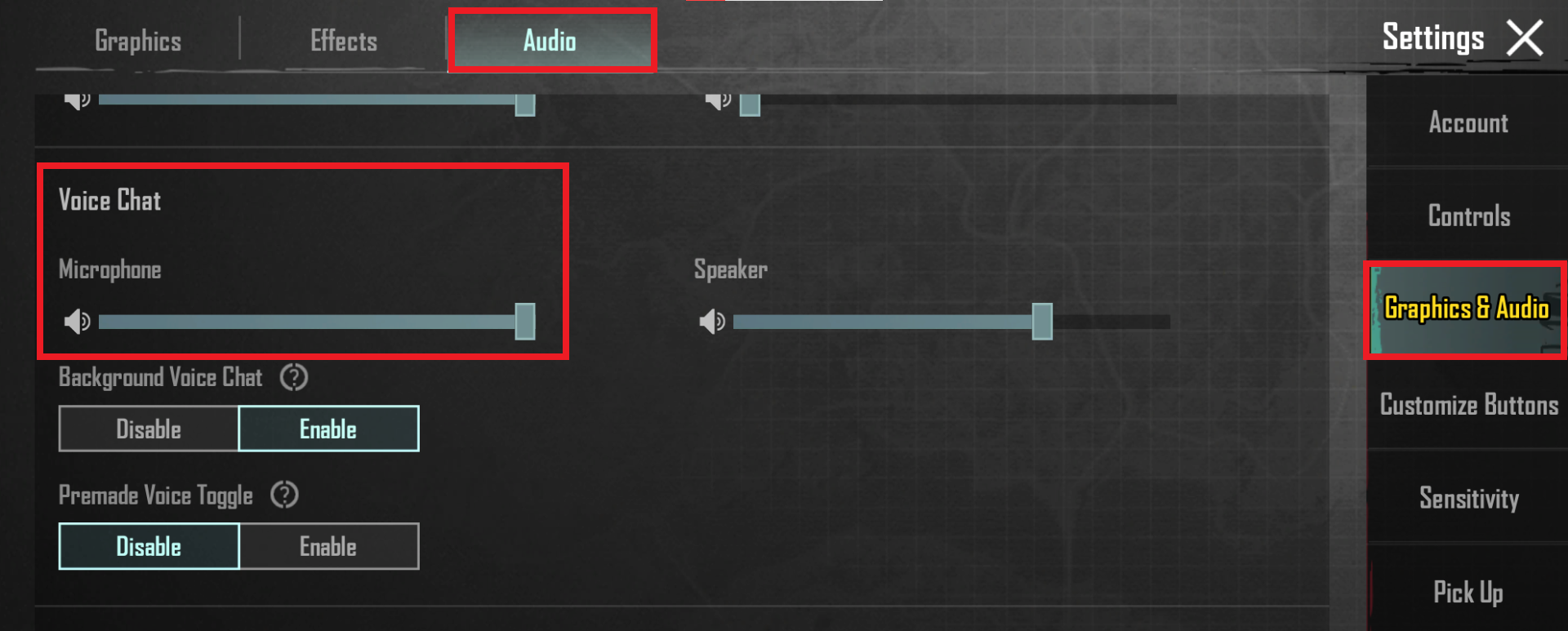
 K
K


