
 J
Jbasically the only way I can get it to work is:
- Comment out command = in my wrangler.toml.
- Run the command manually
- Run wrangler pages dev frontend/dist
JAny other way wrangler will try to bundle my worker and routes while the files are being produced still

 H
HThat might be the issue. It is a bug that
wrangler reads your config when using PagesJI see, I was under the impression it was intended behaviour so tried to get it to work nicely. That also explains why some values in the wrangler.toml are seemingly ignored such as the compatibility date
HIIRC it is because it shares a good bit of its code with
wrangler dev J
JWell, I assume some of it should be read, such as key-value namespaces?
HNo, bindings are configured via CLI flags
JI see, got it
JAlright, my only final hurdle is that I now need to deploy it, which requires building it. I assume building it on the cloud is not the way to go here.
JI got it to work this way! I did have to disable Cloudflare's built-in build process though, and upload manually with wrangler.
One side-effect is that all my backend code is accessible through the web now, as people can navigate to ./shim.mjs etc. Is there a way to stop that? I am thinking of making a redirect rule, but perhaps something more elegant works?
One side-effect is that all my backend code is accessible through the web now, as people can navigate to ./shim.mjs etc. Is there a way to stop that? I am thinking of making a redirect rule, but perhaps something more elegant works?
HThe
shim.mjs shouldn't be in the output directory at all. Maybe try moving it somewhere else?J@HardlyHolidayin’ If I upload manually, I can only upload the output directory.
JAnd cloudflare's built-in build process doesn't work as it doesn't support cargo compiling.
Jwrangler2 doesn't seem to have any parameters that allow me to set the "public" directory to a subfolder.HAre you uploading via
wrangler?Jyep!
HCan you give a folder structure, and your
deployWhat if you move
worker out of dist, and then update the import in _worker.js?JThen how do I upload it?
HIf it is imported by
_worker.js, it should be bundled automaticallyJwell, it certainly is producing some sort of behaviour... I need to debug this a bit more clearly.
JI figured it out. Deploying with
wrangler does not deploy to any connected domains. Any clues on this?Jah! I got it, the old standalone worker was still running and interfering, all good, all works!
JAn amazingly big thank you for the awesome help!
 D
DThis might be a stupid question. If I make a full stack app on Pages using Svektekit, where do I place the backend logic? If it's page specific, can I place it in +page.server? If I have complex logic, should I place it in /functions? Or does it matter? Can I place it in /api, for example?
 D
DHi everyone, I want to Integrate Sentry with Page function, And I follow this docs
DThe Sentry Pages Plugin captures and logs all exceptions which occur below it in the execution chain of your Pages Functions. It is therefore …
 D
DI have one question. What type of Sentry support for page function. I don't know which type is suitable. Please help,
D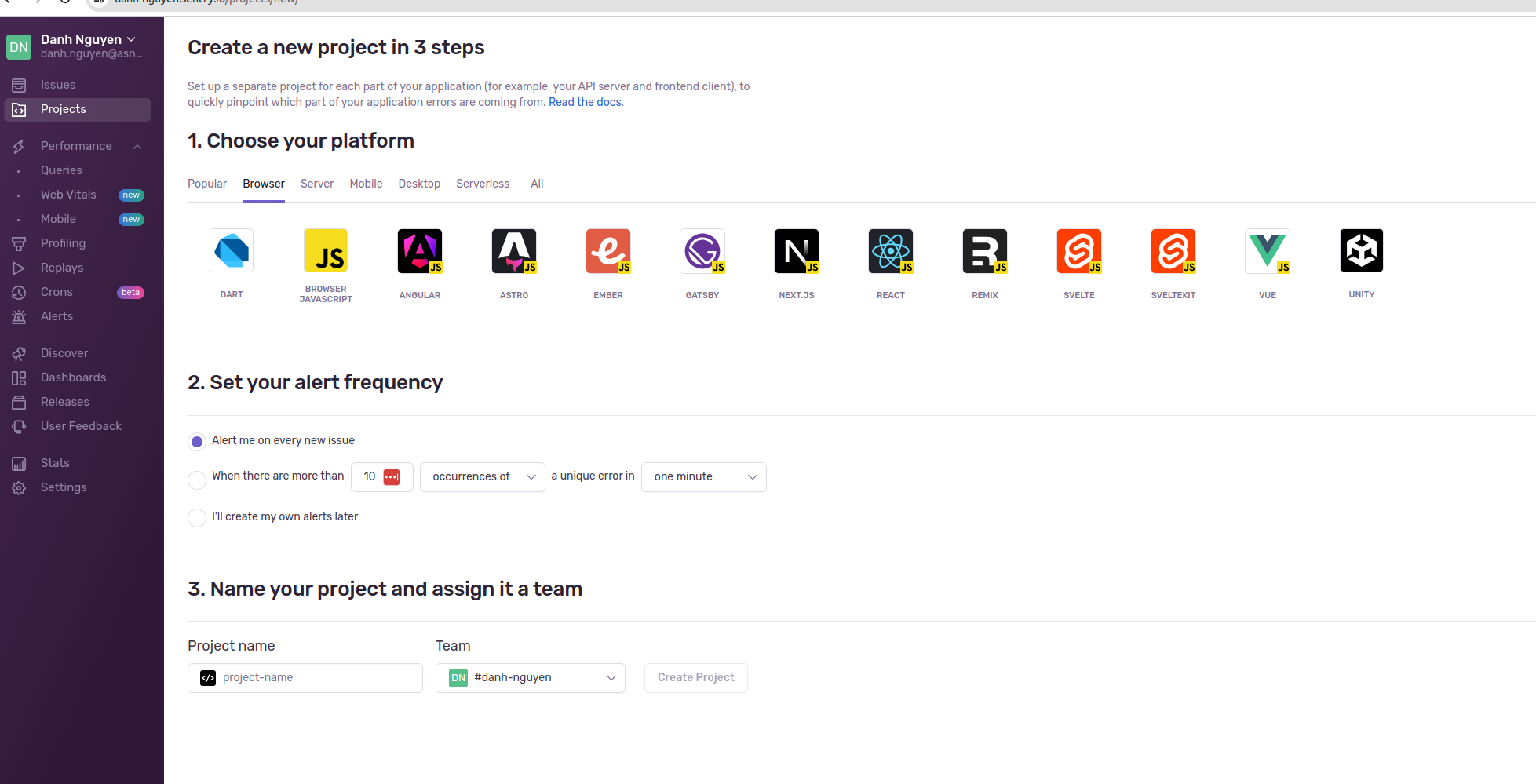
 D
DHi all - I'm confused, and struggling to understand how functions actually fit in.
I've used C3 to create a simple vue3 app with vue router and pina store.
After the fact, I've added a functions folder, with a simple helloworld.js as a function.
For the life of me, I cannot get the function to fire. At best I can get it to return the actual function itself, but invoking the function from within the app escapes me.
Any help or simple guides would be great! I know there is a guide for create-react-app, but I think vue router might be doing something weird.
UPDATE: I literally cannot get it to fire. The lack of decent documentation + the fact that wrangler throws a workerd error every 2 seconds has made me give up. Supabase Edge functions it is then.
I've used C3 to create a simple vue3 app with vue router and pina store.
After the fact, I've added a functions folder, with a simple helloworld.js as a function.
For the life of me, I cannot get the function to fire. At best I can get it to return the actual function itself, but invoking the function from within the app escapes me.
Any help or simple guides would be great! I know there is a guide for create-react-app, but I think vue router might be doing something weird.
UPDATE: I literally cannot get it to fire. The lack of decent documentation + the fact that wrangler throws a workerd error every 2 seconds has made me give up. Supabase Edge functions it is then.
 S
Shey folks! maybe dumb question... In my repository I added the
functionsfunctionsfunctionsbuild/functions? V
VIs the max Worker CPU time feature out yet? If so, is it available for Pages Functions?
 K
KIs the max Worker CPU time feature out yet?Yes.
If so, is it available for Pages Functions?Yes.
KYou will need your usage model set to Standard, and it will appear below the usage model.
K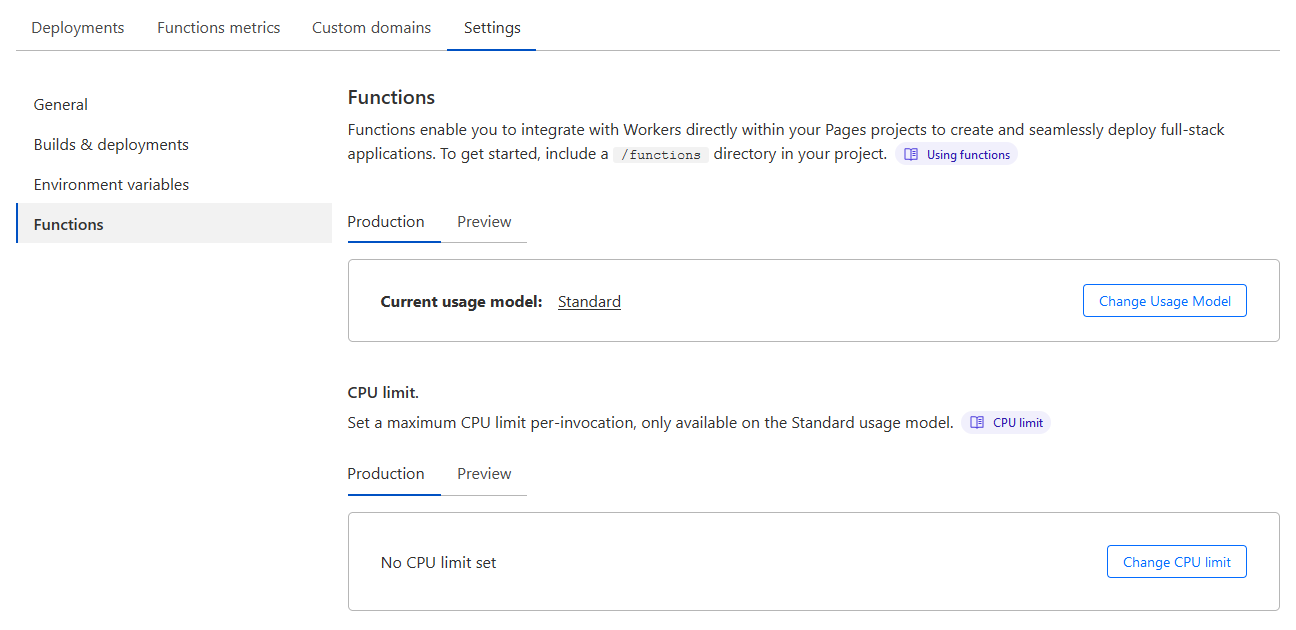 V
VAhhh
VThank you!
 A
AHello
AHow can i recieve my cashout in paid2play thanks
KThat isn't related to Cloudflare, you would have to contact the site owners.
 L
LAnyone know why I can't access my local KV?
Start Command
Function
Context
It's nuxt. And if I try to access it like in the Docs context.cloudflare.env.MY_KV; I get cloudflare isn't defined
Error
Start Command
Function
Context
It's nuxt. And if I try to access it like in the Docs context.cloudflare.env.MY_KV; I get cloudflare isn't defined
Error

 L
LFor real I can't get it running. Please add some proper local examples ... It works on deploy but not local. I tried for hours
HYou can't use bindings in proxy mode
Hnpm
Experimental proxy for interfacing with bindings in projects targeting Cloudflare Pages. Latest version: 0.7.1, last published: 20 days ago. Start using cf-bindings-proxy in your project by running
npm i cf-bindings-proxy. There are no other projects in the npm registry using cf-bindings-proxy.LNoo way I tried for like 6 hours to get this stupid cloudflare context 
LBut doesn't this say I can use the context?? https://developers.cloudflare.com/pages/platform/functions/bindings/
HYou can use bindings, just not in proxy mode. The
context.env in this case is if you are using raw Functions, instead of a framework like NuxtLOhh boi, good to know. But the bindings proxy did work thank you
