

 H
Hmaybe the "solution" here is to take a page out of windows book and make a "brew shell" that has brew first in the path and thats the only way to use brew directly  (this more a joke and last resort workaround i guess)
(this more a joke and last resort workaround i guess)Hat least i remember that was a thing back when i had to use windows
 J
JI was thinking a container but I'd rather not have to do that
Jor maybe putting the homebrew $PATH statement in one of the other dotfiles but the internet's full of confusing statements so it could be one or any combo of .profile, .bashrc, etc.
Hback when i did a lot of python version dependent development i had aliases to set different paths depending on which python venv i had to use so i would just have 
$REALPATH, $PATH27, $PATH3 and $PATHCUSTOM and the aliases just exported those depending on what i needed. it was messy but i needed a solution fast to just get working Hi dont really think there will be a one solution fits all when it comes to that brew issue just because of how environment variables are handled in all platforms
Jwell we only have to fix it for ourselves
Jlike maybe in a terminal config
Hi know, but most platforms handle envs in the same way, you either have it and whatever is first takes precedence or you dont have it (which is why you would have shells with correct paths applied for things like git bash, visual studio, etc in windows)
also because windows for some reason has i believe a 256 character limit for its $PATH or something weird like that
also because windows for some reason has i believe a 256 character limit for its $PATH or something weird like that
Joh I think we might be past that already lol
Hyeah but i know that was a limitation for windows as i hit that limit very fast when i just tried to make my workflow work on windows back when i did dev work for a company
Hthey got tired of trying to force windows to work for me they just gave me permission to use linux where i just set up my dev environment in less than 5 mins
Hi think the options might be
- brew init command (activate brew $PATH) when needed
- dedicated "brew shell" using whatever shell the user has configured
- container/distrobox (adds more hoops though)
Hneither is a good solution
 M
Mor encourage people to use nix profiles instead, which don't expose binaries of intermediate dependencies to the environment
Jno thanks
Mi don't think you'll get homebrew to fix its broken deployment model
 E
EBrews environment/path would need to precede the hosts. Otherwise it will always take priority. Unfortunately, I think the best way around that is a container
Jyeah I'm always back to the root problem of not having a terminal with container support. 
EI was just thinking about the same thing
Jlet's see what the podmansh folks come back with I guess, dan seemed interested in at least investigating the use case
EWould be awesome
JI posted on the flathub discourse, maybe there's a way to tell flatpak to just ignore that stuff
Jok after work I'll pr it out of the justfile and then just do a brew container
ESounds good!
JJI'll just put this in a container in a distrobox
 K
KCan you add that as part of this PR? Then I can update Bazzite's yafti to point there at the same time
KThe distrobox change I mean
Jit'll take me a while to do it
JI'd like to get this in to prevent people from installing it easily in the meantime while I make a post
Jdistrobox just won't accept the brew box ootb, we gotta do some adjustments, etc.
JHomebrew distrobox thread
 C
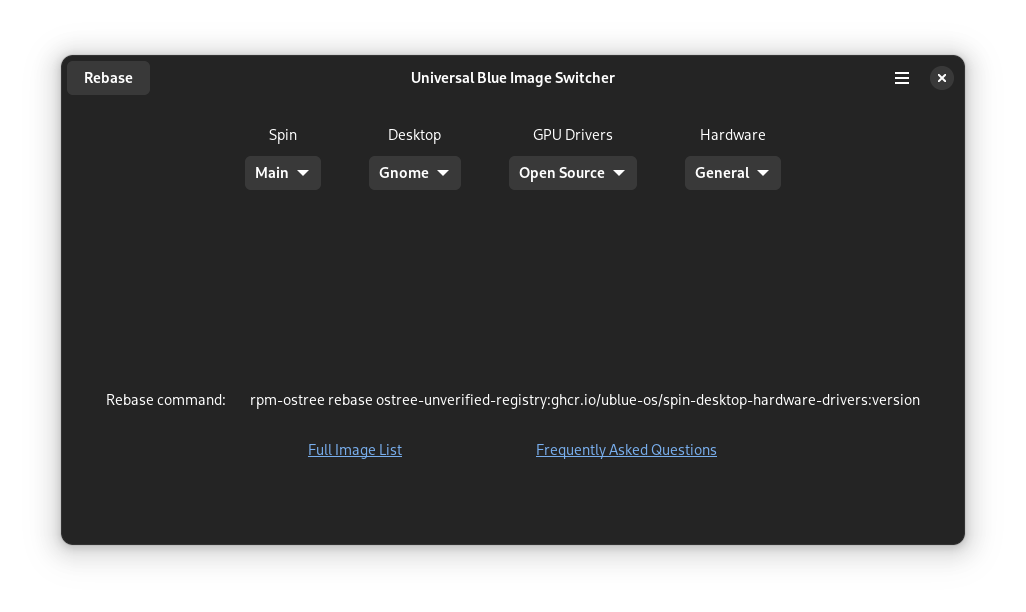
CStatus update on the image switcher app
 C
C- polish UI (easy-moderate)
- add menu options (trivial)
- replace print statements with variables (trivial)
- write 3 lines to build a string (trivial)
- figure out how to live-update the rebase command (moderate)
- write 3 lines to connect the rebase button (trivial)
- write function to run rebase command (moderate)
- write documentation (easy)
- publish flatpak (easy-moderate)
- test
CThe four dropdowns work, and output the necessary data. The two links work. Most of the UI is raw XML, which should be possible to reverse engineer with much nicer Python now that I know a lot more about how these things work. With nice formatting, this app is a template plus 16 lines of code. It is really 8 lines of code.
Him guessing "spin" also contains special builds like -asus and -surface?
C(Incomplete, trivial to add to:)
Spin is Main/Bazzite/Bluefin
Desktop is Gnome/KDE/Sway
GPU drivers is Open Source/Nvidia
Hardware is General/Surface/Asus/Deck
Spin is Main/Bazzite/Bluefin
Desktop is Gnome/KDE/Sway
GPU drivers is Open Source/Nvidia
Hardware is General/Surface/Asus/Deck
Hoh i didnt even see the hardware part
Him pretty much still waking up here
CI can add a couple lines of conditional logic to make sure the user is informed of whether their current selections add up to a valid rebase command
Hwould be a good idea
CI think I will probably at least add a 'version' dropdown for 38/39/etc, but someone would need to maintain that. Signed vs unsigned might be tricky to check for, since I intend for this to work on upstream images, but I can make it a dropdown
CHypothetically, I would like to be able to guide someone to install a Ublue image over the phone by having them install upstream Silverblue with a reliable ISO, then use a GUI to download the image switcher, and use the GUI image switcher to rebase
 H
Hi mean you dont really want users on unsigned images and they wouldnt get this until after they switch to ublue.
could just add a flag "--install" which will use unsigned images for people who switch from base silverblue/kinoite/etc
could just add a flag "--install" which will use unsigned images for people who switch from base silverblue/kinoite/etc
 C
CI am not familiar with that flag at all, so I look forward to learning about it when I iron out more of the functionality of this
Hor use unsigned if you see their base is stock
Hyou make the flag for your tool 
CAhh
CAnywho: unsigned vs signed can be trivially fixed with an 80/20 solution, and the ideal solution of automating it and eliminating the possibility of user error may be fairly easy depending on things y'all know more about than I do
