Hello, even though I haven't muted for 2 weeks, I cannot write anything in the game. This only applies to this game. I can't even type anything on the game login screen.
We are unable to provide assistance if you do not ask a question or state a problem, @������������. Remember to read through #faq before asking questions in the support channels.
We are unable to provide assistance if you do not ask a question or state a problem, @ldsadrazam. Remember to read through #faq before asking questions in the support channels.
Use of any unauthorized third-party software designed to modify or interfere with the game is a violation of PUBG MOBILE's terms of service and will result in an account suspension, @порно актер.
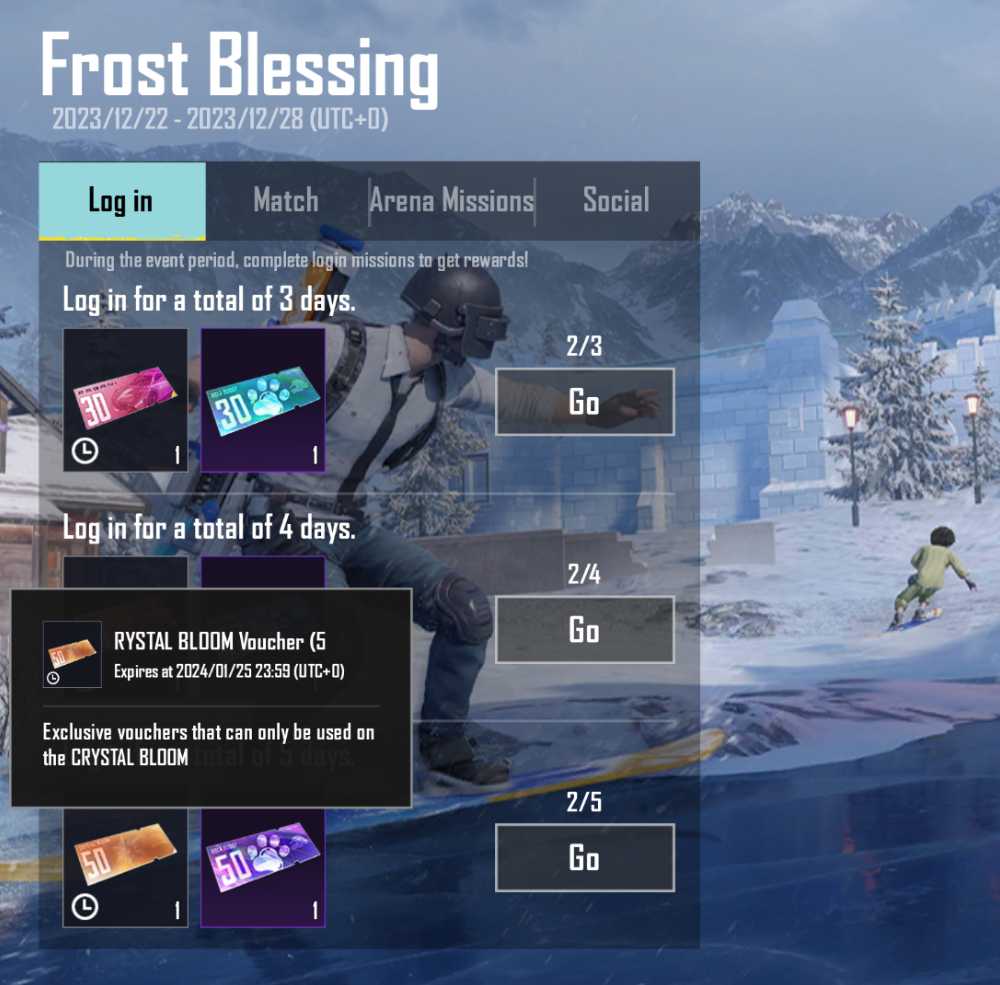
The Crystal Bloom Voucher (60 UC) can let you spin with 0 UC in the Crystal Bloom event if you draw 1 time. If you draw 10 times, 60 UC can be reduced from the total amount if the same voucher is applied.
It was possible to receive the Fiore Vouchers through a different event (X-Suit Return) that was available from 2023/11/28 - 2023/12/07, @FLASH. Regarding the Crystal Bloom Vouchers, you can obtain the 50 UC and 30 UC voucher through the Frost Blessing event in the game as shown in my screenshot. Regarding the Crystal Bloom Voucher (60 UC), will try to get a confirmation regarding this and get back to you if I have more information.
Hello, I have 2 problems, when I log in with gameloop, when I am in pubg, after a few minutes, I switch to the google play store and the game closes, what is the reason, I get an error that I will get a subscription while pubg, I get an error like google play store is installed.
We provide community support only for mobile platform. For further assistance related to GameLoop, please visit their website: https://www.gameloop.com/, @Liva.
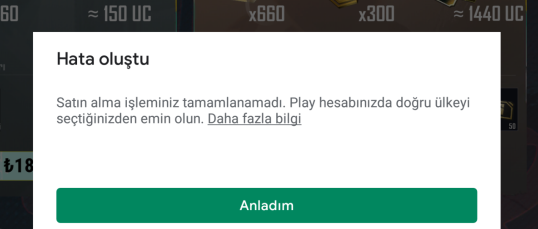
The error message "Your purchase could not be completed. Make sure you choose the correct country in your Play account" in PUBG Mobile suggests that there may be a discrepancy between the country setting in your Google Play account and the location where you are trying to make the purchase. Here are steps you can take to address this issue:
Check your country in your google play account:
• Open the google PlayStore App on your device ー Click your profile icon ー Click settings ー Click General ー Choose Account and device preferences. (You may refer to the screenshots i have given below for detailed info.)
Update or Change Country Setting:
• If the country setting is incorrect, you may need to update it to match your current location. To change the country setting, you might need to add a new payment method with a billing address that corresponds to the desired country.
Clear Cache and Data:
• Clear the cache and data of the Google Play Store app. This can help refresh the settings and resolve potential issues. • Go to your device's settings, then navigate to "Apps" or "Application Manager," find Google Play Store, and clear cache and data.
Use a Valid Payment Method:
• Ensure that you have a valid payment method linked to your Google Play account. Check that the payment method has not expired and has sufficient funds or credit.
Check Payment Restrictions:
• Some regions may have restrictions on certain types of transactions or may not support specific payment methods. Verify that the payment method you're using is accepted in your region.