
 C
CHey! Are there plans to add hyperdrive support to the cloudflare terraform provider?
 K
KIt's publicly documented (https://developers.cloudflare.com/api/operations/create-hyperdrive) so it just needs to be added into cloudflare-go and cloudflare-terraform-provider.
KYou can open an issue at https://github.com/cloudflare/terraform-provider-cloudflare/issues to request it

 S
SCan confirm 

 M
MWe're going to introduce an env var that takes predecence over
wrangler.tomllocalConnectionStringCI opened a PR at https://github.com/cloudflare/cloudflare-go/pull/1492 to add the support for Hyperdrive to cloudflare-go, hope it's okay, first 
go attempt GitHub
Add support for managing Hyperdrive configs
Description
Resolves #1491
Mainly wrote by copying the existing queue.go
Has your change been tested?
Tested ListHyperdriveConfigs manually
Added tests
...
Description
Resolves #1491
Mainly wrote by copying the existing queue.go
Has your change been tested?
Tested ListHyperdriveConfigs manually
Added tests
...
 P
Pif i'm using hyperdrive to connect to a database that handles my user auth sessions, and i have caching enabled with 60 second max_age, and someone logs out... does that mean that for the next 60 seconds they might be pulling their old cached session?
 P
PThis is tragic for me -- is this still the case?

 J
JUnfortunately so, yeah. There's no real way to get Hyperdrive on Pages Functions today - you will have to use Workers as far as I know.
MOnly if the query is exactly the same. I suggest reading https://developers.cloudflare.com/hyperdrive/configuration/query-caching/
Cloudflare Docs
Hyperdrive automatically caches the most popular queries executed against your database, reducing the need to go back to your database (incurring …
MHyperdrive is in beta. We’re working on Pages support. Hold tight.
PInteresting, I wonder if I could add some sort of cache busting useless string to the query just to make sure I get fresh data. Is this a common approach?
MOr as that guide states, use a non-caching Hyperdrive if you rely on non-cached session data.
MCache busting with
random() or some other non-deterministic function will have the same effect.PSweet! Volatile functions too! Nice article
PCloudflare Pages support would be amazing. I was at it all day trying to get it to work. node_compat vs nodejsCompat. Bit of a nightmare
PIs there any GitHub issue where I could track progress? Or any eta you might be able to share?

 B
Bthanks Jon! is there a way to economically run accelerate just for connection pooling?
 M
MI'm getting errors when trying to create a HD, saying the user/pass is probably wrong. The connection string is correct - I've tested it on my local machine. The DB is remote but unrestricted in terms of IP access. The password contains characters such as
_, ! and ^. Are these likely to be the problem?MCommand:
M(I've been able to successfully create HDs before, hence I'm thinking it's password characters.)
MAh - it works if I create the HD via the dashboard instead (same connection string).
M(UX issue: When creating a HD via the dashboard, if you enter a bad connection string, there's no feedback given to the user.)
 .
.how stable and ready for production is the connection pooling of hyperdrive?
.Can I throw this into production where we write around 25k lines per second? Up to 800Mbps disk writes?
CHey! I’ve submitted a PR to add terraform support for hyperdrive: https://github.com/cloudflare/terraform-provider-cloudflare/pull/3111
However in our testing we’ve noticed that the API docs are inconsistent, they state that
Before I update my PR, and submit a new PR to the cloudflare-go repo, it would be good to clarify whether the API itself or the API docs are where the issue lies? I.e will the docs be updated to nest
However in our testing we’ve noticed that the API docs are inconsistent, they state that
passwordorigin.Before I update my PR, and submit a new PR to the cloudflare-go repo, it would be good to clarify whether the API itself or the API docs are where the issue lies? I.e will the docs be updated to nest
passwordorigin? Or the API updated to expose passwordGitHub
Implements #3092
Requires cloudflare/cloudflare-go#1491 to be released.
Note: Not sure if the acctest is actually viable, as I believe DB creds need to actually be valid for the api request to work.
Requires cloudflare/cloudflare-go#1491 to be released.
Note: Not sure if the acctest is actually viable, as I believe DB creds need to actually be valid for the api request to work.
Interact with Cloudflare's products and services via the Cloudflare API
 M
MAPI docs are incorrect -
passwordorigin object - e.g. https://github.com/cloudflare/workers-sdk/blob/d637bd59a8ea6612d59ed4b73e115287615e617d/packages/wrangler/src/hyperdrive/client.ts#L23GitHub Home to Wrangler, the CLI for Cloudflare Workers® - cloudflare/workers-sdk
Home to Wrangler, the CLI for Cloudflare Workers® - cloudflare/workers-sdkCPerfect thank you, will get a new PR up in cloudflare-go and update the terraform one
MThe types there are fairly stable (beta notwithstanding; always risk of some changes)
CGotcha,
Updated https://github.com/cloudflare/terraform-provider-cloudflare/pull/3111
And opened https://github.com/cloudflare/cloudflare-go/pull/1501
Thanks for your help
Updated https://github.com/cloudflare/terraform-provider-cloudflare/pull/3111
And opened https://github.com/cloudflare/cloudflare-go/pull/1501
Thanks for your help
 M
Mis hyperdrive working with mongodb (on mongo atlas)?
SNo, it's not
 E
EWe currently support Postgres, and plan to support MySQL soon.
 Q
QAnyone managed to hyperdrive working with remote database + kysely + local development
Using
Using
Been trying to use
Using
pg@8.11.0, initiating kysely like this:Using
LOCAL_DATABASE_URL for local development (connectionstring including ?sslmode=require), I'm able to setup the connection, but any query will yield Error: Connection terminated unexpectedly. Been trying to use
localConnectionString instead of bypassing hyperdrive in local dev, but it transforms my connectionstring to some hyperdrive.local url.
 X
Xi'm using the same approach with kysely + local development. works fine for me.
Xi don't have
?sslmode=require in my connection stringQI just can't get it to work  trying postgres package, also no success, error
index.ts
package.json
wrangler.toml
trying postgres package, also no success, errorindex.ts
package.json
wrangler.toml
Qi've been trying for hours to get this to work, but i keep on getting odd errors, with different wrangler versions and ssl true/false
Qwonder if its got to do with https://github.com/cloudflare/workerd/issues/1401
GitHub
Which Cloudflare product(s) does this pertain to? Wrangler or miniflare What version(s) of the tool(s) are you using? 3.5.0 What version of Node are you using? 18.16.1 What operating system are you...
MThat’s an old issue that seems entirely unrelated.
Does your database accept TLS/SSL connections?
Does your database accept TLS/SSL connections?
MAre your hyperdrive bindings configured too? When you create a Hyperdrive via the dash or wrangler, Hyperdrive itself connects to make sure it’s reachable before “saving” the configuration.
QI found the reason @Matt.. after enabling logs, i could see certificate issues with my crunchybridge pg and the cf worker. Using
NODE_EXTRA_CA_CERTS=./assets/certificate.pem wrangler dev solved the issue.
 B
Bany ETA on when we can expect MySQL support?
 M
MAt this stage, closer to April/May.
 M
Mhi, i'm running into issues with my rds database slowing down based on client write waits
Mis hyperdrive bandwidth throttled at all?
M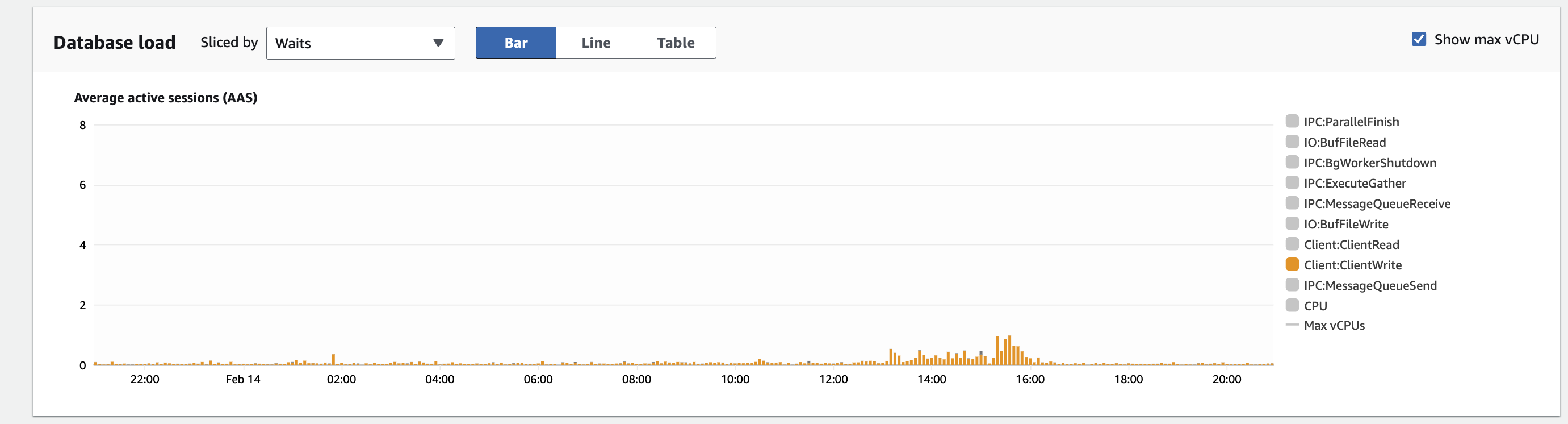 M
Mwhen this happens i see spikes in latency
 I
IAccording to the RDS docs this can also happen if there's high latency between the client and the database.
IAre you accessing it via a Worker that's far from the DB?