back here with another question.. setting up the meanwell LRS-350-24 for the power supply right now. searching for instructions on here i see instructions by walmis to set the output voltage to 20V via the potentiometer, but when i measure mine it can only do 21V at the lowest setting. is that fine?
In DCS how can I compensate for the weight of an off centre grip?
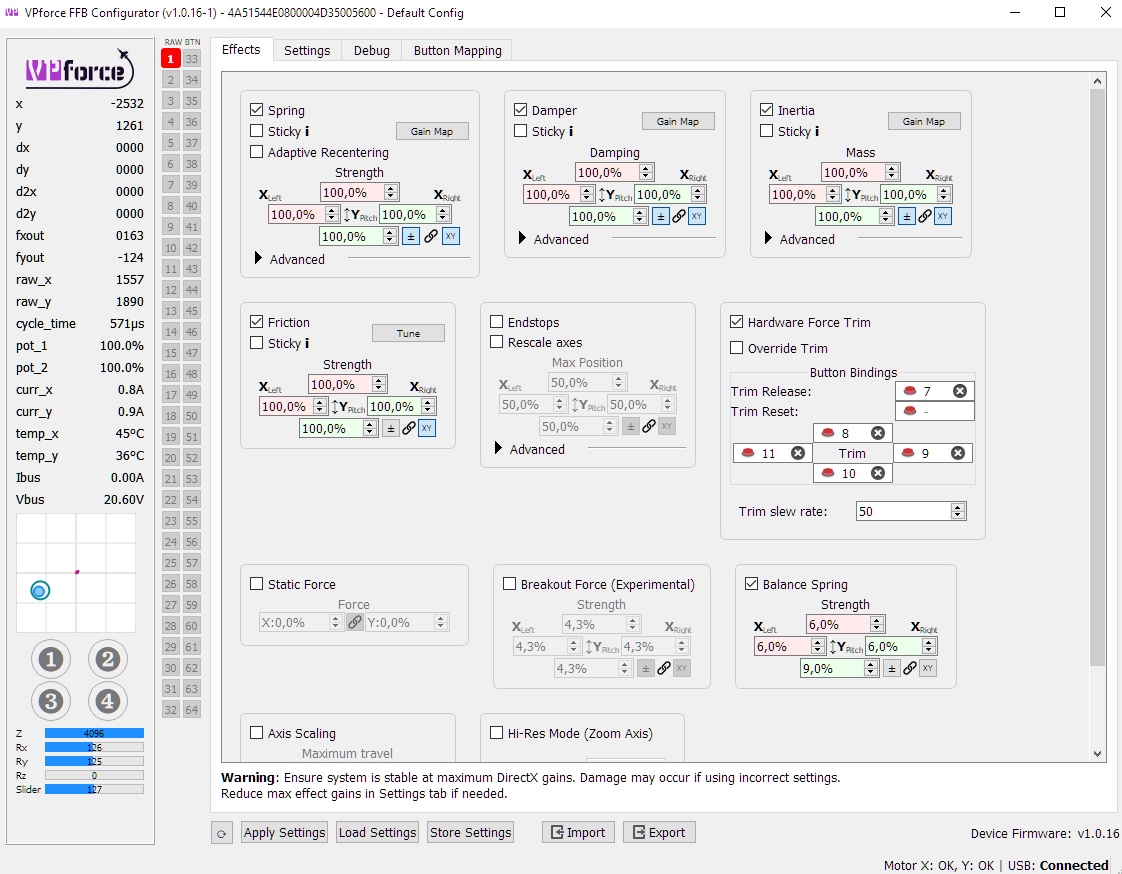
I have the Virpil Z adaptor but on releasing the trip button it always droops back a little, the balance spring effect doesn't seem to have an effect in the game
I want to print a plate to restrict the angle, I can set it in the software for soft endstops is there anyway in the software I can see what angle I'm restricting this to so once I'm happy with the restriction by using the software I know what angle to print the plate for?
Likely some feedback for telemffb, but with the newest version I experience some wierd effect in the f15, where at high speed and large sudden stick movements the stick starts to oscillate wildly. I assume this has something to do with g-effects and it being a delayed response compared to stick input. Ive tried to replicate this in the f18 and f16 but havent found the same extreme oscillation.
note the stick input, all im doing is pulling back then letting go to make it very clear, but this also happens if you pull back and attempt to keep it there
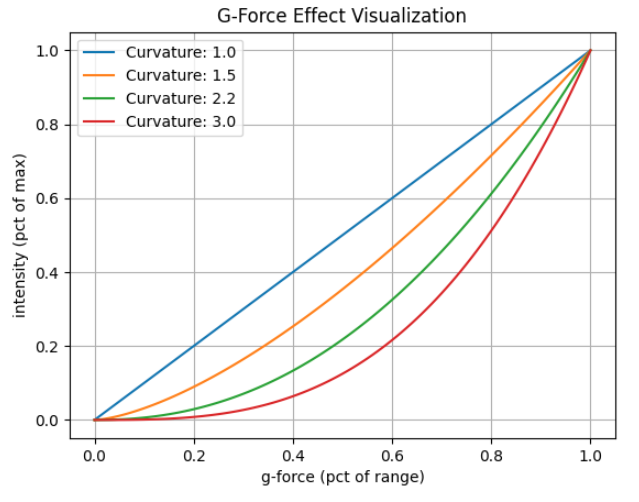
The G-Force effect is far from perfect, but there isn't really a perfect way to implement it since DCS is already in control of the spring force and axis offset.
Some aircraft are quite pitchy with very little control input, which results in extremely fast moving "g force" telemetry, which results in the oscillations you are feeling. The P51 is the same way.
Best suggestion is to play with the min/max and curve settings to try to tame it down. Min/Max are pretty self explanatory , the curve setting affects how the force is applied between min/max.
Hey, been loving my Rhino so far. Had a question regarding the spring function.
I am a CH-47 mechanic, and I'm doing flight control binding checks, I noticed that the "spring" worked differently than the Rhino in my current setup. Pushing the trimmer for center works correctly, however in the 47 and I assume other helicopters, the amount of force required to move the stick from center is the same near the limits as it is at the center. Is there somewhere in the settings I can make this spring more linear? Requiring the same force at the end as near the center point?
Stop Switch Not Woking... Worked fine when I first used it but noticed over the last 2 days it's now stopped working and the stick is powered if it is in or out. Is this something I've disable in software?
Nut was fully tight, wiggled the plastic base and it started working, buzzed it with a multimeter while wiggling and it didn't change so working now. See how long it stays that way
I've had this problem on and off for a while. I can't really figure out what is causing it. But, sometimes on start up of the rhino the stick wont spring force center. There are no simulated spring forces and Hardware trim wont work. If I enable "sticky" spring forces, the hardware trim works and all the spring forces work normally. sometimes I can get the base to "activate" the spring forces by unplugging, plugging, changing usb ports, removing power, or restarting the pc. but, Like now. none of those are working.
If I have the stick plugged in and choose to fly the Gazelle, the collective jumps to 60%. If I move MY collective you can see it trying to respond but immediatly jumps back to 60%
If I unplug the stick the collective works fine.
It only does this on the Gazelle unless I unplug the stick then plug it back in, in which case all heli's now go to 60% collective.
All other mappings have been removed and the only thing bound to collective in axis is my virpil collective, there is also nothing mapped to collective in buttons.
@Glaive(Rikk) With the VPC joystick tester open, do you see any interference with the collective axis when you move either of the Rhino axis after raising the collective?
If not, the only thing I think it can be is a dual binding in the DCS controls. I know youβve checked but Iβd look at the DCS controls tab again and, if you still donβt see the axis bound on the Rhino, clear the bindings on both controllers. Hit OK to exit the controls tab then go back in and rebind as necessary.
Problem solved after lots of digging, seems to be the only module where both the pilot and copilot controls are ALWAYS active. Removed all the controls from the copilot and now it flies fine.
I did a bit of digging. It looks like windows turned on USB suspend mode after an update. I disabled this on all the usb ports in the device manager and In the power plan settings. I'll let you know if this still happens.
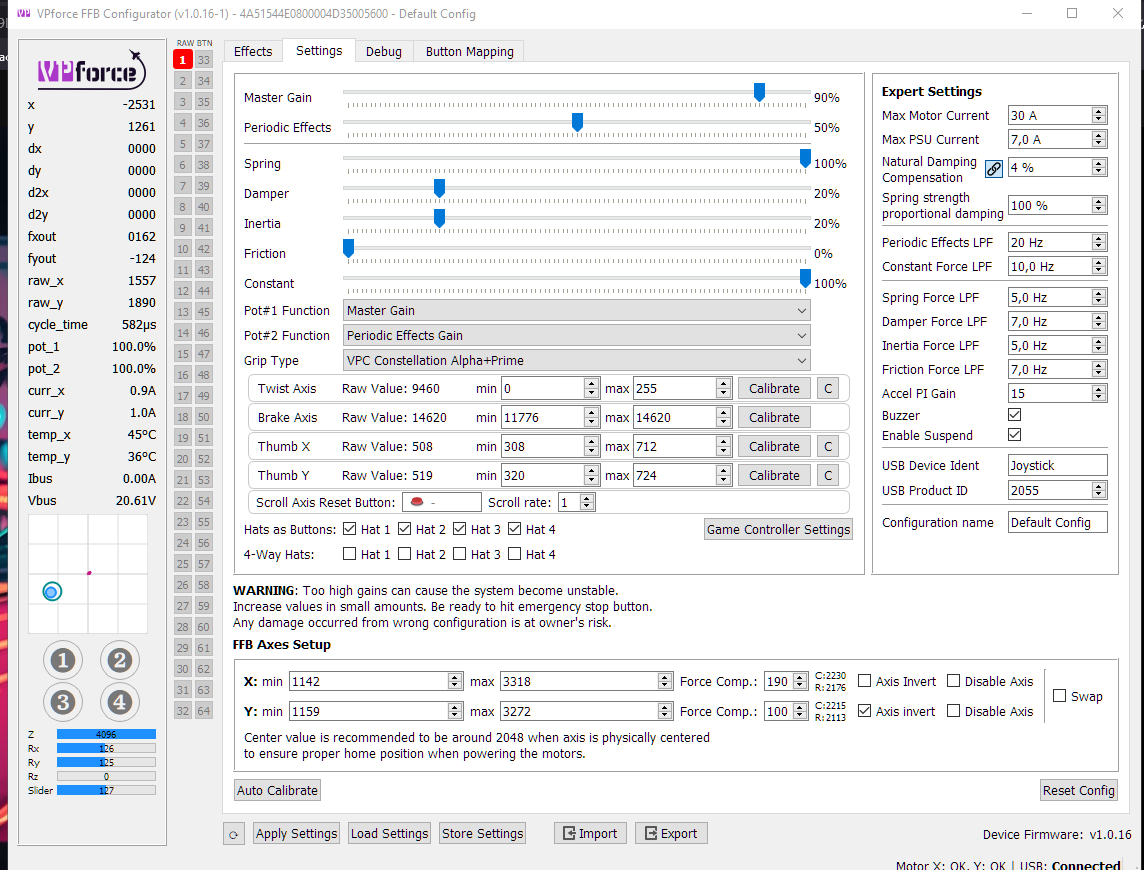
My X-Axis started to feel weird today, when i move it left and right i feel a rumble/knocking that feels like the engine rumble effect. Telem software is off. The Y Axis is totally smooth when moving it over the center. Slowly moving the stick over the center feels smooth. Changing the center with forcetrim also changes the rumble location. These are my settings, playing around with them changes the intensity but doen't fully get rid of it, i can still feel it with 90% Gain and 40% Spring, everything else at 0.
When I pull my stick to the right, at the center of the draw, base makes a sound of plastic getting force and grip feels like it's ticking. And after the center of the draw, it moves smoothly. In the other direction, it moves smoothly to the end. Should I open the base and tighten something?
Easiest to check are the five bolts on each large pulley. I tigtened mine a 1/8 turn, and clunks went away. There were also one or two bases with clicks in the stick connector - alu tube -interface. Lemme find the original post real quick.
I periodically unscrew and lift the leather boot and tighten the screws holding the stick in the gimbal, as well as the bolts that hold the motor in place.