
sure, no problem. so during beta that won't be possible?
sure, no problem.
so during beta that won't be possible?
so during beta that won't be possible?

 M
M S
S J
J M
Mwrangler d1 execute and wrangler d1 migrations apply MM
MM TM
TM MA
MA33 entries at a time before the server hits me with a 500 Internal Server Error. When concatinating the SQL query myself I found that I can go up to a query length of 10000 characters. Depending on the length of my input values I can insert more than 3000 entries at a time with this method. This could be however a security risk as I understand. J
Jwranglernpx wrangler d1 create database_name C
Cnpx wrangler d1 info, but yea would be nice in dashMMM MMMA
MMMA;10000 chars max and if you are sending params100.A K
K I
I I
I N
ND1Response is supposed to contain an errorneverD1_Error, so is there a way I catch this error in a type-safe way so I can determine the error message?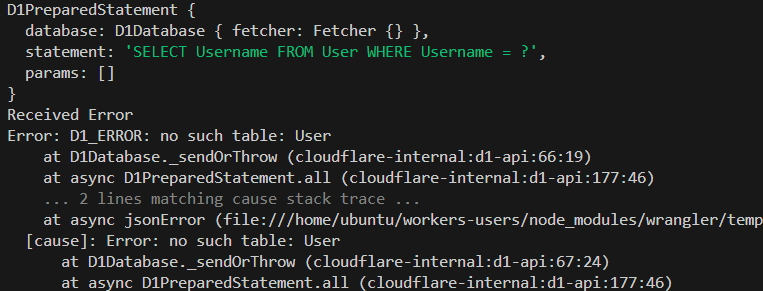 N
Nconst e_error = e as unknown as Error and it works fineNanyunknown U
Unever.bind()SELECT * FROM table WHERE name = ? and then you can bind a value for nameequals, not equals, etc.I.bind() T
Twrangler d1 execute database --command "UPDATE tags SET tag = SUBSTR(tag, 1, LENGTH(tag) - 1) WHERE tag LIKE '%.'" --remote Internal error in D1 storage caused object to be reset. [code: 7500]TCTCJD1Database using getPlatformProxy"wrangler" module FF
FF H
H N
N C
C DN
DN binding D1USEAST of type d1 failed to generate. Please try again later or contact support. [code: 10021]wrangler d1 execute{
sql: 'INSERT INTO "table" ("a", "b", "c") VALUES (?, ?, ?)',
params: [...],
}33500 Internal Server Error10000100003000npx wrangler d1 create database_namenpx wrangler d1 info100D1ResponseD1_Error// Check if the user already exists
const checkUserQuery = 'SELECT Username FROM User WHERE Username = ?';
const checkUserStmt = env.usersDB.prepare(checkUserQuery);
console.log("existing user statement")
console.log(checkUserStmt)
let existingUser;
try {
existingUser = await checkUserStmt.bind(username).all();
}
catch (e)
{
console.log("Received Error")
console.log(e)
}const e_error = e as unknown as ErrorSELECT * FROM table WHERE name = ?equalsnot equalswrangler d1 execute database --command "UPDATE tags SET tag = SUBSTR(tag, 1, LENGTH(tag) - 1) WHERE tag LIKE '%.'" --remote Internal error in D1 storage caused object to be reset. [code: 7500][[d1_databases]]
binding = "DB" # available in your Worker on env.DB
database_name = "prod-d1-tutorial"
database_id = "<unique-ID-for-your-database>" D1Database"wrangler"


