
Is there some authentication support for Functions? what I've seen for Okta seems to require express
Is there some authentication support for Functions? what I've seen for Okta seems to require express
 I
I S
S A
A H
Hfunctions: wuz here D
D R
R A
A
 B
Bwrangler pages project createhello.jsfunctionsnpx wrangler pages dev ./http://localhost:8788/hellohttps://<my-project-name>.pages.dev/hello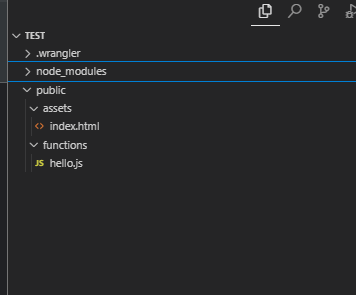
 Z
Zfunctionstestpublic P
PpoolOptions.workers.main KP
KP J
J T
TonRequestonRequestOptions D
Denv.WORKER_BINDING_NAME.fetch(Request)environmentproductionproductionwrangler.toml A
AResponse headers: ${responseHeaders} V
V Error: Failed to publish your Function. Got error: invalid or missing json property for binding PROFILE_INFOYour Worker may throw errors at runtime unless you enable the "nodejs_compat" compatibility flag.BufferArrayBuffer _N_
_N_Stripe.createHttpFetch()export async function onRequest(context) {
return new Response("Hello, World!");
}# stuff above
compatibility_flags = ["nodejs_compat"]
[vars]
PROFILE_INFO = { baseURL = "https://example.com/", USER = "root", PASS = "toor" }
# more stuff belowconst { request, env } = context;
const rawBody = await request.arrayBuffer()
const stripeSignature = request.headers.get('stripe-signature')
const event = await stripe.webhooks.constructEventAsync(rawBody, stripeSignature, env.STRIPE_WEBHOOK_SECRET)Webhook payload must be provided as a string or a Buffer (https://nodejs.org/api/buffer.html) instance representing the _raw_ request body.PPayload was provided as a parsed JavaScript object instead.
Signature verification is impossible without access to the original signed material.
Learn more about webhook signing and explore webhook integration examples for various frameworks at https://github.com/stripe/stripe-node#webhook-signingconst { request, env } = context;
const rawBody = await request.text()
const stripeSignature = request.headers.get('stripe-signature')
const event = await stripe.webhooks.constructEventAsync(rawBody, stripeSignature, env.STRIPE_WEBHOOK_SECRET)const { request, env } = context;
const rawBody = await request.text()
const stripeSignature = request.headers.get('stripe-signature')
const event = await stripe.webhooks.constructEventAsync(rawBody, stripeSignature, env.STRIPE_WEBHOOK_SECRET)No signatures found matching the expected signature for payload. Are you passing the raw request body you received from Stripe? ╮
If a webhook request is being forwarded by a third-party tool, ensure that the exact request body, including JSON formatting and new line style, is preserved.Stripe(env.STRIPE_KEY, {
httpClient: Stripe.createFetchHttpClient(), // ensure we use a Fetch client, and not Node's `http`
});const stripe = new Stripe(env.STRIPE_SECRET_KEY, {
apiVersion: '2023-10-16',
httpClient: Stripe.createFetchHttpClient()
}) const rawBody = await request.text()
const stripeSignature = request.headers.get('stripe-signature')
event = await stripe.webhooks.constructEventAsync(rawBody, stripeSignature, env.STRIPE_WEBHOOK_SECRET)⚠️ Webhook signature verification failed. Err: No signatures found matching the expected signature for payload. Are you passing the raw request body you received from Stripe? ╮
If a webhook request is being forwarded by a third-party tool, ensure that the exact request body, including JSON formatting and new line style, is preserved.
Learn more about webhook signing and explore webhook integration examples for various frameworks at https://github.com/stripe/stripe-node#webhook-signingexport async function onRequestGet(context) {
console.log('Inside index.html proxy function ..')
return context.next()
}


