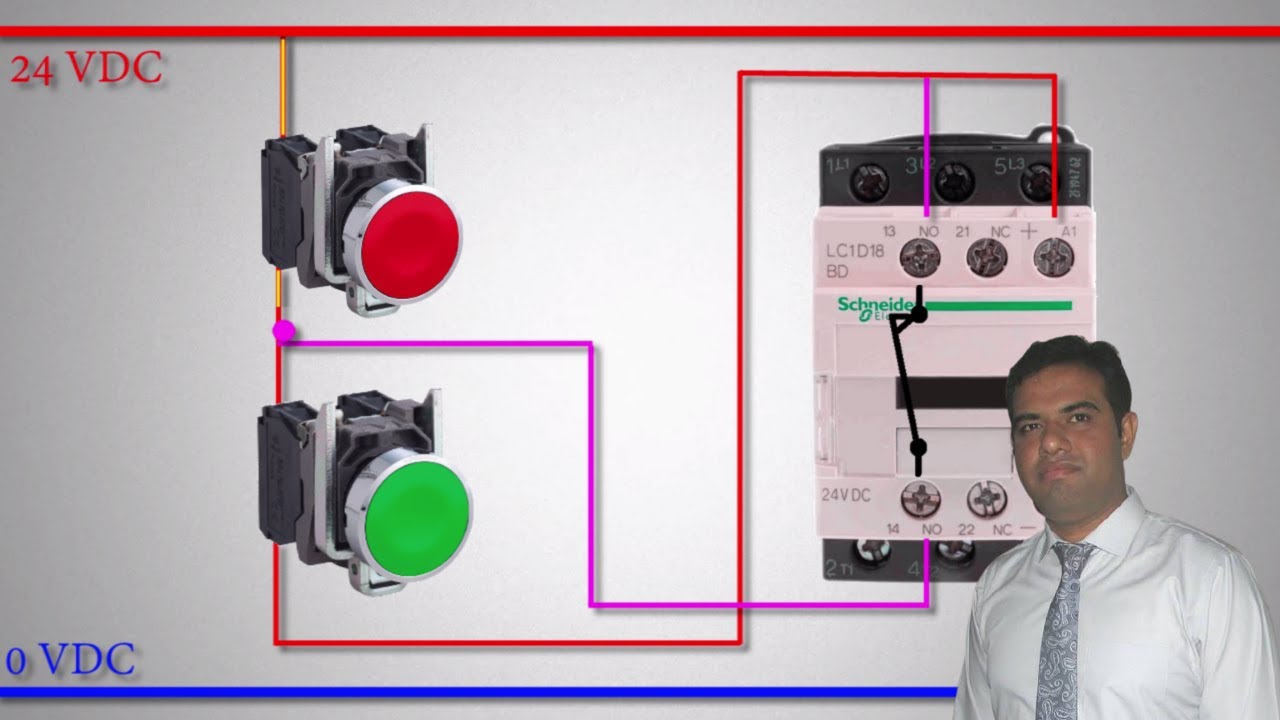
Check out this video. You would put one or more Normally Closed momentary buttons to in series with the red button, along with as many Estop switches as you want. The beauty of this is that only the coil control voltage has to run to the switches. Your loads would be run through the main input/output terminals of the contactor. Probably the positive leg of each power circuit. Hopefully this makes sense.
But I don't want many switches. I want one e-stop to turn off many devices. So I use the optocouplers so that when the estop opens, many optocouplers open in many low current loops to the devices. The device then has a relay, which will open when no current is coming in through that loop. And thus the device loses its supply which runs through that relay. Most scenarios will interrupt power to the relays. So I need to consider that either the optocoupler or relay could fail in the closed position. Your suggestion is to double them up in series, to have a reduced probability that both fail closed. I guess if I would want multiple estops, I would simply wire them in series before the optocouplers.
thanks - so this means to get force trim you should select the option in the telem options - also think there is a force trim option in the main rhino software (from memory) do you need to enable both for it to work?
also what does this mean when setting up the module in telem - pretty sure i got the prompt that uh60l was not found when I first run it (so should u be selecting another helicoter to be used (such as teh ah64) to select when the FFB effects for when the mh60 us running or do something else?) - also pretty sure last time I ran it was getting some kind of force/effects through the stick or was this just some kind of default spring effect?
The UH60L has a default profile in TelemFFB. Possible that the additional modded versions have different "names" that would show up un-matched, but its pretty obvious in TelemFFB how to clone from another aircraft if that is the case.
In DCS, the "actual" FFB part is handled natively by the sim. This includes force-trim for helicopters, and dynamic stick forces and trim following for fixed wing.
None of the community mod aircraft support FFB so you have to fake it with hardware force trim using the configurator software.
got it - actually I think the profile must have been detected but I set the search parameter to anything with UH60 in it (so thats what I must be getting?) - strangely I dont have force trim (hardware trim) selected in either telem or the main software - but when I flick the force trim switch it "seems" to reslect the centre (so something is happening and the actual centre of the stick is jumping) - is your suggestion to just select the force trim in the telem software or the main rhino option to get force trim to work?
are you talking about the virtual stick? AFAIK, the "trim release" binding in the helicopter will make the cyclic behave as "instant trim" (but without FFB).. meaning that as soon as you press it, it sets the virtual offset of the stick such that when you release the stick back to center, the virtual stick will be where it was when you pressed the button.
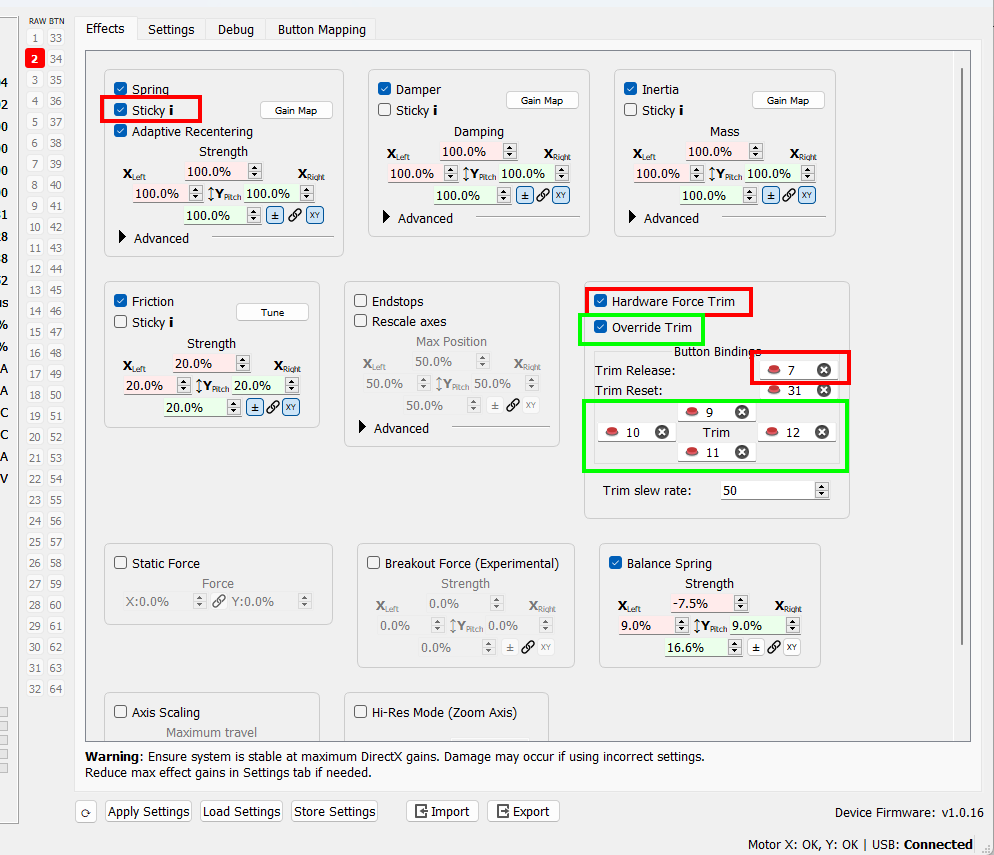
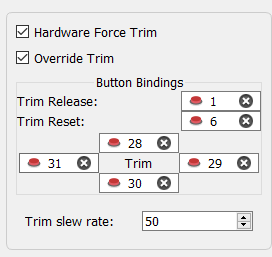
To set it up with hardware force trim, you would want to unbind the in-game force trim and set your configurator up like this... If you also want motorized hat trim, I would unbind the trims in the game and set up the trim override (green boxes) in configurator
thanks - think we are talking about the same thing - 1)by force trim (although some dcs modules call it instant trim in the options) I mean when I release the force trim switch it essentially resets my stick centre(can see my virtual stick in the uh60 move to this new centre) - when I hit the trim reset button it re-centres the virtual stick to the default centre - although interested to know what you mean by this function not having FFB?(as these mods don't support it) - I find with the AH64 for example the stick has no spring in it when I push the trim switch up?
2)weirdly for the uh60 and also the new oh6 mod I have force trim bound in game and I seem to be getting some kind of force trim effect already! (the virtual stick moves to the new centre) even though in the rhino menu I do not have hardware force trim selected? - is your suggestions to clear the force trim/reset bindings in DCS and enable the hardware force trim setting in the rhino menu for the best result? (also if I do this do I need to touch any of the force trim settings in the profile page of the telem software or can I just leave this untouched?)
Without FFB hardware, When you enable "instant trim" for any of the official modules, as soon as you release the force trim button, you need to recenter your physical joystick, because the trimming results in a doubling of your input so that at physical=0,0.. the virtual x,y is whatever you trimmed it to.
WITH FFB hardware, when you press force trim, the spring forces are relieved on the joystick.. when you are done trimming/maneuvering and release the trim button, the spring forces return, centered on the new position. Physical and Virtual stick positions always match.
Neither of these freeware/community mods support FFB. Thus, the stick will not behave as in the 2nd description. You need to use hardware trim to emulate the behavior.
If you enable hardware trim but don't unbind the force-trim in the game, you will end up with an offset spring position but with double the input in the game = bad times.
Regarding hat trim, the IRL Blackhawk has an AFCS system and has motorized hat beep trim, The IRL OH-6 does not have "force trim", but does have hat trim to help alleviate stick forces required to hold the helo at any given attitude
Thanks 1)for the uh60 will enable the hard ware force trim in the rhino software - do I also have to tick the forcetrim box in the Telem software or can I leave it unchecked? 2)for the hat trim shall enable it in the rhino software (assume force trim simply will not work then?) - still struggling to understand how the hat trim works - but is it like a fixed wing aircraft trim - up trims up?
just gave your trim setup suggestions a try on the UH60L - strangely if I unbind the trim controls in game and then enable hardware trim (in the rhino software) and assign buttons - the trim does not seem to function at all with the re-centre position just not registering (which makes the helicopter uncontrollable) when I bind again in game the force trim works ok and I can see from the axis control box the stick centre shift (white box) after I release the force trim button (does not feel as good as the ah64 implementation but it still appears to work ok....) - any help appreciated?
I found a perfect solution for my central emergency stop quest: a modular emergency stop button. This needs to be sticky somewhere on the discord! https://aliexpress.com/item/1005004157851197.html
I think the way this works is - you buy a button which you configure in the order page with 2 modules, the voltage is for the led light in case you chose that. Then you add NO or NC modules if you need more than two contacts they support up to 220v 25A. They stack infintely by the threesome. The LED is a module of its own, so it can be wired in parrallel to one of the stop circuits but can also powered by something like an arduino.
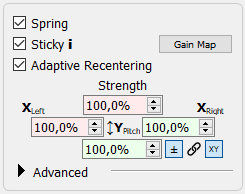
Hello guys, How to set up the Damper force in Heli trim mode? I wanted to have some strong damper force when holding the trim button in Apache. Now the problem is when holding the trim button, there is no force to hold the stick.
With the abundance of options, I might just be tempted to have one contact go to an arduino (which is emulating a hid gaming device), which then passes the state of the emergency switch to the PC. When anyone hits the switch, the PC will do a controlled shutdown
I'm about to try the OH-6 for the first time. Not sure whether or not I want a simulated force trim (OH-6 had none). I'll try what trim override feels like. Would it be like the IRL thingy then?
While I've never flown a IRL helicopter, let alone an OH-6.. for max realism, you would want only the hat-trim overrides in place as the heli does have motorized trim, but does not have traditional "mag brake force trim"
I think you must use the mouse to turn on the fuel in the current 1.1 version.. I saw a bug that the keybind makes the knob move, but it doesn't actually turn on the fuel
I don't know if you found or received an answer yet, but I had the same issue (stick in a very forward position) and I found a solution/explanation somewhere in old posts. I'll see if I find it again
I have been to DCS bug forums for F-14 and found two reports regarding this with bug being accepted by dev team but not resolved. Maybe if more people would post after me there?
I dont really fly the F-14, so I'm not very adept at using the autopilot. If I were a betting man, I would say the issue is that their internal calculations that determine whether AP can be enabled is somehow including the joystick position in the calculations, and since the FFB center position is offset from physical X/Y 0, it throws everything off (%100 speculation).
Oddly.. this seems to work - When set up to engage AP, press the autopilot reference/nosewheel steering button, and then give your stick a little shove forward. The AP seems to activate for me when I do this. However It seems the FFB wants to constantly hunt back and forth for center while AP is engaged.
Its definitely fun to rip around it. I found that I needed to increase the sensitivity of the pedals. I think I set the saturation-X to %60.. the more sensitive configuration, for me at least, makes it easier to dance on the pedals to keep the nose pointed in the right direction Otherwise I felt like it took too much throw of the axis to be effective and made it hard to "stay on top of it"
I normally fly the Huey with the rhino, and have a pretty stiff spring setting, but for the oh 6 I found lowering the spring force made it a lot easier to move the stick to keep up the heli. Or maybe I should just make the curves more sensitive?
I think IRL the "spring centering" force on the OH6 is not very strong, but it "stays where you trim it". Unlike the UH1 for example, where when the mag-brake is engaged, you have to fight against some pretty heavy springs to deflect the cyclic.
No idea When I press AP REF button on the stick, the light goes off as expected but AP does not hold ALT although ALT Hold was selected first. And I engage both AP and REF pilot perfectly trimmed