I would love to know what alien Hardware you're using
I would love to know what alien Hardware you're using
 P
P K
K 5KKPPP
 CC
CCglxinfo | grep "OpenGL renderer"C RKR
RKR MR
MR E
E
 EE
EE
 lol. Imagine installing PPAs just to have new MESA/Kernel/DE....it's like why I distro hopped from it to Fedora KDE 32 all those years ago.E
5.27.10 or what latest was.EI would tell this user to run the portal for any system control apps they wanna use.I thought portal opens up on first boot/login??
But I'm busy raising Cata Classic right now.
 ?RE
?RE 3
3 D
D MMMKKM
 CCCM
CCCM K
K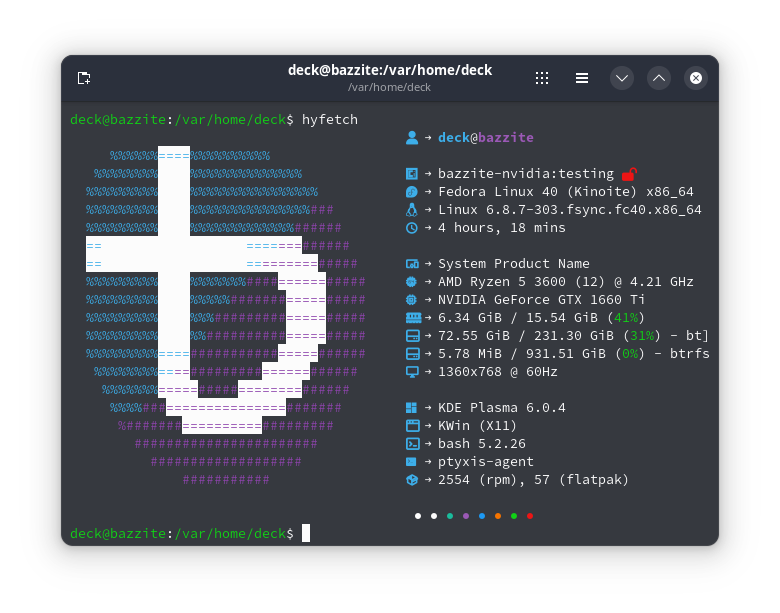
 JKK
JKK J
Jrpm-ostree rebase ostree-image-signed:docker://ghcr.io/ublue-os/bazzite-nvidia:testing will sort it.KKKCntrl C, now my this is my rpm-ostree status -v, should I be worried or do something about it?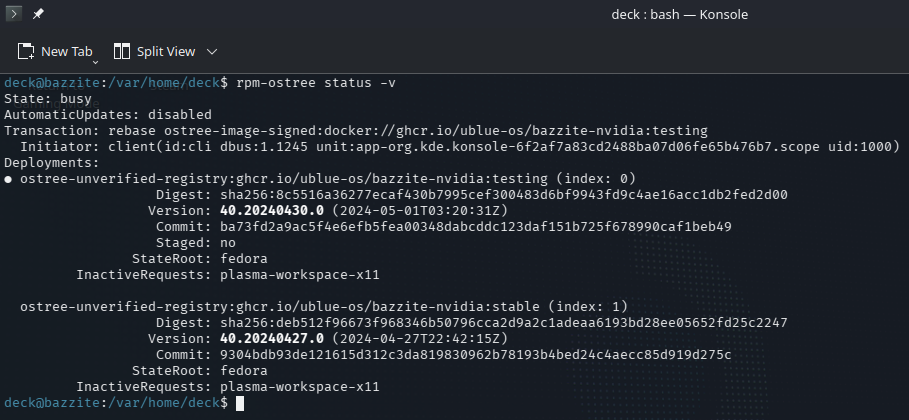 JJK
JJK D
D G
G T
T * Xorg errors (grep '^\[.*(EE)' /var/log/Xorg.0.log ~/.local/share/xorg/Xorg.0.log | cut -d ':' -f 2- ):
[ 909.003] (EE) Failed to load module "ati" (module does not exist, 0)
[ 909.009] (EE) Failed to load module "nouveau" (module does not exist, 0)
[ 909.009] (EE) Failed to load module "nv" (module does not exist, 0)
[ 909.009] (EE) Failed to load module "fbdev" (module does not exist, 0)
[ 909.009] (EE) Failed to load module "vesa" (module does not exist, 0) glxinfo | grep "OpenGL renderer"5.27.10Prose: the knowledge and skills needed to search, comprehend, and use continuous texts. Examples include editorials, news stories, brochures, and instructional materials.
Document: the knowledge and skills needed to search, comprehend, and use non-continuous texts in various formats. Examples include job applications, payroll forms, transportation schedules, maps, tables, and drug and food labels.
Quantitative: the knowledge and skills required to identify and perform computations, either alone or sequentially, using numbers embedded in printed materials. Examples include balancing a checkbook, figuring out tips, completing an order form, or determining an amount.rpm-ostree rebase ostree-image-signed:docker://ghcr.io/ublue-os/bazzite-nvidia:testingCntrlCrpm-ostree status -v