way cheaper then it was at one point yea, and if you get to a really large point you could get even potentially cheaper ent pricing like shopify and such
yes, although a point worth mentioning is you have to add them as a custom hostname (in dash or via api) first, and then they cname (or do the prevalidation first to avoid downtime) and get activated
Hi everyone, I'm currently working on adding a custom domain feature to my project, and I could use some assistance. Here are the details of my setup: I have an Angular site hosted on Cloudflare Pages with the following DNS settings for my domain (site.com):
I have enabled Cloudflare for SaaS and added "fallback.site.com" as the fallback origin for site.com. I also have a domain (test.com) and have created a custom hostname (app.test.com). I generated a TXT validation and added the TXT record and a CNAME record (CNAME --- app --- cd.site.com) to the test.com DNS records. Additionally, I have a worker that routes requests coming to site.com. The worker acts as a reverse proxy, serving content from either the Pages site or a WordPress site, while keeping the URL in the browser as site.com/*. However, when I try to handle the custom domain and serve a page from site.com/custom-domain, the URL in the browser changes from app.test.com to site.com/custom-domain. Here I have attached index.js and wrangler.toml:
And here is the wrangler.toml configuration:
How can I ensure that the content of the pages is loaded while keeping the URL the same in the browser(app.test.com)? Any help or guidance would be greatly appreciated! Thanks in advance for your help!
can a tail worker be the same codebase as the original worker? like is it possible to just call the same workers fetch handler? I don't want to stand up a new worker right now and hoping to kinda hack it.
Also do they get triggered in local dev with wrangler?
doesnt seem to be working, but im not quite sure how to tell honestly. Tailing the logs I dont see the tail worker called, but not sure if that would actually show.
Is there an easy way to tell if the worker is being served from wrangler dev? I have a use case where I want to know if the worker is actually deployed to allow/disallow localhost in CORS. Right now I'm using the CF-Ray header to detect this, but it doesn't work if the wrangler dev is using a remote deployment
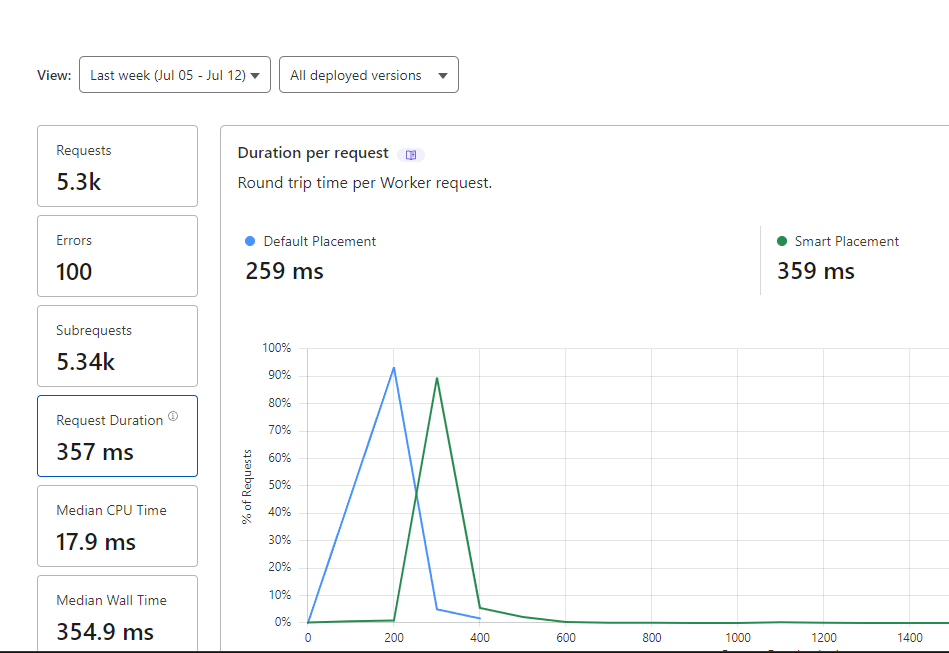
This basically means that smart placement is slower than the normal placement, or am I wrong? D1 database is hosted in East US and my service that's fetching data from this worker every minute is also located in the East of the US.
If you have a D1 DB attached and you turn on Smart Placement, it overrides its location to be closest to the D1 DB, and D1 Requests aren't going to show up in any of the Request Duration/Subrequest charts I don't think