Custom error responses, powered by the Ruleset Engine, allow you to define custom responses for errors returned by an origin server or by a Cloudflare product (including Workers). Custom error responses will apply to responses whose HTTP status code is greater than or equal to 400 that match the expression of the custom error response rule.
Maybe CF did their market research or whatever and concluded that they'd rather let ppl go over the spending limit. "In a free service, you're the product" as they say sometimes
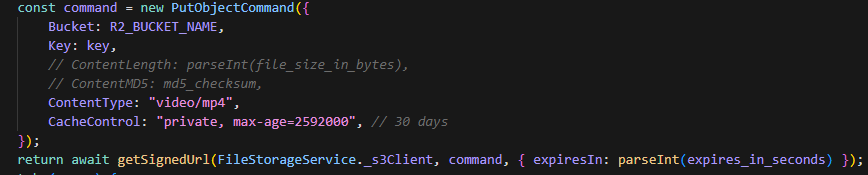
is this a cloudflare r2 thing or s3 thing in general? setting ContentType in PutObjectCommand during url presigning, doesn't throw error if the client sends a different content type during the upload process
if i set content type to video/mp4 in putobjectcommand for generating the presigned url and I upload a file & set content type to plain/text, it gets uploaded
@digitalpoint I am using your cf addon in xenforo, I have set up r2, posts with attachments I can only upload files under 100mb in size, is there any way to download files larger than 100mb with attachments?
It has to do with XenForo not doing multi-part uploads by default (I think there’s a third-party addon that replaces the uploader that does). So you are normally limited to 5GiB uploads per file. However, if you are using Cloudflare’s “normal” reverse proxy service, you are limited to the maximum upload size you have set for your zone (100MB in some cases). Check the setting in Cloudflare Dashboard under Network.
Basically if your site is limited to 100MB uploads (for whatever reason), using R2 for the backend storage isn’t going to change those limits for you. Turn off R2 and it’s going to be the same 100MB limit.
R2 is just the backend storage, so the solution is to get your site to a place where it can accept uploads >100MB. Probably the easiest way to do that will be to disable Cloudflare proxy.
Again, using (or not using) R2 doesn’t change your site’s upload limitation. Disable R2 and you’d still have the same upload limitation you are seeing.
a video/mp4, with content type plaintext in the headers If i remove the md5 hash/content size inside putobjectcommand, I think I can send a txt file, even though I set contentype to video/mp4 in the putobjectcommand
Try set content type to video/mp4 when generating, and actually send a whole plain text file, ignoring what you set in the headers before using the PutObject. Unless that's what you're already doing and I misunderstood
just storing files, i'm not really worried about malwares i just don't want users to store huge files and abuse my endpoint haha 1st time learning about file storage, just want to make sure I'm doing the best practices
@yuvraj In that case the md5 + size validation should be good enough. If a user spoofs the type then that'll affect them if you serve it back to them for viewing/download on a client-side, but at that point it would be their fault and not your responsibility, as long as it doesn't breach the security of your server/other users then it's not really an issue you need to worry about.
And yeah presigned urls in that case are likely still your best bet since processing the files on the server itself can be heavy on memory/server storage, even if you stream
It's not just scale either, it's probably faster to upload with a PutObject url as you don't need to send the file to the server and THEN the bucket, instead sending the file straight to the bucket