I think the YouTubers misunderstand Walmis. I can't speak for certain, as I am drawing some conclusions from what I have seen. But if Walmis was really worried about finding every last person in the world to sell a Rhino too, or drive out all competition. He wouldn't sell the kits, and actively support those who build their own and even those we sell kits themselves right in his Discord .
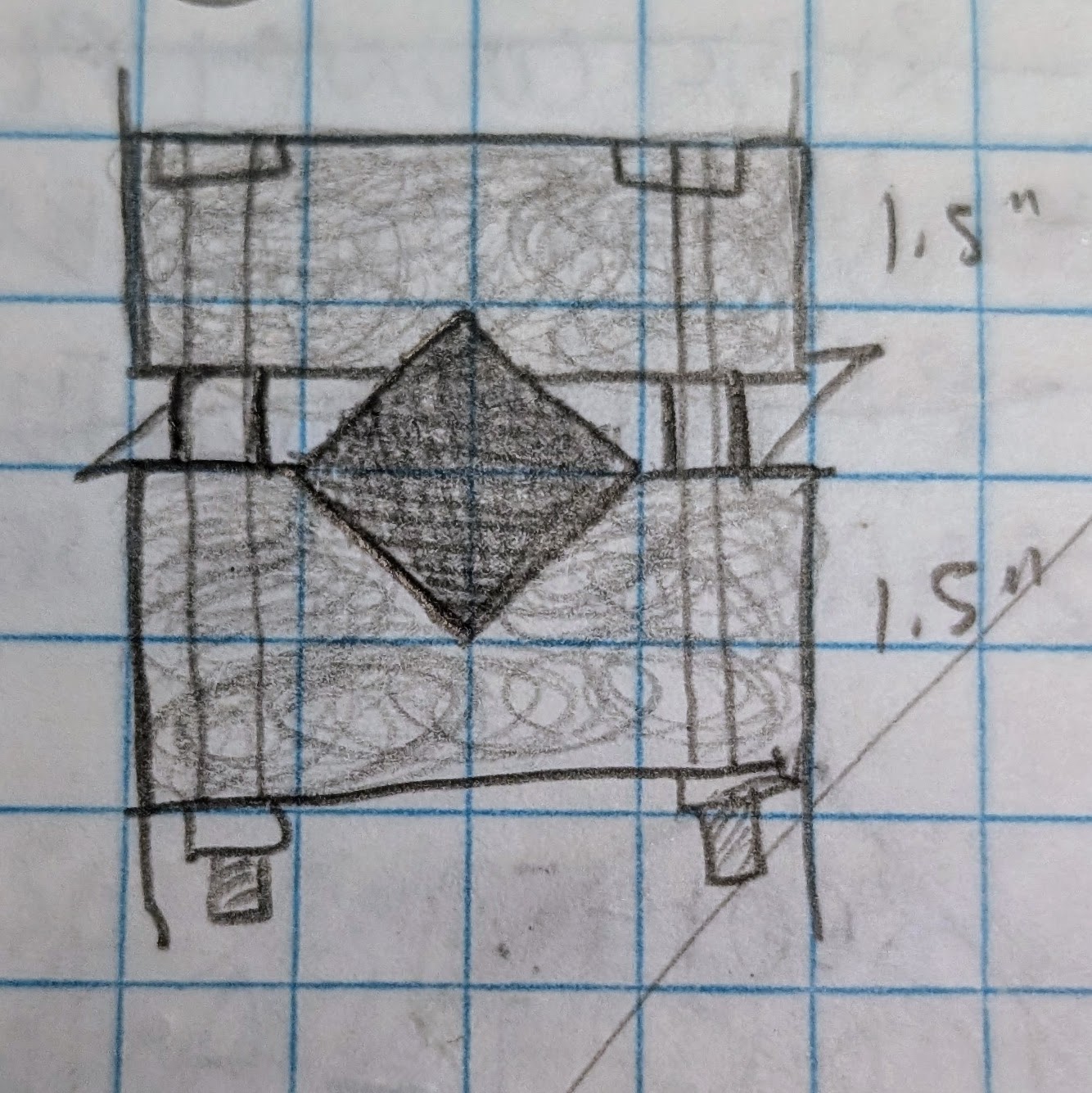
The issue with the NLR seat is that the section of that cross-member is diagonal to the ground. So you have to come up with some kind of weird mount. This was my first stab at it before I reailzed ground mounting would be easier.
Hi all! Had a question on the rhino. Can the software integrate with a game like I racing to provide ffb on the roll axis for turning and potentially on the Y axis for throttle? Working on an accessibility build for a friend
Hi there, contemplating/planning a rhino + tiger pedals build. But have a few questions that I wasn't able to easily resolve by searching the msg history. 1. When using both the rhino and pedals, are they controlled in the same setups, and changed simultaneously? or do you run two instances of the software? 2. I'd like to make it with extra power (using 86's) but have seen people comment on the cogging, is this something that those users have calibrated out? or is that just something to expect? I'd like to use it on a 20mm extension, and just worry about not enough force for me (on my racing rig I use 20NM, but mid cornering average is 12-15NM , but this is apples and oranges I know)
3. For those that built using the 86 did anyone try is with the gimbal 3d printed (I'd probably wont use it at full power, and have PAHT-CF), or is this straight up get it CNC'd? (anyone done this in Australia?) 4. Thinking of modifying my build so it's lower by moving the underneath motor to the side, to better fit the 20mm extension. Has anyone done this? I have a Trak Racer TRX so can't mount to the floor.
Can speak on 86 construction, but I don’t have pedals.
2) I had minor cogging on 1 axis at the center point of the motor (2048 on the encoder). I reduced belt tension and it effectively went away so I think it was just an issue caused by the tension as I originally was cranking it down.
3) I’ve done the gimbal 3d printed and haven’t had issue yet but am running it pretty light, don’t have much time or force on it to say much. But my thought was, I’ll try it this way and beef it up if it fails. I print my own so that’s not as much of a deal to me.
4) 86 motor build are pretty much all custom right now. The files available publicly only for the 57 series motors. So you are kind of already going to be designing it for your specific application. All of the popular file sets available use the gimbal over motor design but you can use at least the gimbal parts as a design basis to fit into your custom chassis.
When you start the configuration software, you tell it which device you want to load. You can launch and connect to multiple devices and manage them separately.
The telemetry software is multiple instances of the same application under the hood, but the UI is managed through the primary instance and you have the opportunity to adjust the effects on each FFB device individually.
Same pitch and width yes, but length will vary based on your design. For cooling if you are doing your own design, you can cool it however you want. But both motors use the same control board which only has headers for two fans.
Regarding cooling. The bigger motors have much more thermal mass than the small ones, which in my opinion means two things - for the same amount of load they will take much, much longer to get heat saturated (they have more power though), but when they are, it takes more to cool them down as well. The original 80mm fan is already on the small side imho. I modified my Rhino to incorporate a T30, which is capable to hold the temp at bay under constant load. So when you are already planning on doing your own design, I would incorporate at least a 120 mm PC case fan and thoroughly think about airflow patterns. (btw. what kind of gimbal are you going to use?)
The 80mm fan is honestly 80mm more than most get for these devices. Most wheelbase doesn't have cooling at all, neither does the Brünner or the upcoming Moza.
My suspicion is it takes a lot of effort to cool these through all the thermal mass so a fan really isn't doing much for the motors at all, but it does exchange the ambient air in the case.
To actually do anything for the motors you would have t wrap it in cooling fins and heatpipes, and you would still be nowhere near doing much of anything in terms of winding temps.
Cheers for the info, yeah thought the larger motor would be able to disperse the heat better due to mass, if at similar power. Not sure on the gimbal yet, didn’t know there were different types being used. Only at the start of planning, haven’t started anything in fusion360 yet. So will take onboard any tips or learnings. Have been putting thought behind how to make a stronger gimbal, like a 3d print with an imbedded metal frame (via pausing print part way).
That‘s not really true. When you pull max force on the rhino, anything above 20-25 amps on the y-axis motor it heats up about (very roughly) 1 C every 1-2 seconds or so. So basically you have 30-60 sec continuous max force before thermal throttling sets in without active cooling (depending on ambient temp too of course). With the stock fan you can slow down that temp build up, but only so much. Usually that gets you to a point where you don’t notice throttling because most jets can’t sustain max force for so long and eventually the load will drop and the motor can cool down. However with a more powerful fan and a reworked airflow pattern, I can actually keep the temperature from raising above any critical threshold while being at constant max load.
I‘m very much looking forward to @walmis next release of the VP control software with the ability to actively control the fans. Because I think it would be very beneficial to have the fans running at slow speeds all the time and ramp them up early(er) to slow down the temp saturation.
can it be that the instability of the fulcrums AP with a FFB stick is because the ingame trim is moving too fast? i noticed that planes with a faster trim seems to rock more when AP is engaged
its more likely that the aircraft is just poorly coded in this regard. I assume if you were to disable FFB alltogether and were able to mimic the movements of the stick while AP is active, it would behave the same way. There needs to be some internal logic that compensates for/ignores the stick movement when it is happening as a result of FFB. All speculation of course, but seems likely.
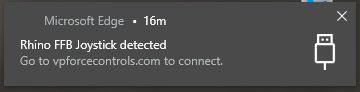
Randomness; does anyone know how to kill this dang thing? I dont' use Edge period -- and this comes up and most times it gets freaking stuck. I cannot hit the X to remove the pop up. I wasn't sure if anyone else has come across this thing and found way to disable it completely.
Context: this thing is physically stuck to my screen. I will have to reboot to get rid of it. Force closing Edge does nothing, there's no real process I can identify that has this popup connected to it.
It seems to come up every time I plug in now. If I get it pretty quickly I can make it disappear. If I wait too long it'll get stuck on the screen until I reboot (even if I disconnect the rhino.)