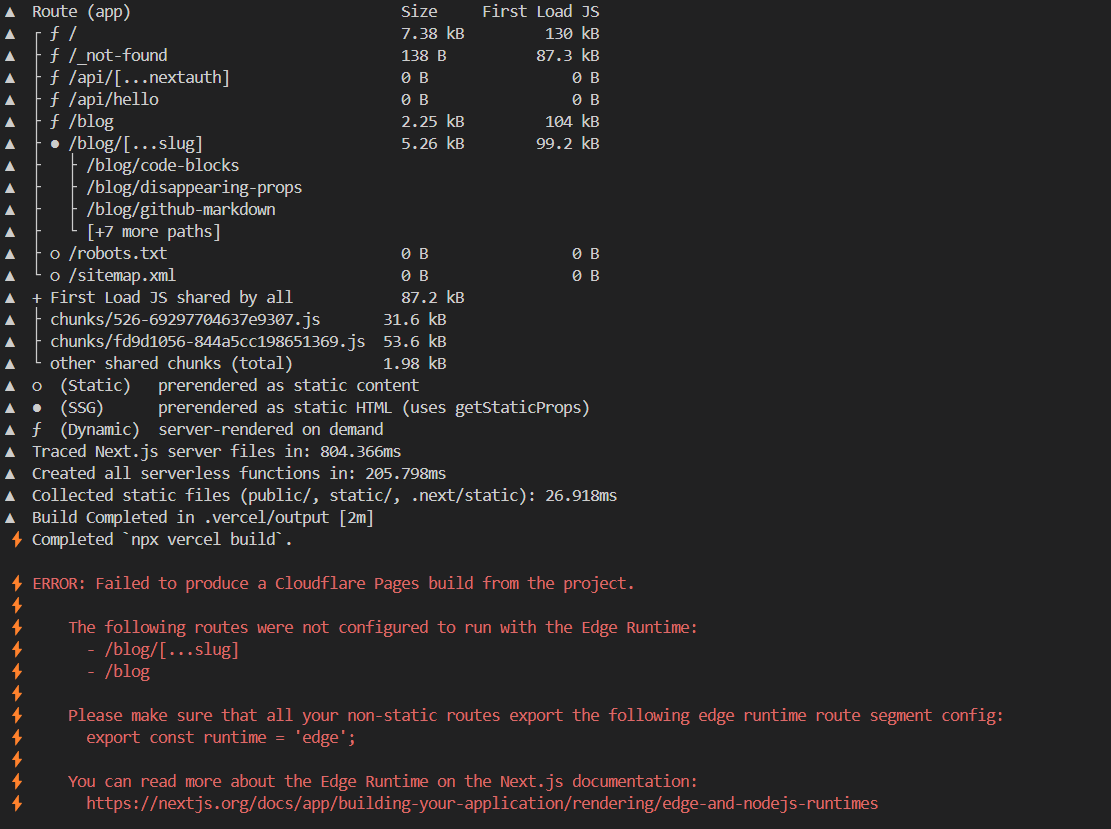
The default flow/set-up from nextjs? or need to tweak some?
The default flow/set-up from nextjs? or need to tweak some?
 K
K
 J
J PJP
PJP JJPKKP
 SSSSS hence asking about the workaround or if anyone has got it working another way.SS
 SJ
SJ NNJNN
NNJNN D
D B
B@vercel/otel library in a Next.js app that compiles with next-on-pages, then the CLI throws an error. So, we can’t use observability tools with OpenTelemetry (e.g., Sentry, Highlight.io). Furthermore, Cloudflare bought Baselime (observability tool) which supports OpenTelemetry standards, but we can’t use that either. @vercel/otel not being supported is ongoing for 7 months. @vercel/otel soon? SJSK
SJSK P
P A
A B
B MMBMMJM
 J
J L
L E
Eerror.tsx at the root of my app directory:not-found.tsx with this:"pages:build": "npx @cloudflare/next-on-pages",error.tsx and not-found.tsx and the error persists..next, .vercel, and node_modules14.0.0 as I saw that's what was used in the next-on-pages e2e tests, and the issue persists..page.tsx, layout.tsx, and route.tsx, and specified the edge runtime, I'm completely stumped. TE
TEuse client from error.tsx gives this:asyncnot-found.tsx (which doesn't have any logic, just returns a div saying "not found", and it still gives the same error:Elayout.tsx file had the following:platforms approach, so don't have a root page.tsx file, only a layout. L
L D
D@vercel/otel@vercel/otel@vercel/otelFirebaseError: Firebase: Error (auth/network-request-failed).⚡️ ERROR: Failed to produce a Cloudflare Pages build from the project.
⚡️
⚡️ The following routes were not configured to run with the Edge Runtime:
⚡️ - /_error
⚡️
⚡️ Please make sure that all your non-static routes export the following edge runtime route segment config:
⚡️ export const runtime = 'edge';
⚡️
⚡️ You can read more about the Edge Runtime on the Next.js documentation:
⚡️ https://nextjs.org/docs/app/building-your-application/rendering/edge-and-nodejs-runtimes⚡️ ERROR: Failed to produce a Cloudflare Pages build from the project.
⚡️
⚡️ The following routes were not configured to run with the Edge Runtime:
⚡️ - /_error
⚡️
⚡️ Please make sure that all your non-static routes export the following edge runtime route segment config:
⚡️ export const runtime = 'edge';
⚡️
⚡️ You can read more about the Edge Runtime on the Next.js documentation:
⚡️ https://nextjs.org/docs/app/building-your-application/rendering/edge-and-nodejs-runtimeserror.tsxerror.tsxerror.tsxapp'use client';
export const runtime = 'edge';
export default function Error() {
return (
<div>
<h1>Oops! Something went wrong.</h1>
<p>Try refreshing the page?</p>
</div>
);
}not-found.tsxnot-found.tsxnot-found.tsxexport const runtime = 'edge';
export default async function NotFound() {
// ...
return (
<div>
<h1>Not Found</h1>
</div>
);
}"next": "14.2.12",
"@cloudflare/next-on-pages": "^1.13.2","pages:build": "npx @cloudflare/next-on-pages",.next.vercel14.0.0.page.tsxlayout.tsxlayout.tsxroute.tsxuse client ./app/error.tsx must be a Client Component. Add the "use client" directive the top of the file to resolve this issue.export const runtime = 'edge';
export const dynamic = 'force-dynamic';
export const revalidate = 0;platformspage.tsx