Wine-GE is rather old now (last release is almost a year ago) and thus might not work correctly. Please follow these instructions on using GE-Proton with umu instead:
Head to the Wine Manager in Heroic, click the "Proton-GE" tab, and install "Proton-GE-Latest"
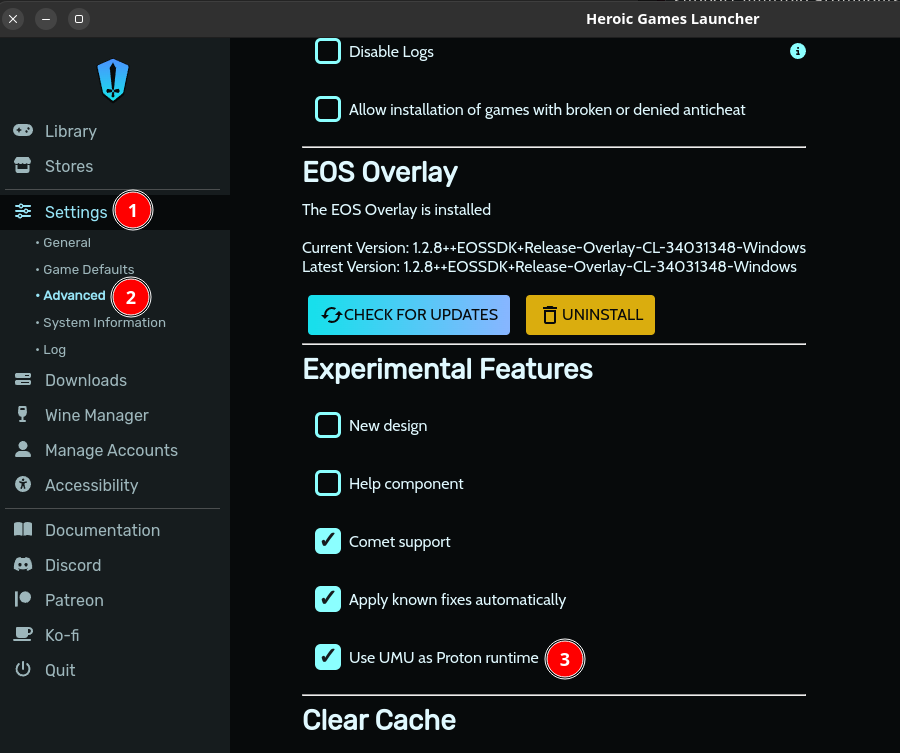
Enable umu in "Settings" (Heroic sidebar) -> "Advanced" -> "Use UMU as Proton runtime" Note: For a visual guide, see attached image
Head to the settings for your game(s) (icon on game card in library). In the "Wine Version" dropdown, select "Proton - Proton-GE-latest"
Rename your Wineprefix (path is shown in game settings), e.g. from
current-name
current-name
to
current-name_bak
current-name_bak
. To clarify: Rename the actual folder on your hard drive, do not change the option in the game settings. Note: This will make game-specific configuration data (e.g. in-game settings or save files) unavailable. If this is an issue, let us know & we'll help you restore them.
yeah, it should be enabled by default, but I think it only enables it if installed and when turned on manually it actually installs the thing if needed