Weird, I swear the TOD said that video streaming specifically wasn't allowed on the CDN but then again it's been pretty back and forth in the discussions I've read.
Is there a way to see how much bandwidth is being used per file/folder? Or is it total? Or is there some way for me to collect logs when a file gets hit?
I basically allow users to upload various files and currently there's no bandwidth limit ofc but I want to be able to see which users are heavy users in the case that something needs to happen so knowing which user is using up the most bandwidth would be nice to know
Gotcha, so just to clarify, I'm looking at the dashboard under cache and I can see the paths which got the most traffic, so that's fine, however in my case I'd like to show this to my user as a "Here's how much bandwidth you've used this month" kind of statistic. So for each user their various files would have a path of like '/{user_id}/{folder_id}/somefile.jpg' which means I just need to aggregate the banwdith used by all paths that start with the specific user's ID.
Is it possible to retrieve that info via some sort of API?
Ah I see, but there's no dedicated simple way I guess? Also I know nothing about graphql tbh lol
I used to use BunnyCDN and they have a log forwarding option so it was pretty easy to figure out how many times a file was viewed, etc, by forwarding the logs to a simple $5 VPS and parsing them and adding them to a db
Oh yeah I wouldn't let them interact with r2 directly, I just want to build an admin dashboard so I can keep track of which user is using how much bandwidth and reach out to them if needed, etc
i have no idea why. i adjusted my cors rules for my bucket. I simply send a signed transaction from my server to the client and the client just cannot use it due to this
So I'm not sure if you remember but you helped me with learning about HLS and serving video files (thanks for that)
I generate the manifest on the fly because I use waf so every time a manifest is requested, I know that the video has been played (or at least preloaded/requested/whatever). But what I don't know is how much bandwidth they used, because if the video file is 1GB lets say and they only watched 1 minute before exiting out, they'll incur less bandwidth than a video file that's 50MB but a user watch the whole thing, even though I've recorded 1 play for each file
So with the way it's being done, I can't do tracking at the layer closest to the user because the manifest file (which is the only 'file' that my server returns) simply links to direct files within the r2 bucket
Yeah bandwidth is not a concern, but I did read some stories about how some guy got reached out by cloudflare to hop on a large contract because he was using like 1-3 petabytes of data
Now I don't see myself even coming close to that, but in the off chance that some power house user uses my service to host their 1GB file that suddenly gets 1 million views, that's a petabyte of data right there, so if cloudflare reaches out to increase costs, I'd like to know who's using all the bandwidth and figure out extra pricing, etc
That's insane haha, I mean like I'm just thinking about worst case scenario because I'm planning on charging a fixed price per 100GB lets say, but I'm not specifying bandwidth limits. But if some power user manages to get their video popular overnight and it gets like 10 million views, that's a lot of bandwidth, so I just want to try to be ready for a scenario like that if cloudflare comes knocking asking for a big contract when I'm still only charging them like a flat $10 a month
Hi, I have a webapp playing video out of R2. I saw something odd that I couldn't find a reason for today. I was developing on a branch (and pushing to a preview URL ending in .dev). My video playback was a little slow, some requests for content seemed to hang. I merged it to my main branch (and my real domain ending in .com) and it seems fine. Is there some r2 throttling going on when the referrer is a .dev domain? Explicitly this isn't a dev R2 domain. I'm using the regular S3 API endpoint (ending in r2.cloudflarestorage.com).
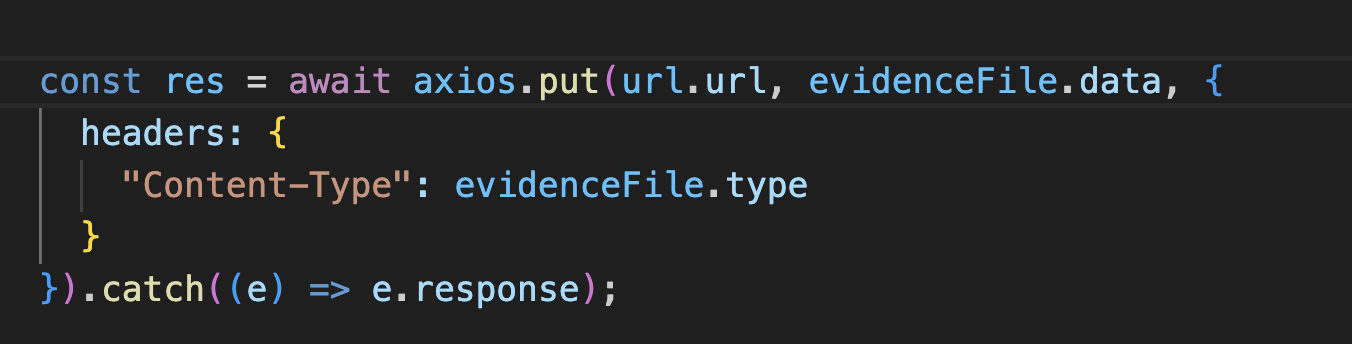
Is there a standardized way of uploading files to R2? Especially large files? Currently I just generate a pre signed url and send that to the frontend but I want to handle scenarios where a users internet might cut out, or the upload fails for some reason, etc. is there a way to show progress or have the files be automatically cleaned up if it's stopped halfway or something?
hi. I am using R2 general storage to store images for my website. I have a lot of images and I want to give logged users all privileges to access any image. What would be the best way to do it? I dont want signed url for each image and if I understand correctly, you can not get signed url for whole repo. Right now I am using the workers to authenticate by JWT and then server the image. But for this I have to get the image blob using fetch in the frontend and then display the blob. Is there any way I can use <img> tags in the frontend to show images?
getting this for uploading files from the client side:
Access to XMLHttpRequest at 'https://BUCKET.ACCOUNT_ID.r2.cloudflarestorage.com/key/whatever.mov?X-Amz-Algorithm=AWS4-HMAC-SHA256&X-Amz-Content-Sha256=UNSIGNED-PAYLOAD&X-Amz-Credential=whatever&X-Amz-Date=20250303T104239Z&X-Amz-Expires=3600&X-Amz-Signature=whatever&X-Amz-SignedHeaders=host&x-amz-acl=public-read&x-amz-checksum-crc32=AAAAAA%3D%3D&x-amz-sdk-checksum-algorithm=CRC32&x-id=PutObject' from origin 'http://localhost:3000' has been blocked by CORS policy: Response to preflight request doesn't pass access control check: No 'Access-Control-Allow-Origin' header is present on the requested resource.
Access to XMLHttpRequest at 'https://BUCKET.ACCOUNT_ID.r2.cloudflarestorage.com/key/whatever.mov?X-Amz-Algorithm=AWS4-HMAC-SHA256&X-Amz-Content-Sha256=UNSIGNED-PAYLOAD&X-Amz-Credential=whatever&X-Amz-Date=20250303T104239Z&X-Amz-Expires=3600&X-Amz-Signature=whatever&X-Amz-SignedHeaders=host&x-amz-acl=public-read&x-amz-checksum-crc32=AAAAAA%3D%3D&x-amz-sdk-checksum-algorithm=CRC32&x-id=PutObject' from origin 'http://localhost:3000' has been blocked by CORS policy: Response to preflight request doesn't pass access control check: No 'Access-Control-Allow-Origin' header is present on the requested resource.

 N
N G
G T
T V
V S
S M
M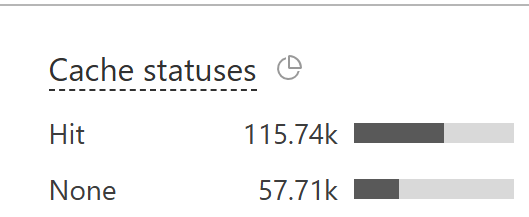
 A
A G
G B
B


 E
E 秋
秋 G
G
 A
A

