

 A
Atheres some explanation on smart placement here: https://developers.cloudflare.com/workers/configuration/smart-placement/
Abasically if you enable smart placement, cloudflare will try to place the worker closer to the database rather than closer to the user, which can help reduce database latency
Aalso,
meta.duration N
NThanks for the help 

 L
LThe
Also, when reporting issues, putting your database ID is always helpful, otherwise we can't really help with abstract reports. In most cases this error is reported, it's a user error with a slow query or a query without indexes, so help us to help you
storage operation exceeded timeout which caused object to be resetAlso, when reporting issues, putting your database ID is always helpful, otherwise we can't really help with abstract reports. In most cases this error is reported, it's a user error with a slow query or a query without indexes, so help us to help you
LSame as my other reply. Database ID and period this was happening?
Queries number across a whole day is not very relevant for this overload error. Overload error is usually because of sudden spikes, not because of total load across a day.
Queries number across a whole day is not very relevant for this overload error. Overload error is usually because of sudden spikes, not because of total load across a day.
 M
MThanks for getting back to me! Database ID is 31174a64-6897-47f9-8364-644637f90c40. Sentry shows
DB is overloadedstorage operation exceeded timeout く
くIs it possible to use sql transactions in D1?
 L
LNot with interleaving JS code if that's what you mean. Each batch query or single query you send to D1 is running within a transaction.
くThanks for letting me know.
LI only see the
Same for the overload errors. I don't see other errors except that one time.
If your queries are idempotent (e.g.
We have some plan to document some of these errors and denote which are retryable, but if you design your queries to be "safe" to retry you can already do it yourself. This will pretty much cover these one-time errors.
storage operation exceeded timeout2025-03-01 14:33 GMTSame for the overload errors. I don't see other errors except that one time.
If your queries are idempotent (e.g.
insert if not existsWe have some plan to document some of these errors and denote which are retryable, but if you design your queries to be "safe" to retry you can already do it yourself. This will pretty much cover these one-time errors.
MThanks for looking into it! Have to say, there are more transient/one-off errors than I had expected when I based my app on D1, and I wasn't aware I would have to write query-retry code
 A
AMaybe asked some time ago. But docs state some kind of dB per user. I‘m wondering how that should be possible with d1? And how to handle dB Migrations?
MDoes anyone know if there are plans to add support for embeddings/vectors to D1 (maybe via Vectorize integration)? I would like to merge/rank D1 queries (BM25) with dense embedding ranking? For now are there any good workarounds?
Thx.
Thx.
AIm looking for a example architecture on how the scale out of D1 should work for per user databases
 J
JI hope this message finds you well. I’m reaching out to request your assistance with an issue I’m experiencing with my D1 database.
Currently, I’m unable to access my database with the ID 1bad90ef-990b-4ad1-908b-4bddd1f3ffd9. When I try to view its status through the Cloudflare Dashboard, it remains stuck in a "loading" state indefinitely. This issue is preventing me from managing or using the database effectively, and I’m unsure of the underlying cause.
Could you please help me investigate what might be going wrong? I’d greatly appreciate any insights or guidance you could provide to resolve this.
Thank you in advance for your support! Please let me know if you need any additional details from my side to assist with troubleshooting.
Best regards,
and I want check my timetravel by wrangler d1 time-travel info dbname
it's show me ✘ [ERROR] A request to the Cloudflare API (/accounts/{myid}/d1/database/1bad90ef-990b-4ad1-908b-4bddd1f3ffd9) failed.
internal error; reference = e_PVSMDp_1bdbed40ae1f4484a8b15b649291cf15 [code: 7500]
all other d1 is work well ,just this db is error
Currently, I’m unable to access my database with the ID 1bad90ef-990b-4ad1-908b-4bddd1f3ffd9. When I try to view its status through the Cloudflare Dashboard, it remains stuck in a "loading" state indefinitely. This issue is preventing me from managing or using the database effectively, and I’m unsure of the underlying cause.
Could you please help me investigate what might be going wrong? I’d greatly appreciate any insights or guidance you could provide to resolve this.
Thank you in advance for your support! Please let me know if you need any additional details from my side to assist with troubleshooting.
Best regards,
and I want check my timetravel by wrangler d1 time-travel info dbname
it's show me ✘ [ERROR] A request to the Cloudflare API (/accounts/{myid}/d1/database/1bad90ef-990b-4ad1-908b-4bddd1f3ffd9) failed.
internal error; reference = e_PVSMDp_1bdbed40ae1f4484a8b15b649291cf15 [code: 7500]
all other d1 is work well ,just this db is error
 W
Wwhat's your account id?
(it's safe to share)
(it's safe to share)
 T
TSame error:
D1_ERROR: internal error; reference = 3v37q0sukf03r4emb40aq73q75d8d68ecf8f9e8155f1ccc7dad82e00 J
J8863216c46bc0b22436dac7ad793a08f
JAny progress? Thanks a lot
 B
BI store base32 and base64 strings within sqlite. It would be nice if D1 supported extension functions to encode blobs as base32/base64 / decode base32/base64 strings (akin to hex/unhex that do the same)
BIt just makes it more convenient when running queries directly to debug stuff vs having to write JS to interpret the DB.
 H
HWrong channel? This is for D1, the database
 A
AHey Team, I am based in Sydney Australia, and trying D1 + Cloudflare pages using Drizzle ORM.
I am experiencing, each DB Call takes at least > 230 miliseconds.
I found multiple forum, people discussing D1 queries taking time. (I have created indexes, but that should not be a problem, since my DB is very small , with few test data in KBs).
Is this latency due to D1 not closser to my Pages Worker?
I am experiencing, each DB Call takes at least > 230 miliseconds.
I found multiple forum, people discussing D1 queries taking time. (I have created indexes, but that should not be a problem, since my DB is very small , with few test data in KBs).
Is this latency due to D1 not closser to my Pages Worker?

 1
1Smart Placement might help, are your requests going to the Sydney colo or elsewhere?
 B
BHi, if you have multiple workers needing to talk to the same d1 instance when doing local development? How do you achieve that?
If I run both workers, they each create a
If I run both workers, they each create a
.wrangler J
J'persist' option on wrangler when you run it, pick one dir for both
 A
Ahow to figure out, where request goes when we query D1 database?
1In the response from the Worker, look at the
cf: coloThanks, I get-
Isn;t it about the location of pages or worker? I am curious about my D1 DB location where read happens, I guess for each query to take >240s, it seem it is network latency.
Isn;t it about the location of pages or worker? I am curious about my D1 DB location where read happens, I guess for each query to take >240s, it seem it is network latency.

 S
Sif you scroll up 5 messages theres your answer x)

 L
LEvery D1 response now has a
To get the location of your worker, as others mentioned above you can use Cloudflare headers of the request telling you the
Or fetch the URL https://cloudflare.com/cdn-cgi/trace from within your worker and check the
meta.served_by_regionTo get the location of your worker, as others mentioned above you can use Cloudflare headers of the request telling you the
coloOr fetch the URL https://cloudflare.com/cdn-cgi/trace from within your worker and check the
colo= L
LWhat does "build an SQLite database separately" mean? You mean uploading an existing SQLite database file?
If yes, you can use the import API: https://developers.cloudflare.com/d1/best-practices/import-export-data/
If not, I don't understand the question, so please elaborate.
If yes, you can use the import API: https://developers.cloudflare.com/d1/best-practices/import-export-data/
If not, I don't understand the question, so please elaborate.
AI mange to find DB location from command
wrangler d1 info <db_name> , which tells me my db is in Wesern north america, while the only time i ussed it ws from AU. Now I am moving my DB Back to AU by creating new db/exporting data to it.Acommand
wrangler d1 export --remote <db_name> --output=x_backup.sql does not create DDL & DML in correct order. (Table being referred get created later.). T
TPretty sure the answer to this is no. Cloudflare announced some D1 changes last April. Maybe they'll have more updates around the same time this year.
 J
J▲ [WARNING] No migrations folder found. Set
i;m getting this error why?
PS : Solved it, was a stupid fix
migrations_dir in your wrangler.json file to choose a different path.i;m getting this error why?
PS : Solved it, was a stupid fix
Ji already set up the path
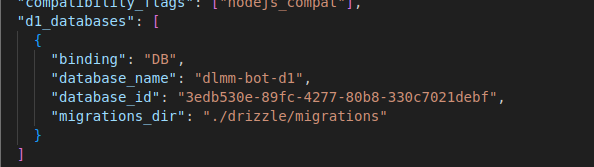 く
くIs it possible to do something like enum type with d1?
 J
Jsqlite doesn't support enums directly, but you could use a
CHECK constraint on your column to accomplish a similar result. D
DMake a not null foreign key constraint to an enumerated table 
 A
Ayeah they bank a bunch of updates for developer week each year
