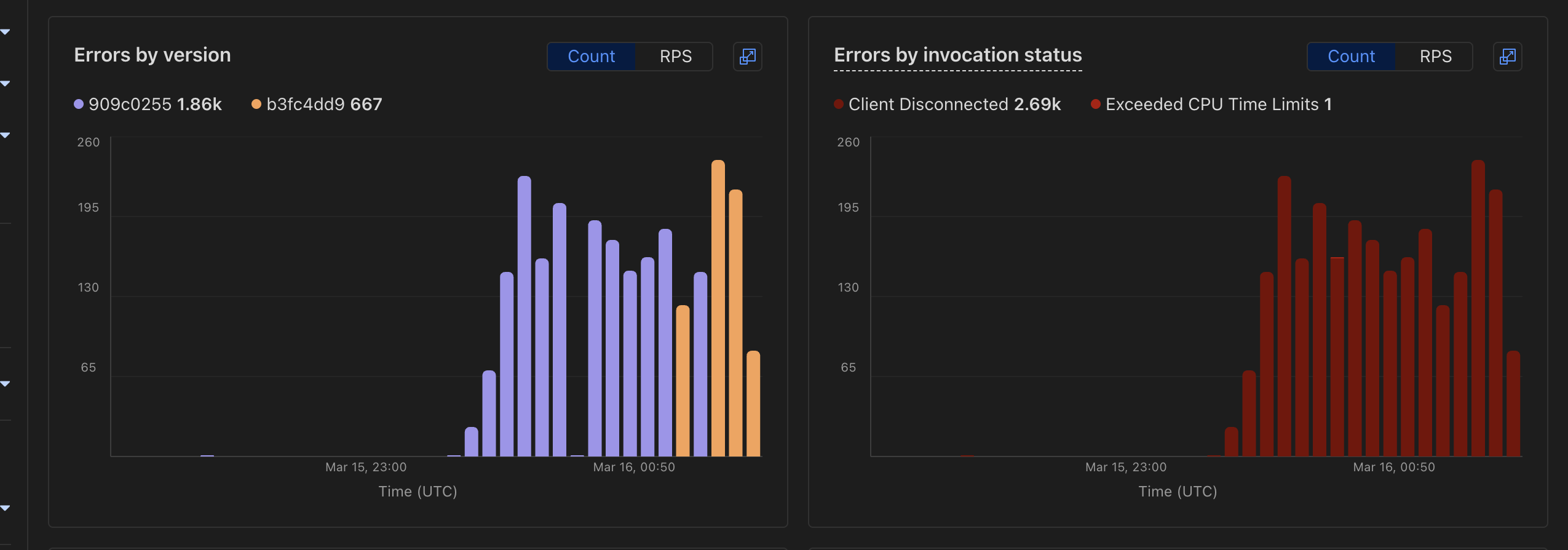
Hi, I'm not sure if Hyperdrive is the culprit here, but I'm seeing a huge spike in errors, and I don't see any logs in my dashboard so I can't really trace it down. I did see this happen when I was having issues with Hyperdrive, so I wanted to see if I could get a look please!
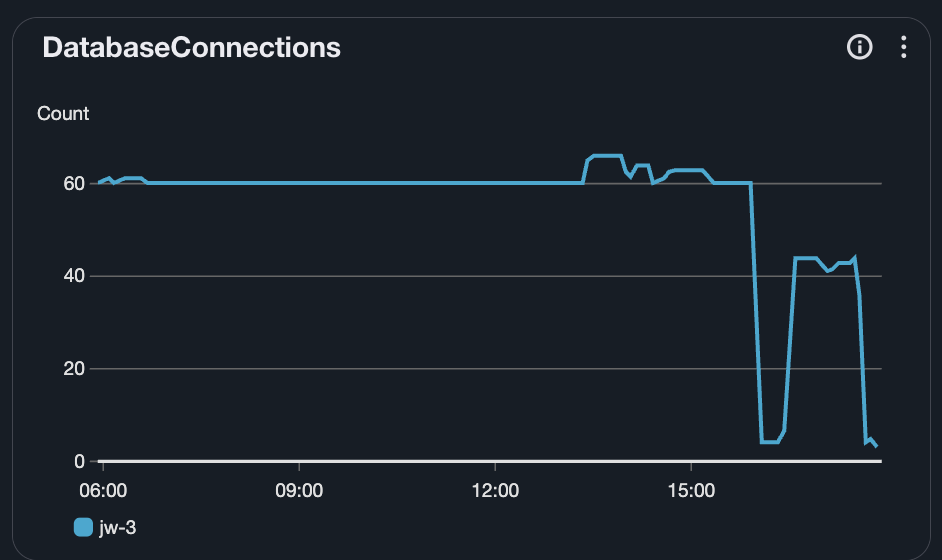
around the same time, i see that the number of DatabaseConnections I have in RDS gets really weird, which happened the last time I had a bunch of DB disconnects
I'm now fairly convinced that it was a Hyperdrive issue. As a hot-fix, I just deployed with a raw postgresjs client (no hyperdrive) and the errors stopped
I am afraid we were still having issues. I created a new Hyperdrive to the same db and it works fine. CORRECTION: the new hyperdrive worked fine at first, but then Client Disconnected errors started building up again
when things have settled, can you share more about what has been causing these client disconnected issues over the past couple weeks? i was considering moving to a privately accessible database with a Hyperdrive connection, but i can't justify the risk now because at least with a publicly accessible db, i can connect to it normally.
There's a few different things contributing to this, and picking apart which are the worst offenders requires some observability improvements that should have gone out today. I'll try to set aside some time this week to write up our plans on this topic.
Hyperdrive connects to external databases (e.g Neon, RDS, on-prem Postgres, etc), so it would depend where and how you're hosting the database you're trying to connect to.
D1 is a Cloudflare-native data storage product. It is a truly distributed product, and runs on our own network with our own tech stack. This means it will (usually) be more performant. However it does have some pretty sharp restrictions to its use, such as size or features, when compared to a more "standard" Postgres database.
Sometimes those restrictions will render D1 inappropriate for some use cases. In those cases, it would be nice to have the option to run your applications on a more standard Postgres offering either on-prem or from other vendors. In that case we still want people to be able to use Cloudflare's Developer Platform to build their application, so we built Hyperdrive. It is a tool for connecting from Workers to those other vendors' products. Because those are not on our network or our servers, connecting to them involves a network hop to wherever they're running. This means that Hyperdrive will often not be able to compete on raw latency alone. However, if you need some features that are not available on D1/R2/KV etc, now you have a way to access them.
Let us know how it goes @PatrickJ! Also, depending on how cache heavy your workloads are you may find workers smart placement interesting. If you have more cold reads/less cache hits and a lot of subrequests per worker invocation, it may be best to have that worker placed near your data source
It'll take some traffic to kick on, but what it'll do when run with Hyperdrive is eventually learn to run the Worker itself right next to your DB. That'll make cache misses way faster, but slow down cache hits. Whether that's an improvement will depend on how often you get cache hits, like Thomas said.
Our Cloudflare Worker (backed by Hyperdrive) had a big spike in Errors and Wall Time today starting at around 10:30am PT today. On Hyperdrive, I don't see any spikes in latency, but I did see a couple errors in each of our Hyperdrive instances at ~10:30am PT. Struggling a little with how to debug or fix this - most traffic is fine, but our P999 wall time jumped to 70k ms. All of our backing databases are completely normal, and I'm able to query Hyperdrive normally locally
Yes in the context! Something like this middleware is recommended
// Middleware to inject the database client into the contextexport const database = async (c: Context, next: Next) => { if (c.env.ENV === "test") { const database = new MockDatabaseClient(); c.set("database", database); await next(); } else { const sql = postgres(c.env.HYPERDRIVE.connectionString); const database = new KVDatabaseClient(sql); c.set("database", database); // set the database client to the context await next(); // clean up the client ensuring we don't kill the worker before that is completed c.executionCtx.waitUntil(sql.end()); }};
Note that I'm wrapping the sql connection in another class for mocking purposes
Blog coming soon. TLDR: that's a different "kind" of connection than the ones to the origin, takes ~2ms to open, and closing it will avoid holding your Worker open doing any processing, helping keep your CPU time down. I'd recommend doing it the way Emilio showed.